Key Takeaways
- Claude Code is Anthropic's agentic coding tool that runs in your terminal and the claude desktop app. It connects to claude models, reads your local filesystem, and lets you use claude code for multi-step coding tasks described in natural language-all without leaving the command line.
- It runs on top of the same underlying models powering claude chat and the desktop app, but adds direct access to your project directory, project memory via a md file like CLAUDE.md, and the ability to edit multiple files in a single session.
- Typical outcomes include faster debugging, smoother onboarding to unfamiliar entire codebases, and automating repetitive tasks like test scaffolding and boilerplate generation. Claude Code represents a shift from passive chatbots to active agentic AI, but engineering review remains essential.
- In the broader landscape of ai tools, Claude Code occupies a distinct layer between inline IDE assistants and full app builders. For teams that need secure business applications on existing data rather than source-code edits, a platform like Jet Admin is the better fit.
What Is Claude Code? (Plain-English Definition)
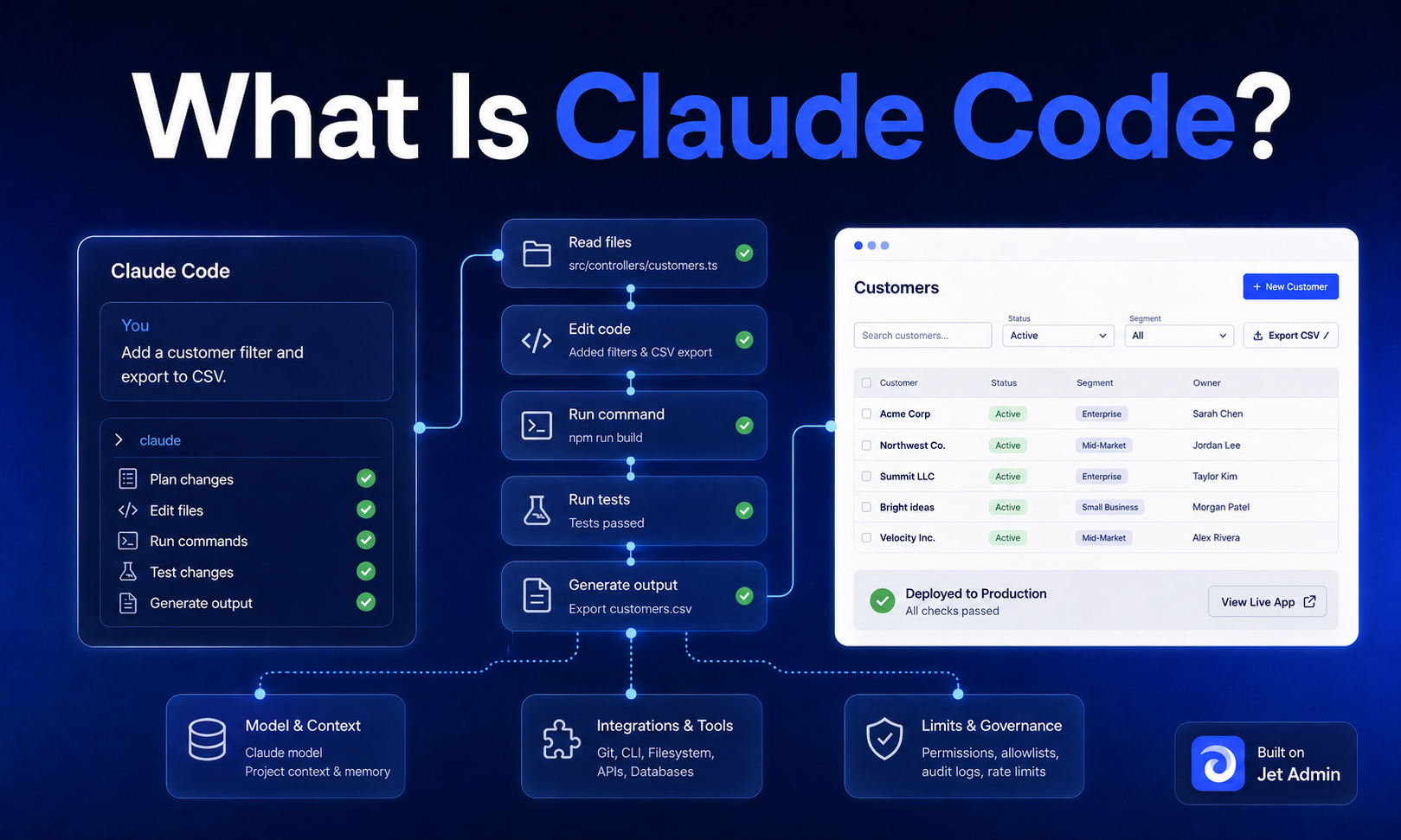
So what is claude code, exactly? It is an agentic CLI coding tool developed by Anthropic that lives in your terminal or desktop app. Instead of just autocompleting single lines, it connects to Claude's AI models and lets you describe what you want in plain English. It then reads, creates, and modifies files in your project accordingly.
When you start claude code from a project directory, the tool treats that folder as its working context. It scans the directory tree, indexes key files, and builds enough understanding to propose or apply changes across multiple files at once. Claude Code maps entire codebases in seconds for better context, which is what makes it genuinely useful on real-world repositories rather than toy examples.
How does it differ from claude chat in the browser or the claude desktop app? They share the same claude models, but Claude Code adds deep local filesystem access, persistent project memory through custom slash commands and configuration, and native command line interface workflows. Compared to ai coding assistants embedded in IDEs-think autocomplete and inline suggestions-Claude Code plans and executes multi-step coding tasks, handles reading code across directories, and runs commands on your behalf. It uses agentic AI to automate multi-step coding tasks rather than just suggesting the next token.

How Claude Code Works Under the Hood
The workflow is straightforward. You open a terminal in your project folder, run claude, authenticate with Anthropic, and start issuing natural language instructions. Claude Code inspects your files, plans a sequence of steps, and applies edits-with your confirmation-directly to your local file system.
Under the hood, Claude Code streams relevant file contents and your instructions to the selected model (options include Claude Opus for deep reasoning or faster variants for quick fixes). The model returns structured edit plans, which Claude Code translates into diffs applied locally. Nothing happens in a browser-only buffer; changes land on your actual files.
The concept of a "working context" is central. Claude Code builds and maintains a mental model of your project structure-directory tree, dependencies, configuration-to power navigation and multi-file changes. It maintains a long working memory of local projects, which means conventions and architectural decisions persist across interactions. Claude Code can handle codebases up to 18,000 lines long, making it practical for real production systems.
Persistent memory goes beyond the raw context window. A CLAUDE.md file (a md file stored in your repo root) lets you encode project conventions, architectural notes, and coding standards. Optional .claude directories can hold slash command definitions and rules. These artifacts give Claude Code more context about your codebase than what fits in a single prompt.
The context window itself is finite. Claude models can only consider a limited amount of text per cycle. Claude Code manages this through automatic compaction-summarizing earlier conversation when approaching limits-but long, intense sessions (roughly 15–20 minutes of heavy edits) can still exhaust context. You can manually compact via the /compact command or start a new session when things drift.
Operationally, Claude Code works in agent mode: describe a goal like "migrate auth to OAuth 2.1," and it decomposes that into subtasks-searching files, applying changes, running tests, verifying results-iterating through each phase.
Installing Claude Code and First-Time Setup
Setup is lightweight if you're already comfortable with a terminal and Node.js. If you prefer graphical interfaces, IDE extensions or the desktop app may be easier entry points, though using Claude Code requires a learning curve for terminal-based interaction regardless.
Prerequisites:
- Node.js version 18 or higher (install via nvm if needed)
- macOS 10.15+, Ubuntu 20.04+/Debian 10+, or Windows 10+ via WSL2
- 4 GB+ RAM and an internet connection
Installation options:
- npm (recommended): Claude Code can be installed using npm with npm install -g @anthropic-ai/claude-code. This global install makes the claude command available from any directory.
- macOS binary: On macOS, use curl to download the installation script for a native binary install.
- IDE extensions: Available for vs code and JetBrains IDEs, wrapping the same agentic capabilities in a graphical interface.
First run:
- Navigate to your project directory in the terminal.
- To start claude code, run claude in the terminal.
- Choose your login method (browser-based OAuth, claude account, or API key).
- You must authenticate with your Anthropic account on first run.
Always verify installation commands against Anthropic's official docs because installers and supported platforms change over time. Running claude doctor after install can help catch edge cases.
Authentication, Plans, and Using an API Key
You can run claude code in two billing modes: via subscription plans linked to a claude account, or via an api key from the Anthropic console.
Subscription approach:
Log in with the same credentials you use for claude chat or the desktop app. The tiers break down as follows:
Plan | Monthly Cost | Notes |
|---|---|---|
Free | $0 | ~9 messages/month; limited to chat and light use |
Claude Pro | $20/month | Regular users; unlocks Claude Code with standard quotas |
Max Plan (5×) | $100/month | Power users; 5× usage vs Pro per rolling window; priority access to new models |
Max 20× | $200/month | Enterprise-grade; 20× usage; highest output limits |
An annual subscription discount may apply depending on region and current promotions; check the pricing page for applicable tax details and current offers. The max plan provides great value for teams doing heavy development work.
API key approach:
Developers obtain an api key from the Anthropic console and configure Claude Code to use it via environment variables. The Claude API offers pay-as-you-go pricing based on tokens, which suits CI pipelines, automated workflows, or teams that want granular control over api usage and spending limits.
Trade-offs: Subscription plans give predictable monthly cost and integrated access. API billing is more flexible but risks unexpected token costs. For teams, consider governance: shared API keys vs individual logins, revocation processes, and which repositories Claude Code can access.
Core Capabilities and Typical Coding Workflow in Claude Code
Claude Code is meant to augment standard development tools, not replace them. It excels at understanding existing code, implementing changes across a codebase, and maintaining quality through automated checks.
Core capabilities:
- Reading and explaining arbitrary files and folders in your project
- Performing multi-file edits-refactoring, renaming symbols, updating imports
- Generating new files: modules, components, comprehensive tests
- Running shell commands: build, lint, format, run commands for test suites
- Orchestrating running tests and verifying results after changes
- Claude Code allows queuing multiple prompts for efficient task management
A typical workflow:
- Open a repo and run claude code from the project root.
- Survey the architecture: "Explain the data flow from API to UI." Claude Code helps developers understand unfamiliar codebases quickly.
- Diagnose a bug by pointing it at logs and stack traces. Claude Code can perform complex debugging effectively, tracing issues across services.
- Review its proposed patch across several files, then accept the diff and verify with tests.
Claude Code integrates with GitHub and GitLab for workflow management-reading open pull requests, drafting branch-specific changes, and suggesting commit messages. In some setups, it can open pull requests directly.
Less obvious workflows include onboarding to legacy systems (generating architecture summaries), migrating framework versions, and sweeping refactors that touch the entire codebase. Claude Code supports multi-file edits based on codebase understanding, which makes feature implementation across modules far more practical than manual search-and-replace.
Claude Code integrates with dev tools and operates within the developer's local environment, which means your existing linters, formatters, and test runners all work seamlessly. Human oversight remains critical: review diffs, run tests, and consider security terms and domain correctness before merging.

Advanced Features: Custom Slash Commands, Multi-Agent Work, and External Tools
These capabilities are aimed at advanced users who want to scale Claude Code beyond one-off prompts into reusable, team-wide workflows.
Custom slash commands:
Claude Code supports custom hooks and slash commands for projects. These are stored as Markdown files under .claude/commands, each representing a reusable prompt template. For example:
- /add-tests generates test suites for a specific file
- /debug-logs analyzes recent log output against the codebase
- /refactor-pattern applies a consistent refactoring across matching files
Each command can include placeholders for arguments, which means teams can codify repetitive tasks and enforce consistent patterns. You can also use a json file to configure command metadata. The same principle applies whether you're writing code for a whole app or maintaining a single service.
Multi-agent and multi-worktree setups:
You can run multiple claude code session instances, each focused on different Git worktrees (frontend, backend, tests). This parallelizes large changes while respecting plan and context window limits. Subagents-isolated sessions for delegated research or side tasks-keep the main session's context clean.
External tool integration:
Because Claude Code operates via the command line tool, it can orchestrate other tools-linters, formatters, task runners, deployment scripts. Configurable hooks can automatically run type checks after edits or format code before commits. Claude Code includes safety controls to limit risky actions while allowing automation, so destructive commands require explicit approval. If you need to cancel something mid-stream, hit esc to interrupt.
Hybrid workflows with other AI tools:
Some teams use a gemini cli or similar large-context tool for initial analysis of massive codebases, then bring distilled insights back into Claude Code for implementation. This is especially useful when you need to dive deeper into a rabbit hole of dependencies that exceed a single tool's context window. You can also configure inference providers via Hugging Face for alternative model backends.
Strengths, Limitations, and Context Window Considerations
Claude Code is strongest at understanding and editing real-world codebases, but it inherits standard LLM constraints around context size and hallucination risk.
Strengths:
- Claude Code handles large codebases better than other AI tools, with deep comprehension of complex, multi-language repositories
- Reliable multi-file edits guided by clear instructions, including very large files
- Agentic behavior that turns "fix this issue" into sequenced, auditable steps-agentic search through files, targeted edits, verification
- Rich explanations that support onboarding and design decisions, not just writing code
- Claude Code has direct access to a developer's local files, so it reads and modifies the actual source rather than working in a sandbox
- Thinking tokens enable the model to reason through complex problems before generating output
Context window limitations:
Claude Code has a relatively short context window of 15-20 minutes of intense work. Even with large-context claude models, only a finite amount of code fits into a single prompt-response cycle. Long sessions lead to context drift where earlier details drop out. Auto-compaction and memory documents help but can lose subtle edge cases. Sometimes starting a new session or running /compact is safer-using fewer tokens per interaction keeps things focused.
Behavioral limitations:
- Occasional hallucinated APIs or misread documentation when specs are ambiguous, similar to the ~18.3% API error rate and 14% terminal problem rate observed in research on agentic coding tools
- Tendency to over-edit if prompts are vague ("clean this up") instead of constrained ("only change this function and update tests")
- The system prompt and project conventions in CLAUDE.md help, but they're not foolproof
Practical mitigation tips: Keep prompts specific. Break changes into smaller steps. Use test driven development workflows to catch regressions. Rely on CLAUDE.md to encode clean code conventions and add more comments where behavior matters.
Who Claude Code Is Best For (Use Cases and Team Profiles)
Claude Code is primarily for engineers and technically fluent builders comfortable with the command line interface or IDEs-not for non-technical end users looking for a chat interface to build apps.
Best-fit users:
- Backend, full-stack, and DevOps engineers managing complex services and infrastructure-as-code
- Frontend teams with large React/Vue/Next.js codebases who need help refactoring or tightening tests
- Data and ML engineers converting notebooks into production pipelines
- Power users who want to build features rapidly using vibe coding techniques while maintaining quality
Common use cases:
- Debugging tricky production issues using logs, traces, and code navigation across a specific file or many files
- Large-scale refactors: renaming core concepts, upgrading frameworks, reorganizing modules
- Onboarding into unfamiliar repositories via architecture summaries that explains entire codebases
- Automating boilerplate, test creation, and documentation updates-the kind of coding tasks that eat hours
Claude Code allows developers to focus on higher-level design and problem-solving rather than mechanical edits. Solo developers benefit from the productivity boost; teams can standardize behavior using shared conventions and new tools like custom commands and hooks.
Claude Code is not a no-code app builder. It is optimized for source code and development workflows, not for building end-user data apps. For that, you need a different layer entirely.
Security, Governance, and Deployment Considerations
For technical buyers evaluating Claude Code in enterprise or regulated environments, data handling and access control matter most.
Data flow: Claude Code runs locally but sends prompt content-code snippets, logs, instructions-to Anthropic's servers for model inference. No edits happen purely offline. Teams should treat this as data leaving their perimeter and review Anthropic's current security documentation for specifics on data retention and model training policies. Under Team/Enterprise terms, code and conversations are not used to train models.
Governance patterns:
- Use organization-scoped accounts or API keys instead of personal logins
- Centralize control of quotas and spending in the Anthropic console
- Define clear policies on which repositories Claude Code can access (production vs non-production)
- Each claude code session writes a JSONL transcript and snapshots edited files for auditability
Deployment: Standard cloud-hosted inference is the default for most teams. Verify any private or enterprise deployment options directly with Anthropic-they evolve over time.
Jet Admin approaches governance differently: it focuses on app-level permissions, audit trails, and controlling who can run which actions on live data. This complements code-level tools like Claude Code rather than replacing them.
Claude Code vs Other AI Coding and App-Building Tools
Claude Code sits within a broader landscape of development tools: terminal-based coding agents, IDE assistants, browser chat UIs, and higher-level app builders.
IDE-integrated assistants (like github copilot) excel at inline suggestions and single-file context. They're great for quick fixes and autocomplete but don't reason across your entire codebase or run commands.
CLI-centric alternatives wrap different foundation models or specialize in narrower tasks-doc generation, test automation, or migrations. Benchmarks like TUA-Bench show Claude Code with claude opus achieving ~65.8% overall on terminal-use agent tasks, performing strongly but with variation across task types.
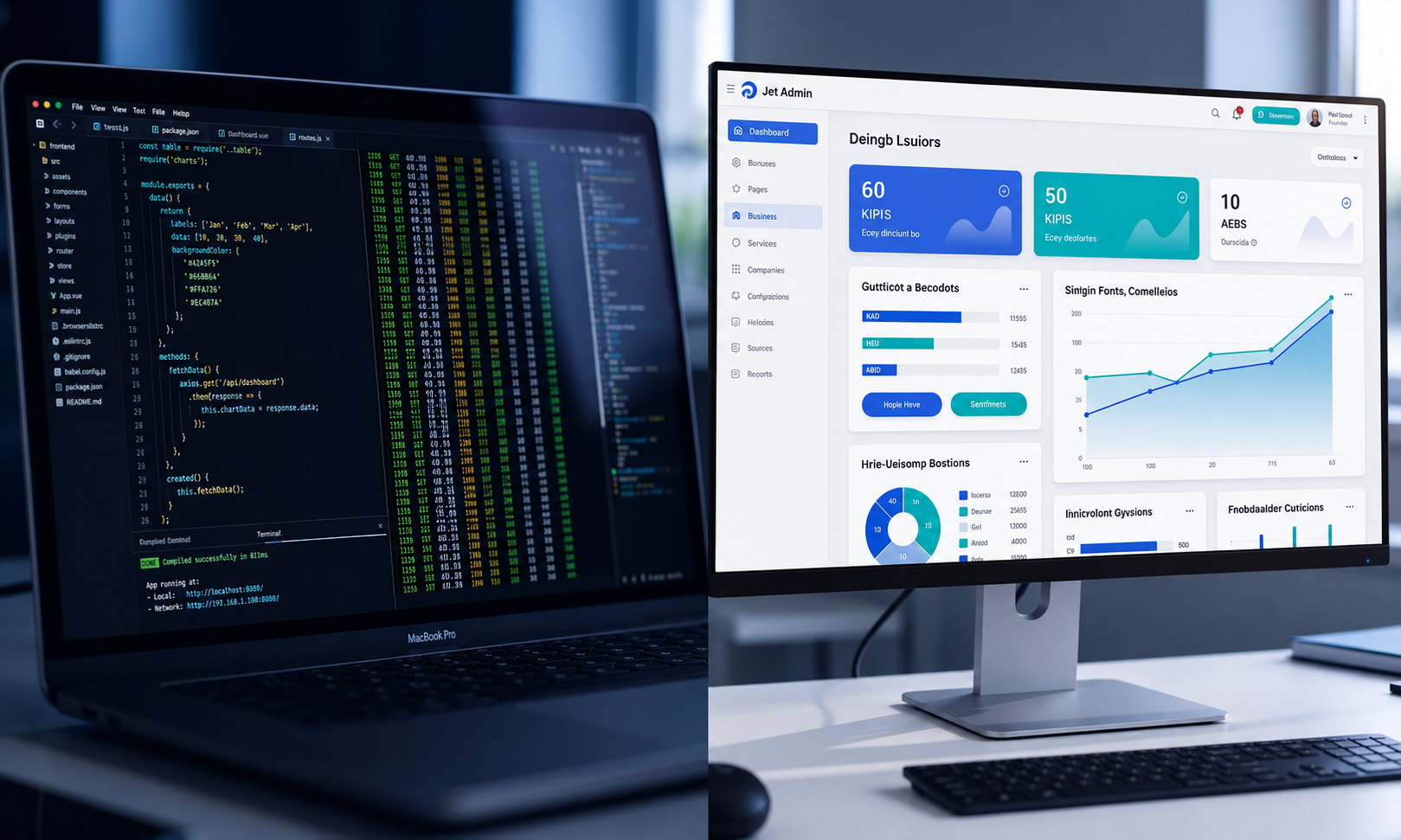
App builders like Jet Admin occupy a different category entirely. Jet Admin builds secure business apps and internal tools on top of existing databases, APIs, and SaaS. Where Claude Code helps engineers change source code, Jet Admin helps teams ship production-ready dashboards, admin panels, and AI-powered operations apps.
Category | Best For | Primary Interface |
|---|---|---|
Jet Admin | Secure, governed business apps with AI agents | Visual builder, prompt-based |
Claude Code | Repository-centric engineering work | Command line, terminal |
IDE AI (Copilot, etc.) | Inline assistance while editing | Editor/IDE |
Think in terms of layered adoption: use claude code to speed up writing code for services and APIs, then use Jet Admin to expose those services safely to business users with permissions and audit controls.
Where Jet Admin Fits Alongside Claude Code
Many teams evaluating Claude Code are also thinking about how to deliver AI capabilities to non-engineers. That is where Jet Admin becomes relevant.
Jet Admin connects to existing data sources-databases, internal APIs, spreadsheets, SaaS apps-and uses AI to help generate business apps on that data. It can generate interfaces, workflows, and application logic, then deploy apps to end users with permissions and audit controls.
The real difference is in how AI is used. In Claude Code, AI edits and reasons about source code within a repository. In Jet Admin, AI agents can read and write live data, call other tools, and orchestrate multi-step tasks inside an app experience under explicit permissions.
A practical collaboration pattern: engineers use Claude Code to build and maintain backend services and APIs, then plug those APIs and databases into Jet Admin to create secure interfaces for operations, support, or finance teams. Neither tool replaces the other-they operate at different layers and are complementary in a modern stack.
How to Decide If Claude Code Belongs in Your Stack
Weigh developer readiness, security posture, cost, and long-term maintainability before adopting any AI coding tool.
Evaluation criteria:
- Are your teams comfortable with Git, the command line, and reviewing AI-generated diffs?
- Do you have large, complex, or poorly documented repositories where Claude Code's codebase-mapping features pay off?
- Can you define clear policies on what code can be sent to external AI services?
Operating cost considerations: Subscription pricing vs API-based billing. The trade-off between developer-time savings and token expenses over a project's lifetime. Heavier usage generally favors higher subscription tiers or careful API metering.
Phased rollout plan:
- Start with a small pilot team on a non-critical codebase
- Measure impact on time-to-fix, code review load, and developer satisfaction
- Expand coverage and integrate custom slash commands or hooks as maturity grows
Think of Claude Code as one layer in an AI strategy that includes test automation, observability, and platforms like Jet Admin for business-facing apps. Start by experimenting with Claude Code on a pilot project, then explore how Jet Admin can turn those services into governed, AI-enhanced internal tools.
FAQ
Can I use Claude Code if I'm not comfortable with the command line?
Claude Code itself is terminal-first. However, Anthropic also offers claude chat and a desktop app with a chat interface, which feel more approachable for non-engineers. Some IDEs like vs code offer Claude-powered extensions that expose similar coding assistance through a graphical interface. Non-technical users who need AI in business workflows may be better served by tools like Jet Admin that hide the underlying code and surface safe, governed actions instead.
How does Claude Code handle very large monorepos?
Claude Code uses targeted file selection, project indexing, and summarization to work within the model's context window while reasoning about large repositories. Best practices include working in focused subdirectories, maintaining CLAUDE.md and other memory artifacts, and chunking large refactors into several steps or sessions. For extremely large codebases, some teams pair Claude Code with a separate large-context analysis tool and bring distilled insights back for implementation.
Can Claude Code fit into my existing CI/CD and code review process?
Claude Code operates mainly before CI/CD, generating or editing code locally just like a human developer. Its changes go through normal Git workflows-commits, pull requests, automated tests, and code review in platforms like GitHub or GitLab. Enforce the same standards for AI-generated code as for human-written code, including test coverage and security review.
Is it possible to run Claude Code completely offline?
No. Claude Code depends on remote claude models, so it requires network connectivity to Anthropic's API endpoints and cannot run fully offline. Organizations with strict network controls should work with Anthropic's official documentation to understand allowed connectivity patterns. For truly air-gapped environments, traditional tooling and local static analysis remain necessary.
How does Claude Code relate to Jet Admin for internal tools?
Claude Code accelerates writing and maintaining source code. Jet Admin focuses on assembling secure internal tools directly on top of existing data sources. Example flow: use Claude Code to build and test an API for approvals or ticket routing, then plug that API and database into Jet Admin to create an app with permissions, audit logs, and AI agents that business users can safely operate. This separation keeps critical data access governed at the app layer while development teams move faster with AI coding assistance.