A no code app builder lets teams ship secure internal tools, client portals, and dashboards without hiring developers or waiting months for engineering bandwidth. But getting from a quick AI-generated prototype to a maintainable, production-grade business app requires more than dragging components onto a canvas. This guide walks through the full path-architecture, data, permissions, testing, governance-so your next app actually survives contact with real users and real data.
Key Takeaways
A modern no code app builder combines a visual builder with ai features so that operations, product, and IT teams can move from plain-English prompts to secure, data-connected business apps. No-code app builders allow users to create applications without writing programming code, and no-code app builders lead to faster prototyping and iteration based on user feedback. No-code development can reduce costs by 60-80% compared to traditional development, which is why about 70% of new applications are now built on no code platforms.
This article focuses on the needs of operations leaders, product teams, IT managers, and professional developers who must ship maintainable internal tools, client portals, and dashboards-not consumer-facing novelty apps for the apple app store or google play.
You will learn how to move from prototype to production: data and backend choices, auth and granular permissions, testing, deployment, governance, collaboration models, and ongoing maintenance. Each section covers trade-offs rather than just features.
Throughout the guide, Jet Admin is used as a concrete example of a no code app builder that connects to existing databases and SaaS tools, supports AI-assisted building, and offers enterprise governance. You can review the full connector catalog on the Jet Admin integrations page.
What Is a No Code App Builder in 2026?
A no code app builder is a platform that lets teams build apps-web app interfaces, mobile app experiences, internal dashboards, and client portals-using visual tools and AI instead of hand-writing code. No coding experience is needed for no-code app builders, which is why non-technical users can build apps using no-code platforms, known as citizen developers.
In 2026, the category includes ai features like prompt-based scaffolding, AI data modeling, and AI agents. It often overlaps with "low-code" when teams extend with custom code or scripting. The global no-code and low-code market is valued at approximately $65 billion, growing at roughly 26% CAGR. Applications can be developed in days or weeks instead of months with no-code platforms, which partly explains this growth.
No code platforms can build mobile and web applications, but the category splits into two camps. Business app builders focus on internal tools, client portals, admin panels, and partner dashboards-common use cases for no-code tools include internal business applications and customer portals. Consumer or mobile-first builders target app store publishing with polished native mobile apps. Bubble has been popular for over a decade in no-code development and is best for complex web applications like SaaS products. Softr builds client portals and lightweight business apps. Glide turns spreadsheets into responsive business apps.
This guide uses examples oriented around web apps, internal portals, and secure workflows rather than consumer apps for the apple app store or google play. If you need to build a booking app or simple branded app for end consumers, some tools mentioned here may also apply, but the architecture and governance emphasis will differ.
How a Modern No Code App Builder Works (High-Level Architecture)
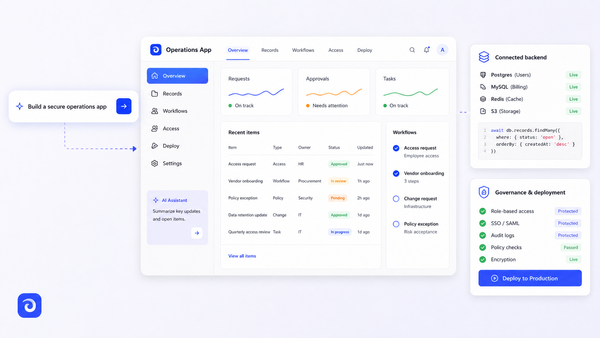
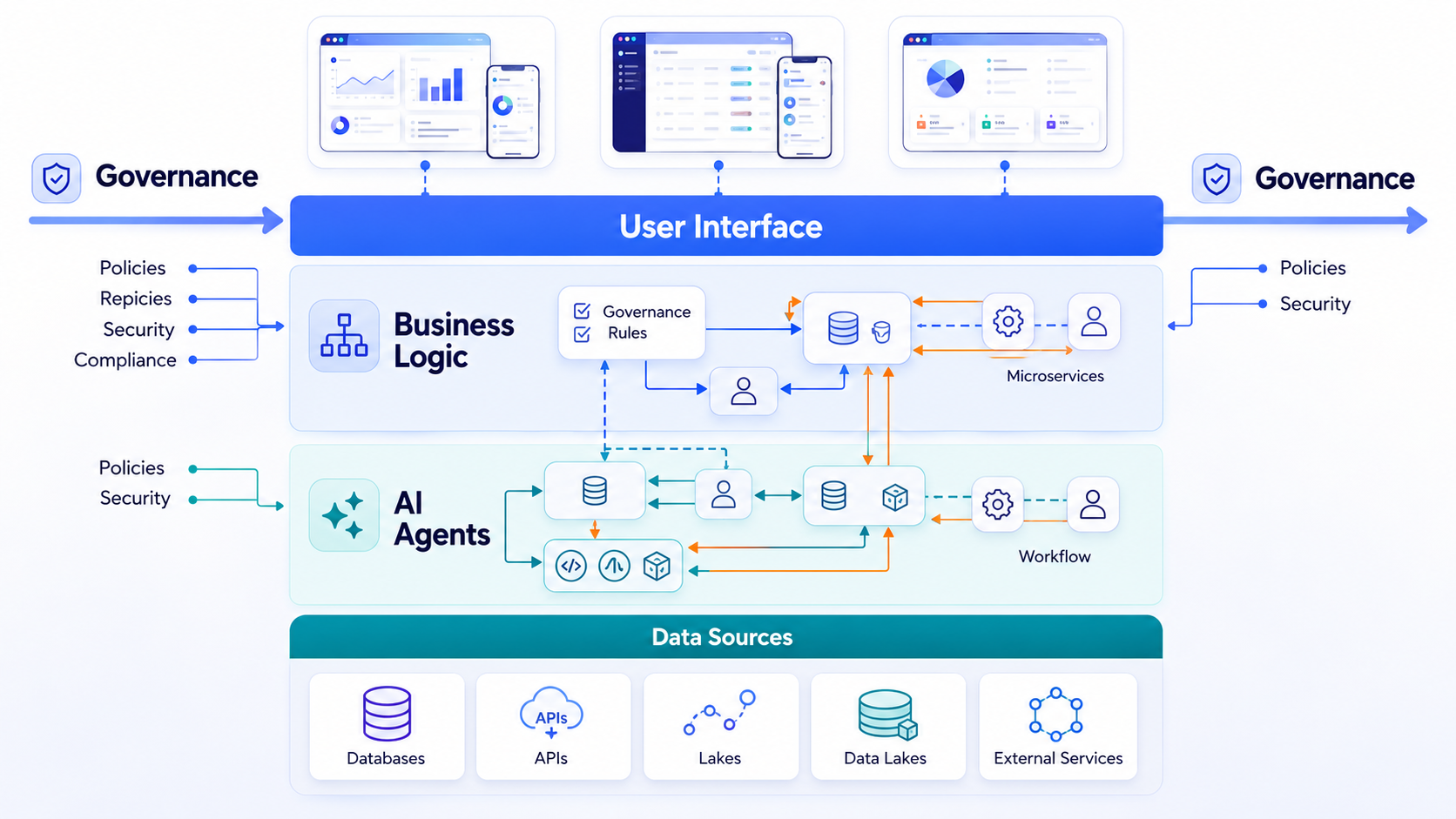
Think of a no code app builder as four layers stacked together: data and backend, logic and workflows, UI and UX, and governance and deployment. Each layer can be configured visually, and the best platforms let you drop into code when a layer demands it.
Data and Backend Layer. This is where the app connects to databases like PostgreSQL, Snowflake, or BigQuery, plus APIs, spreadsheets like google sheets, and SaaS tools. Some builders offer a built in database; others let you bring your own existing data sources. Jet Admin, for example, supports 50+ connectors ranging from relational databases to storage services like Amazon S3.
Logic and Workflow Layer. No-code platforms automate repetitive business processes easily through visual workflows. You build conditionals, validations, scheduled jobs, and AI-powered steps-such as calling OpenAI or Anthropic APIs-using drag-and-drop rule builders rather than code files. Bubble handles frontend design, backend logic, and databases in one environment, representing one end of this spectrum.
UI and UX Layer. Visual drag-and-drop editors simplify the design of user interfaces without coding. No-code app builders use visual interfaces and drag-and-drop components for app development. Visual programming allows users to create apps without code, whether you're assembling tables, forms, charts, or Kanban boards.
Governance and Deployment Layer. Role-based access control, audit logs, environment separation (dev, staging, production), and one-click deployments push updated apps to end users instantly.
Prompt-Based Building vs Traditional Visual App Building
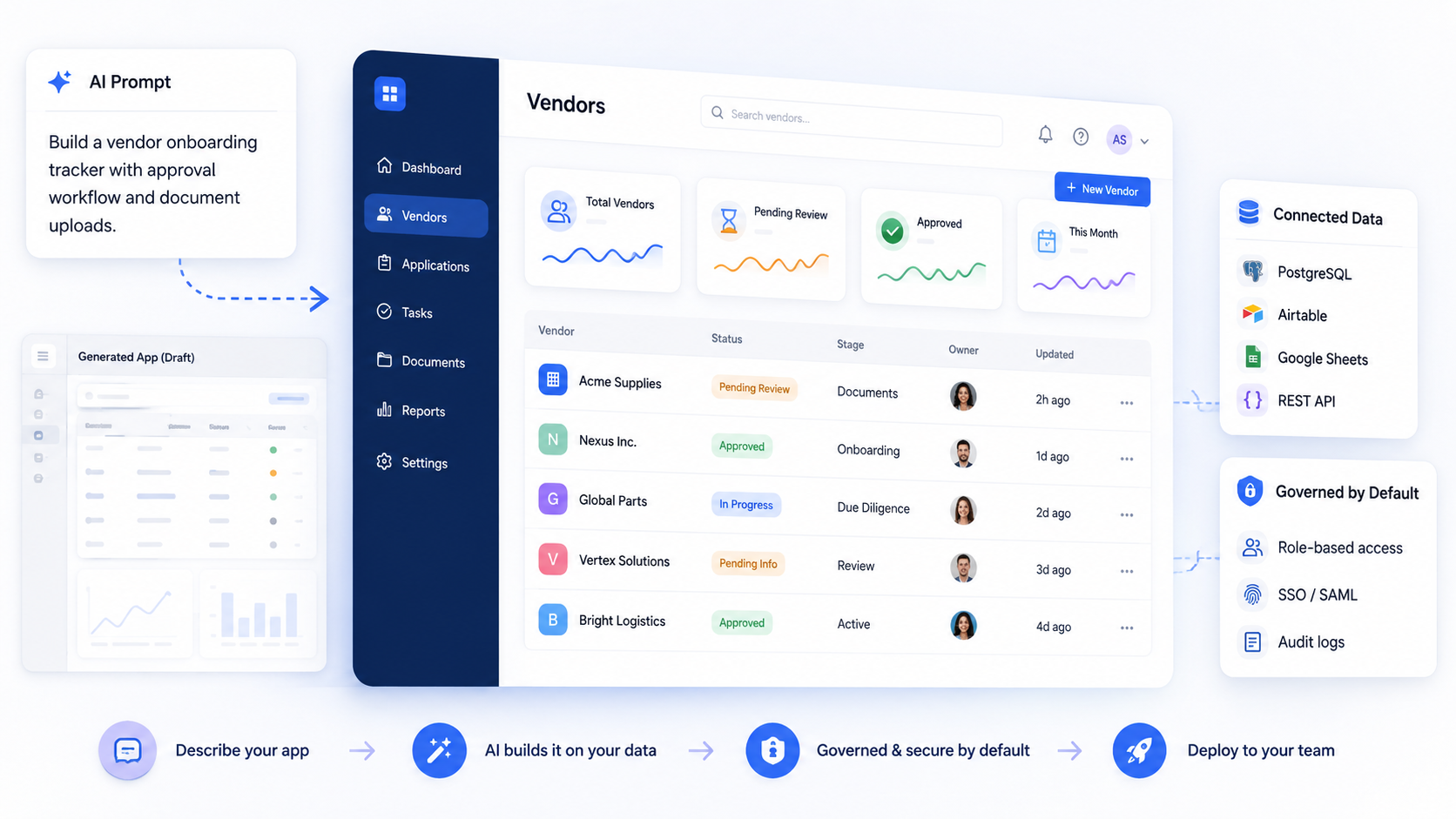
Between 2024 and 2026, "prompt-to-app" builders emerged where you can build apps using plain language descriptions and get a working app within just a few minutes. Many modern no-code app builders utilize AI to generate app components from natural language descriptions, collapsing what used to take weeks into a single conversation.
No-code builders can create apps from plain English descriptions. Zite generates production-ready business software from plain English descriptions. Zite also generates business apps from plain English descriptions with its ai builder capabilities. Emergent deploys apps to a live URL after building them. FlutterFlow generates screens and components from prompts or Figma designs. These tools contrast with more traditional visual builders like Bubble or Glide app interfaces, where you assemble screens component by component.
Strengths of prompt-based building:
- Faster initial scaffolding-no-code platforms can handle minimum viable products (MVPs) quickly and efficiently
- Useful for exploring multiple UI versions before committing
- Generates CRUD views and basic logic from a short spec
Limitations:
- Hallucinated data models that miss edge cases
- Generic UI that doesn't match your brand or workflow
- Minimal or missing permissions and security configuration
- Community reports confirm that prompt-generated apps often break under real multi-user conditions
The balanced approach: start from an AI-generated scaffold, then refine tables, permissions, and workflows in a visual editor where operations and product teams can inspect every field and rule explicitly. Adopt a policy where prompts power prototypes and first drafts, but production apps require a review checklist-schema review, permission matrix, error handling-before rollout.
MCP/Coding Agents, Existing Code, and No Code App Builders
MCP (Model Context Protocol) and coding agents are AI systems that can read repositories, call tools, and modify code bases under guidance. They matter for teams with existing software assets who want to accelerate without starting from scratch.
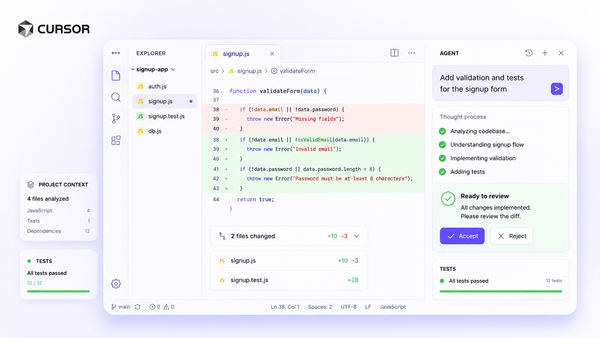
Some no code app builders now integrate with coding agents so developers can offload repetitive tasks-generating boilerplate React components, refactoring basic logic-while managing the app visually. Emergent allows full code access after app generation, which means professional developers can inspect and modify everything the AI produced.
Three common patterns emerge:
Approach | Control | Speed | Governance | Maintainability |
|---|---|---|---|---|
Agent-only workflow | Low-harder to audit | High for prototypes | Weak without guardrails | Depends on code quality |
No code app builder with integrations | Medium-High-visual rules | High with templates | Strong-RBAC, audit logs | Visual, shareable |
Hybrid: no code + imported code | High-full code access | Moderate | Configurable | Requires engineering |
For most ops and product teams, the recommended path is to use a no code app builder as the primary interface, with optional coding-agent assistance and custom code where necessary. Letting agents run unsupervised over production systems introduces risk that visual governance tools are designed to prevent.
Data and Backend Options in No Code App Builders
The central question ops and IT leaders ask: "Where does my data live, and how does the code app builder talk to it?"
Three dominant backend models exist:
- Bundled database. The platform hosts your data in a built in database. Easy setup, but may limit scale, control, and portability. Jet Admin's "Jet Tables" combine PostgreSQL robustness with a spreadsheet-style interface for teams who want managed storage.
- Bring-your-own database or API. Apps sit on top of existing systems of record. Jet Admin connects to relational databases like PostgreSQL, MySQL, Snowflake, and BigQuery, plus SaaS tools like Salesforce, HubSpot, and Stripe via its supported data sources catalog.
- Hybrid. Mix both per use case-some data in platform tables, some in external RDBMS, some in third-party SaaS, with joins and rollups across sources.
Glide turns spreadsheets into responsive, AI-powered business apps, making it a spreadsheet-based builder. Softr connects directly to Airtable for app building. These are effective for simple apps, but serious internal tools should support robust SQL queries, complex data relationships, and large datasets-not just small google sheets.
Performance considerations: Querying remote databases introduces latency. Data warehouses like Snowflake carry query-time and cost implications. Look for pagination, lazy loading, and efficient filtering. Model your user accounts, permissions tables, and data infrastructure early so reporting and expansion don't require painful rewrites later.
Integrations: Connecting Your No Code App to the Rest of Your Stack
Integrations turn a standalone app into a useful business system-connecting CRMs, billing, communications, analytics, and AI providers. No-code app builders support integration with databases and other business tools as a core capability, not an afterthought.
Modern no code app builders commonly support REST and GraphQL APIs plus dozens of direct connectors. Jet Admin's catalog includes Salesforce, Stripe, HubSpot, Slack, Google Sheets, Shopify, Jotform Apps, and many more, alongside an api connector for custom endpoints and api configurations for REST and GraphQL services.
Typical integration patterns:
- Read-only dashboards: Pull data from a BI warehouse for monitoring and analytics
- Read/write internal tools: Refund consoles, order management, ticketing admin tools
- Client portals: Filter external data per tenant so a customer sees only their own invoices
AI integrations: Use providers like OpenAI, Anthropic, or Google Gemini for summarization, classification, or routing-but keep prompts, logs, and outputs under governance. Jet Admin supports connectors for OpenAI, Anthropic, Google Gemini, DeepSeek, and MCP.
Plan your integration roadmap: start with core systems of record (ERP, CRM, billing), then add features like Slack notifications, email sending via SendGrid, and calendar sync once main workflows are stable. When evaluating app builders, verify not only the existence of connectors but also how they handle auth (API keys vs OAuth), rate limits, retries, and schema changes over time. Payment integrations with tools like Stripe should support both read and write operations.
Auth, SSO, and Granular Permissions
Authentication and authorization are where many DIY tools and simple apps fail. A serious no code app builder must match enterprise security expectations-not just offer a login screen.
Modern auth requirements:
- SSO via SAML or OpenID Connect
- SCIM user provisioning for automated user lifecycle management
- Support for providers like Okta, Google Workspace, or Auth0
- Local user accounts where appropriate
Jet Admin supports JetAuth, Google OAuth, OpenID/OIDC, Auth0, Supabase Auth, and token-based authentication, covering most enterprise SSO scenarios.
Granular permissions go beyond "admin vs viewer." Look for:
- Row-level filtering: Support agents see only the tickets they own
- Column-level restrictions: Salary or PII fields hidden from certain roles
- Action-level controls: Only managers can trigger refund workflows over $500
A no code app builder should make these policies visual: permission matrices in the UI, conditional visibility flags on components, and filters automatically applied to database queries per user role. Jet Admin provides team-based permissions restricting access by role down to dashboards, collections, and specific UI elements, plus activity logs recording who did what and when.
For client portals, platforms must support segregated access by tenant or customer account. Without tenant-aware permissions, building B2B portals or partner dashboards becomes a security liability.

Designing UI/UX in a No Code App Builder
While prompt-based builders can generate custom apps with starting UIs, long-lived internal tools and client portals require explicit design decisions. Visual programming makes app building accessible for non-technical users, but accessibility doesn't mean you should skip design thinking.
Typical UI building blocks: Pages, sections, layout grids, reusable components, and templates for dashboards, CRUD interfaces, and workflows. A drag and drop builder lets you assemble tables, record views, charts, and forms without touching code. Jet Admin's visual builder provides these components plus segments for tracking workflow stages like order processing pipelines.
Responsive design: Most business-focused platforms output responsive web apps that work across desktop, tablet, and mobile device browsers. This differs from true native ios or android apps compiled for app stores. For most internal tools, a responsive web app is sufficient.
Designing for operations teams: Dense data tables, keyboard shortcuts, bulk actions, inline editing, and filters that mirror spreadsheet workflows. Ops teams live in data-design accordingly.
Branding and client-facing needs: Custom domains, color palettes, logos, and white-labeling let external users experience the app as part of your product suite. A professional app for client portals needs to feel like your brand, not a generic tool.
Use component libraries and design systems: reuse UI patterns for lists, detail views, wizards, and error states to lower maintenance across unlimited apps built on the same platform.
Building Business Logic, Workflows, and AI Features
Business value comes from logic-approvals, validations, routing, and workflow automation-not from static screens alone.
Visual workflow tools: Most app builders offer trigger types (button-click, record created, scheduled jobs), conditions, branches, loops, and actions like "update record," "send email," or "call external API." No-code platforms automate repetitive business processes easily through visual workflows, replacing manual handoffs with structured flows. Jet Admin's Workflow Builder and Approval Workflow support branching logic, and Flex Actions permit custom operations via API calls.
Modeling real processes: Consider onboarding (multi-step forms, document uploads, manager approval) or financial operations (limit checks, multi-approver flows, audit trails). These flows involve more than basic logic-they require state management, error handling, and rollback capabilities.
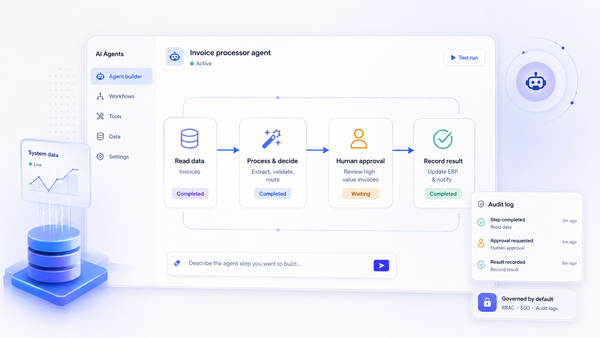
AI in workflows: Use AI actions to summarize long text, classify tickets, draft responses, extract fields from documents, or route items based on free-form input. Jet Admin integrates with OpenAI, Anthropic, and Google Gemini for these use cases.
Best practices:
- Never let AI silently make irreversible decisions
- Keep human-in-the-loop approvals for critical operations
- Log prompts and responses for later audit
Example scenario: An internal support tool where agents see AI-suggested replies and risk scores. The AI drafts a refund recommendation and flags the account's history, but agents must confirm actions like refunds or account closures. Form submissions trigger automated classification, but disposition requires human review. This balance between automation and control is what separates professional apps from demos.
Testing, QA, and Change Management in No Code Apps
"No code" does not mean "no testing." Production apps touching revenue or compliance-critical flows need disciplined QA, and no code apps are no exception.
Core testing capabilities to look for:
- Separate dev/staging/prod environments
- Version history with rollback
- Ability to clone apps safely for experimentation
Treat changes as releases. Use change logs, naming conventions, and review checklists so ops and product leaders can sign off on new workflows before they reach frontline teams or clients.
Testing AI-powered features: Use test datasets, prompt libraries, and compare model outputs over time. Monitor for regressions after model updates. AI behavior can drift-what worked last month may produce different results after a provider updates their model.
Integrate with existing QA processes: Smoke tests, user acceptance testing (UAT) with representative users, and where possible, API-level automated tests triggered outside the platform.
Pre-deploy checklist:
- [ ] Permissions verified for every role
- [ ] Edge cases tested (empty states, large datasets, concurrent edits)
- [ ] Logging and activity tracking enabled
- [ ] Rollback plan documented
- [ ] AI prompts reviewed for accuracy and safety
- [ ] Data filters confirmed per tenant or user role
Deployment Models, Hosting, and Performance
Deployment decisions-cloud, self-hosted, or hybrid-affect your security posture, latency, and regulatory compliance.
Common models:
- Fully managed cloud: The default for platforms like Bubble or Glide. Lowest operational overhead.
- Self-hosted or open-source: Options similar to ToolJet or Budibase. More control, more DevOps investment.
- Enterprise VPC or on-prem: For regulated industries requiring data residency control. Many no-code platforms provide built-in infrastructure for hosting, security, and compliance at enterprise plans tier.
Trade-offs: Managed cloud reduces ops burden but may limit data residency control. Self-hosting offers more control but requires patching discipline. No-code platforms can scale for enterprise use with the right choice of deployment model.
Performance considerations: How does the platform handle concurrent users, heavy queries, caching, and long-running workflows? Enterprise internal tools often serve hundreds or thousands of internal users. Pagination, query optimization, and asynchronous processing matter for powerful apps that handle real workloads.
Deployment cadence: One-click publish to all users is fast but risky. Larger organizations favor phased rollouts, feature flags, and per-group beta access. Involve security and data infrastructure stakeholders early to align on hosting models, network requirements, and SLAs.
Governance, Audit Trails, and Compliance
As no code app builders move from side projects to critical internal systems, governance becomes a first-class requirement. You cannot deploy apps that handle customer data, financial transactions, or employee records without proper controls.
Governance features to expect:
- Centralized user management and role definitions
- Environment controls (who can publish, who can edit shared data sources)
- Policies for adding new integrations or AI capabilities
Audit logging: Capture who did what and when-login events, data changes, workflow executions, admin configuration changes. Jet Admin provides activity logs for this purpose. Export options to SIEM tools strengthen compliance posture.
Compliance drivers: SOC 2, ISO 27001, HIPAA for healthcare, GDPR data subject rights in the EU. App builders can support compliance via data access policies, retention controls, and export mechanisms rather than claiming generic "compliance" without specifics. Verify certifications with vendors directly-enterprise pricing tiers often unlock these features.
Internal guardrails:
- Standardized templates for common app types
- A review board for new integrations
- Guidelines for when AI features are allowed with customer data
Governance also includes lifecycle management: deciding when apps should be archived, who owns ongoing maintenance, and how to prevent "shadow IT" apps from persisting without oversight.
Vendor Lock-In, Extensibility, and Owning Your Logic
The core concern many developers and IT leaders have: "If we build our workflows in a no code app builder, can we ever leave?"
Dimensions of lock-in:
- Proprietary data storage that's hard to export
- Logic and workflows in opaque, non-portable formats
- Custom components that can't be extracted
- Billing models that penalize migration
Some limitations of no-code platforms are their inability to handle highly customized features, which pushes teams toward custom code extensions. Platforms like FlutterFlow let you export flutter code. Tools that offer code export or GitHub sync give teams an exit path. Others focus on keeping everything inside the platform-convenient, but riskier long-term.
Extensibility mechanisms: Custom JavaScript or Python blocks, serverless functions, webhooks, and REST/GraphQL APIs let teams add features and augment the platform with bespoke logic. Jet Admin supports custom JS, SQL, HTTP actions, and embedding custom components for advanced functionality. This hybrid approach means you can write code where needed without abandoning the no code platform entirely.
Practical mitigations:
- Keep canonical data in databases you own
- Document critical workflows outside the tool
- Maintain API layers that could outlive the current app builder
The goal is not zero lock-in-that's rarely realistic. Choose a platform whose benefits (speed, governance, integrations) clearly outweigh switching costs, with clear exit paths for your data and logic.
Collaboration Between Ops, Product, and Engineering
The best outcomes with no code app builders happen when business and technical teams collaborate. No-code platforms help non-technical users build apps easily, but that doesn't mean operations should build everything alone or IT should block adoption.
Collaboration patterns:
- Ops or product managers define requirements and own workflows
- Designers or front-end specialists shape UX
- Engineers handle complex integrations, performance optimization, and governance policies
Platform features that help: Role-specific editing permissions (schema vs UI vs content), comments and annotations on components, shared libraries of templates, and workspace-level access controls. Jet Admin supports collaboration features including comments, notes, and task assignment on record pages.
Reducing backlog pressure: Instead of every internal tool ticket landing on engineering, non-technical app creators can ship 80% of internal features while developers focus on custom systems and platform extensions. Building internal tools this way frees engineering for higher-leverage work.
Process recommendations:
- Regular "app review" sessions across teams
- Agreed naming standards, even in no code logic
- Shared documentation so knowledge isn't trapped in one person's head
Treat the app builder as a strategic platform: onboard teams in cohorts, provide training, and establish a center of excellence that curates best practices and reusable modules.

Practical Build Checklist: From Idea to Production App
Here is a step-by-step checklist to build your first app-whether it's an internal approvals tool, a client portal, or an operational dashboard.
- Define the problem, users, and success metrics. Who will use this? What does "working" look like? A functional app starts with clear scope.
- Inventory data sources and systems of record. Identify specific tables in PostgreSQL, Salesforce objects, or google sheets you'll connect. Map out your existing data before touching the builder.
- Choose deployment and auth model. Cloud or self-hosted? SSO or local accounts? Decide before you scaffold.
- Sketch core screens and flows. Wireframe on paper or in a design tool. Even a rough sketch prevents wasted iteration.
- Scaffold with AI or templates. Use prompt-based generation or platform templates to create apps quickly. You can generate custom apps from a description and refine from there.
- Configure data models and permissions. Define row-level filters for each role before inviting users. Set up user accounts, roles, and tenant isolation.
- Build and test workflows and AI actions. Wire up approvals, notifications, and automations. Test each path with realistic data.
- Run UAT with pilot users. Invite representative users, gather feedback, fix issues. Your first app should survive real use before broader rollout.
- Plan and execute rollout. Deploy apps to the broader team or clients. Communicate changes, train users, and monitor adoption.
- Monitor, iterate, and document. Track errors, review logs, and refine. Treat no code apps as products with backlogs.
Start with a narrow slice-a single onboarding flow or issue type-rather than attempting to replace multiple legacy systems at once. This checklist works whether you use prompt-based generation or a traditional visual builder; the underlying stages remain the same.
How to Evaluate a No Code App Builder for Your Organization
Selecting a no code app builder is a strategic platform decision, not a quick SaaS signup. The average organization evaluates approximately 3.8 platforms before choosing one. Many no-code tools require no prior programming knowledge, but that doesn't mean every tool fits every use case. Choosing a no-code builder depends on your app's complexity and needs.
Evaluation criteria by theme:
Theme | Sample Questions |
|---|---|
Use-case fit | Internal tools vs native mobile apps vs client portals? |
Data & integrations | Can we connect securely to Snowflake and Salesforce? |
Security & governance | SSO, audit logs, row/column/action permissions? |
Performance & scale | Handles thousands of internal users and large datasets? |
Extensibility | Custom code, code export, API escape hatches? |
Pricing | Per builder seat, per end user, per app, or usage-based? |
Pricing landscape for context: Zite's paid plans start at $19/month for 100 AI credits. Emergent's paid plans start at $20/month for 100 credits. Bubble's paid plans start at $69/month for 175,000 workload units. FlutterFlow's paid plans start at $39/month for unlimited projects. Softr's paid plans start at $59/month for 3 published apps. Adalo's paid plans start at $36/month for app store publishing. Most no-code platforms offer free tiers for building prototypes, but paid plans unlock unlimited users, custom domains, advanced functionality, and push notifications. Be aware of limits on form submissions, unlimited published apps, workload units, and connectors at lower tiers.
Run a time-boxed pilot (4–6 weeks) where a cross-functional team ships one real app and uses that experience to validate fit. Document a short "platform scorecard" capturing qualitative and quantitative findings to avoid decisions driven by initial AI demos.
Conclusion: Choosing the Right No Code App Builder Path
A no code app builder is no longer a prototyping toy. With the right architecture, governance, and integrations, it can power durable internal tools, client portals, and operational workflows-fully functional apps that teams rely on daily.
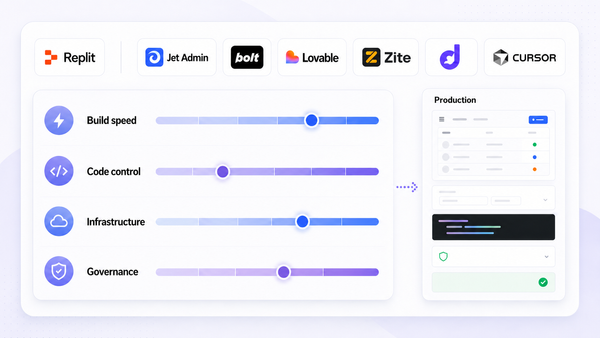
The trade-offs are real: prompt-based vs fully visual app building, integrated vs bring-your-own backend, managed cloud vs self-hosted, and pure no code vs hybrid with custom code and agents. Each decision shapes your security posture, total cost, and long-term flexibility.
If you are primarily building internal tools on top of existing data, prioritized platforms should excel at secure integrations, granular permissions, and enterprise governance rather than consumer mobile publishing. Use the practical build checklist and evaluation criteria from this guide to run a focused pilot. Learn how your teams collaborate inside the tool before standardizing.
Consider exploring Jet Admin or a comparable no code app builder that integrates with your databases and SaaS tools, supports AI-assisted app creation, and offers the governance features your security team requires. Start with one real app, ship it to real users, and let the results guide your platform decision.
FAQ: No Code App Builder Fundamentals
These questions address practical concerns operations, product, and IT leaders commonly raise after evaluating no code app builders-covering topics not fully explored in the main sections above.
Can I use a no code app builder for both internal tools and external client portals?
Yes, many platforms now support both scenarios. You can build admin consoles for internal teams and branded client portals that expose filtered data to customers or partners. The key requirement is tenant-aware permissions-each client must see only their own data, enforced at the query level, not just the UI level.
For external-facing portals, you'll also need custom domains and branding so the experience feels like your product, not a generic tool. Verify licensing carefully: some tools price differently for internal vs external users, or limit the number of published apps on lower tiers. A platform that supports unlimited apps and unlimited users on enterprise plans will scale more predictably than one that charges per end user for external access.
How do no code app builders handle mobile experiences if they are not native apps?
Most business-focused builders output responsive web apps or progressive web apps (PWAs) that work well on phones and tablets through the browser. For most internal tools and client portals, this is sufficient-users access the app via a URL on any mobile device without needing to visit an app store.
If your team specifically needs native app presence on the apple app store or google play, options exist. FlutterFlow creates cross-platform apps for iOS, Android, and web. FlutterFlow supports cross-platform mobile app development and lets you export flutter code for further customization. Flipabit allows publishing to all app stores from a single app build. Adalo supports native app publishing for true native ios and android apps. For most B2B and internal use cases, however, a responsive web app avoids the complexity of app store review processes while delivering a fully functional experience.
What skills does my team actually need to succeed with a no code app builder?
Core skills include understanding business processes, basic data modeling (tables, relationships, complex data relationships), UX judgment for workflows and forms, and a willingness to test and iterate. You do not need professional developers for most builds, which is a major reason no-code development reduces costs so dramatically compared to traditional development.
That said, having at least one technically inclined builder-or a partner from IT-helps with integrations, security reviews, and performance tuning. This person doesn't need to write code daily, but should understand api configurations, authentication protocols, and data modeling patterns. Invest in training and internal documentation so that knowledge of the platform and conventions is shared, not concentrated in a single "no code hero."
How do updates and maintenance work once my apps are live?
Most platforms let you edit apps visually and push updates instantly. Some offer environment support so you can test changes before promoting them to production. This means you can add features, modify workflows, or update UI components without downtime-turning what would require a development sprint into a same-day change.
Maintenance still matters. Assign owners for each app, establish a release process, and schedule regular reviews of logs, permissions, and AI behavior as your data and business rules evolve. Treat your no code apps as products: maintain backlogs, prioritize improvements, and periodically refactor flows or UI components as your organization grows. A working app that nobody maintains becomes a liability, regardless of whether it was built with code or without.
What are the hidden costs or limits I should watch for when adopting a no code app builder?
Common constraints include limits on records, workflows, API calls, or users on lower tiers. Some platforms offer a free plan or free tier for initial exploration, but gate critical features-SSO, audit logs, premium connectors, push notifications-behind enterprise plans. Per-seat pricing for builders differs from per-end-user pricing for consumers of your apps, and the distinction matters enormously when you deploy apps to hundreds of people.
Read pricing pages carefully. Model expected usage over 12–24 months. Ask vendors about overage scenarios and upgrade paths. Some platforms advertise unlimited apps but impose limits on form submissions, workload units, or api connector calls that effectively cap your usage. Start a pilot on a lower tier, but plan for how costs scale once several teams and hundreds of users adopt the platform. The cheapest option at launch is not always the cheapest option at scale-87% of IT leaders report no-code and low-code tools help address talent shortages, but the ROI depends on choosing a platform that doesn't surprise you with pricing cliffs.