
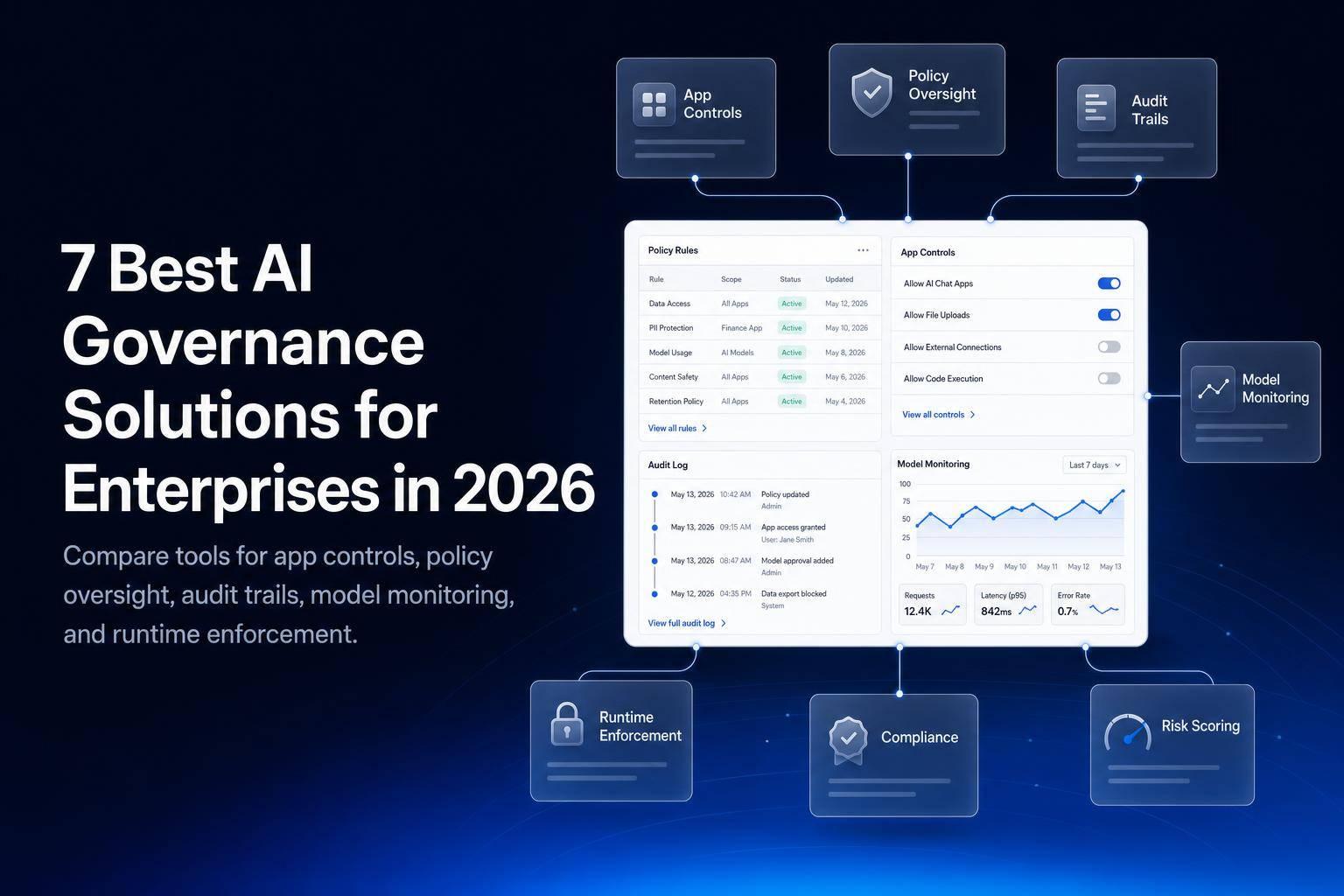
If I had to sum it up in one line: these 7 tools solve different AI governance problems, so the right pick depends on whether I need app controls, policy review, audit records, privacy workflow fit, Microsoft coverage, model monitoring, or live runtime checks.
Here’s the short version:
- Jet Admin: best when I need to govern internal AI-powered apps with tight access rules, approvals, and audit logs.
- Credo AI: best when I want policy-led oversight across AI use cases, models, and approvals.
- IBM watsonx.governance: best when I need lineage, factsheets, and audit records for regulated reviews.
- OneTrust: best when I want AI governance inside privacy, risk, and compliance workflows I already use.
- Microsoft Purview: best when my company runs on Microsoft 365, Azure, and Copilot.
- Fiddler AI: best when I need post-deployment model monitoring for drift and LLM tracing.
- Arthur AI: best when I need runtime controls that check and block LLM activity in production.
In other words: there is no single “best” platform for every enterprise. Some tools focus on controls before release. Others focus on what happens after launch. And some are built more for apps than for models.
AI Governance Tools and Technologies - AI Governance Series with Chris Mawata
sbb-itb-8346adb
Quick Comparison
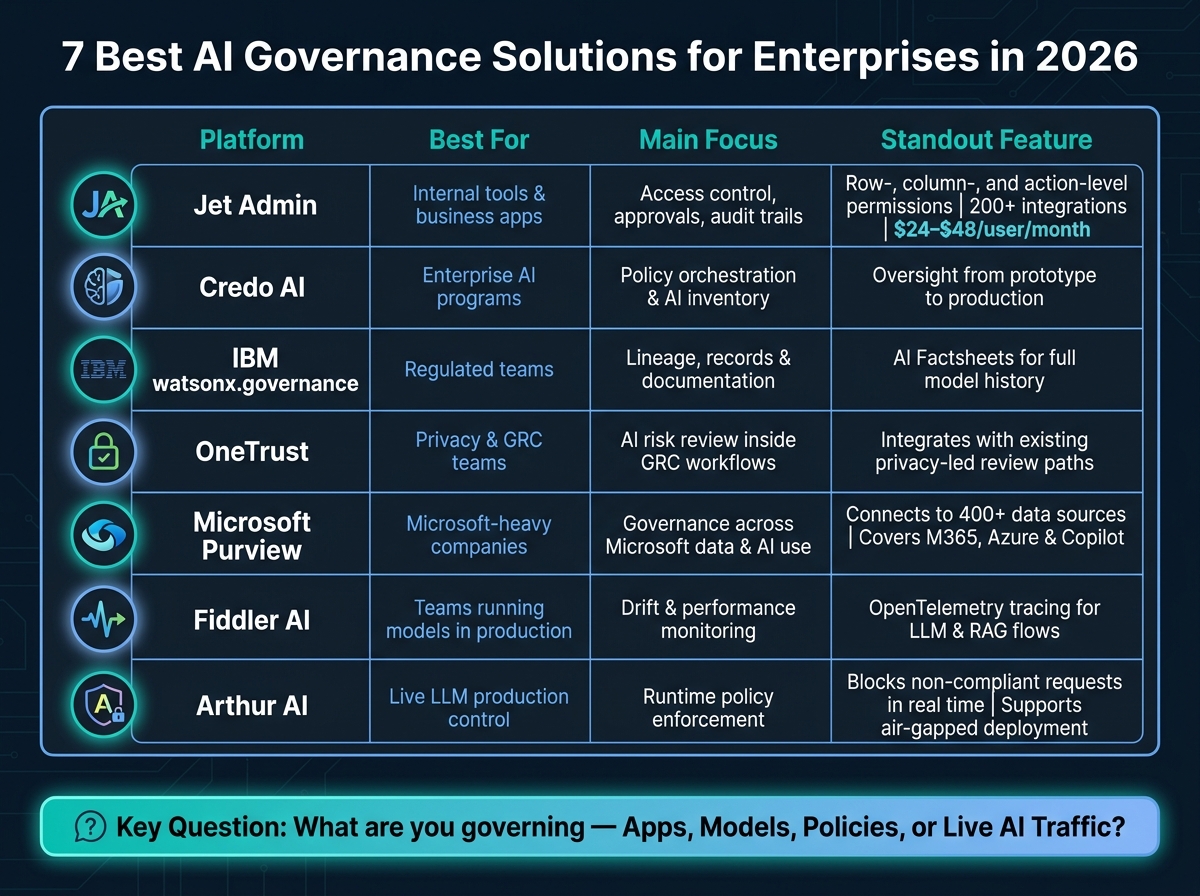
7 Best AI Governance Solutions for Enterprises in 2026: Side-by-Side Comparison
| Platform | Best for | Main focus | Standout point |
|---|---|---|---|
| Jet Admin | Internal tools and business apps | Access control, approvals, audit trails | Row-, column-, and action-level permissions |
| Credo AI | Enterprise AI programs | Policy orchestration and AI inventory | Oversight from prototype to production |
| IBM watsonx.governance | Regulated teams | Lineage, records, and documentation | AI Factsheets for model history |
| OneTrust | Privacy and GRC teams | AI risk review inside GRC workflows | Works well with privacy-led review paths |
| Microsoft Purview | Microsoft-heavy companies | Governance across Microsoft data and AI use | Tight fit with Microsoft 365, Azure, and Copilot |
| Fiddler AI | Teams running models in production | Drift and performance monitoring | OpenTelemetry tracing for LLM and RAG flows |
| Arthur AI | Live LLM production control | Runtime policy enforcement | Blocks non-compliant requests in production |
A few facts stand out right away:
- Jet Admin lists 200+ integrations
- Microsoft Purview connects to 400+ data sources
- Jet Admin has a Free plan, with Pro at $20/month and Business at $100/month, and unlimited users on every plan
- Several tools support regulated setups, including on-premises and air-gapped deployment
If I’m choosing among these, I’d first ask one simple question: What am I trying to govern - apps, models, policies, or live AI traffic? That answer usually narrows the list fast.
1. Jet Admin
Jet Admin handles governance at the app layer for internal tools, dashboards, workflows, and business apps. If your team needs tight control over AI-powered apps that sit on top of databases and APIs, Jet Admin centers on access, actions, and audit trails.
Governance and access controls
Jet Admin controls who can open an app, what data they can view, what actions they can take, and what gets logged across internal tools tied to databases and APIs. It connects to databases, APIs, and common business data sources, then adds governance rules on top.
Its permissions get very specific. Access can be limited at the row, column, and action level. That means a support agent can be restricted to records from their assigned region, sensitive payment fields can be hidden from certain roles, and admins can choose who can run workflows, export data, or edit an app. Jet Admin also keeps builder access separate from end-user access, which matters when you don't want everyone touching the wiring behind the scenes.
For identity management, Jet Admin supports SSO (on the Business plan and above) through SAML, OIDC, OAuth, Auth0, and Google OAuth, along with JetAuth. It also supports approval workflows for higher-risk actions. For example, a refund above a set threshold can require manager approval before it goes through.
Monitoring and auditability
Once access is locked down, the next piece is auditability. Jet Admin logs both builder and end-user activity, tracks version history, and separates Dev/Sandbox, Staging/UAT, and Production environments. In plain terms, that makes it easier to see what changed, who did it, and where it happened.
Deployment and integrations
For enterprise rollout, the deployment model matters just as much as permissions. Jet Admin supports cloud deployment, plus self-hosted, on-premises and air-gapped deployment on the Enterprise plan. Jet Bridge acts as a security layer between an enterprise's database and the end-user's browser to secure private data. With 200+ integrations across databases, APIs, Google Sheets, Airtable, Firebase, Supabase, and more, it can slot into many enterprise data setups.
| Feature | Capability |
|---|---|
| Authentication | SSO, SAML, OIDC, OAuth, Auth0, Google OAuth, JetAuth |
| Permissions | RBAC at row, column, and action level |
| Audit & Governance | Builder and end-user logs, version history, environment separation |
| Deployment | Cloud; self-hosted, on-premises and air-gapped on Enterprise |
| Workflows | Approval chains, human review, scheduled jobs, event triggers |
Governance features (granular permissions, SSO, audit logs) are on the Business plan at $100/month; self-hosted, on-premises and air-gapped deployment and SCIM are on the Enterprise plan, available through sales.
2. Credo AI
Once app-layer controls are in place, the next step is policy-first oversight.
Credo AI centers on enterprise AI inventory, policy orchestration, and lifecycle oversight from development through production. It gives security, compliance, IT, and AI risk teams a way to track AI systems across the company, apply governance rules in a consistent way, and gather the evidence needed for regulated AI programs.
The main thing to verify is scope. You want to know whether the platform supports the entire AI program, not just a single model or one workflow. That matters for teams that need policy review, approvals, and evidence collection as part of regulated AI work.
Use the checks below to see whether the platform handles governance from inventory all the way to evidence.
| Buyer Check | What to Evaluate |
|---|---|
| Track models, apps, and use cases | Does the platform maintain a complete AI inventory across the enterprise? |
| Apply rules across the lifecycle | Are governance policies enforced from prototype through production? |
| Assign role-based permissions | Can access and approvals be scoped by role and team? |
| Record approvals and evidence | Does the platform capture audit trails and compliance evidence automatically? |
| Cover prototype to production | Does oversight span the full lifecycle, not just deployed models? |
3. IBM watsonx.governance
For enterprises that need audit-ready lineage and documentation, IBM watsonx.governance is built for regulated teams that need clear AI governance, lineage, and records they can actually use during reviews.
Governance scope
IBM watsonx.governance covers the full AI lifecycle. It supports both generative AI, including LLMs, and standard machine learning models. That matters if your company runs a mixed AI setup instead of putting all its chips on one model type.
AI Factsheets automatically capture model metadata, training data, versions, and performance metrics. So instead of chasing details across tools and teams, you get a documented trail as the model moves through its lifecycle.
Monitoring and auditability
The platform’s lineage tracking records training data, versions, and performance metrics for audit review. In plain English, it shows how a model changed over time and what data and version history shaped it.
That gives auditors and internal stakeholders a clearer view of how the model was built, updated, and documented.
Documentation and audit workflow
IBM watsonx.governance automates documentation for model metadata and training history as part of its compliance workflow. That cuts down on manual recordkeeping and gives teams stronger evidence when they need to show their work.
Use the checklist below to verify documentation depth, lineage coverage, and audit readiness.
| Buyer Check | What to Evaluate |
|---|---|
| Mixed AI environment support | Does the platform govern both LLMs and traditional ML models? |
| Automatic documentation | Are AI Factsheets generated without manual input? |
| Lineage and traceability | Can teams track training data, versions, and performance history? |
| Audit readiness | Does it produce audit-ready documentation? |
OneTrust takes a different angle, focusing on privacy-led AI governance and risk management across the enterprise.
4. OneTrust
After audit-ready documentation, the next thing to test is whether AI governance fits the privacy and risk workflows your company already uses.
OneTrust is a fit for enterprises that want AI governance to run inside existing privacy, risk, and compliance workflows instead of living as a separate program. It leans on privacy-led AI governance, centralized risk reviews, and evidence handling across the systems enterprises already have in place.
In plain English: the main question is whether AI governance, risk reviews, approvals, and evidence collection can happen in the same GRC workflow.
That matters more than it may seem. If every AI use case needs its own stand-alone review path, things can get messy fast. But if AI reviews and approvals can reuse the workflows your teams already know, adoption tends to be smoother and easier to manage.
You’ll also want to see whether controls, evidence, and reporting stay consistent as rules shift and connected systems expand. That’s where a lot of tools look fine in a demo but start to wobble in day-to-day use.
The checks below focus on workflow fit, integration, and traceability, not stand-alone AI controls.
| Buyer Check | What to Evaluate |
|---|---|
| GRC fit | Does it align with existing privacy, risk, and compliance processes? |
| ERP, CRM, and legacy system integration | Can it work with ERPs, CRMs, and legacy systems? |
| Existing workflow reuse | Does it avoid creating a separate AI governance process? |
| Policy and evidence traceability | Can controls and evidence be traced as requirements change? |
5. Microsoft Purview
For Microsoft-heavy enterprises, governance usually works best when it stays close to the identities, data, and collaboration tools teams already use.
Governance scope
Microsoft Purview is a strong fit for enterprises that need AI governance inside Microsoft 365, Azure, and Copilot workflows. You can use it to centralize policy enforcement, access controls, and audit coverage for Microsoft-based AI use.
That matters when security, compliance, and IT teams need oversight without pushing work outside the Microsoft environment. Put simply, the main draw is centralized control over Microsoft-based AI, data, and user access.
Monitoring and integration
Microsoft Purview offers deep integration with Microsoft 365 and Dataverse, which gives teams unified visibility across Microsoft and connected systems. It also connects to 400+ data sources, including ERPs, CRMs, and legacy databases.
That makes it easier for security and compliance teams to trace AI activity across the systems employees already use instead of stitching views together by hand.
Compliance
In regulated environments, Purview’s security and compliance controls align with GDPR and HIPAA requirements. So if your team already has controls built around those rules, it’s easier to line up AI governance with what’s already in place.
| Buyer Check | What to Evaluate |
|---|---|
| Microsoft stack fit | Does your enterprise run mainly on Microsoft 365, Azure, or Copilot? |
| Copilot coverage | Do you need governance for Copilot use? |
| Connector coverage | Can it connect to external ERPs, CRMs, and legacy databases? |
| Regulatory fit | Do you need security and compliance controls for regulated workloads? |
6. Fiddler AI
After policy and documentation, the next layer is runtime model behavior. Fiddler AI focuses on post-deployment observability for predictive models and LLMs.
Production monitoring
Fiddler monitors production models for performance degradation, data drift, and attribution drift, where the signals behind model decisions shift away from the training pattern.
Monitoring and observability
OpenTelemetry tracing maps complex LLM and RAG workflows. That makes Fiddler useful when governance depends on spotting issues after deployment, not just approving models before launch.
| Buyer Check | What to Evaluate |
|---|---|
| Model type coverage | Do you run predictive models and LLMs in production and need post-launch monitoring? |
| Drift detection | Do you need monitoring for data drift, performance degradation, or attribution drift? |
| LLM workflow visibility | Do you need tracing for complex LLM or RAG pipelines? |
7. Arthur AI
When governance needs to reach live production traffic, Arthur AI leans into runtime enforcement. Put simply, it applies governance to LLM activity while the model is running, not just during an earlier review step.
Arthur Shield serves as a runtime control layer for LLMs. It runs policy checks, blocks non-compliant requests, and controls execution in production. That makes it a strong fit for enterprises that need enforcement turned on during actual AI use, not only before deployment.
Deployment options
Arthur AI supports SaaS, VPC, and on-premises deployment. Its Kubernetes-native architecture also supports air-gapped environments, which matters for regulated industries such as finance and healthcare.
| Buyer Check | What to Evaluate |
|---|---|
| Runtime enforcement | Do you need governance controls applied while AI is running in production? |
| Deployment flexibility | Do you need SaaS, VPC, or on-premises deployment options? |
| Air-gapped / regulated environments | Do you need isolated deployment with no external cloud routing for regulatory or data-residency requirements? |
Pros and Cons by Enterprise Governance Need
If your team cares more about governed internal tools than model monitoring, Jet Admin is the app-layer pick.
Jet Admin works well for enterprises that want to build internal apps on top of existing databases, APIs, and spreadsheets, without ripping out the systems they already use.
This quick summary helps you line up Jet Admin with your needs around app access, deployment, and audit controls.
| Product | Best enterprise fit | Key advantages | Main limitations | When to shortlist |
|---|---|---|---|---|
| Jet Admin | Teams building governed internal tools and business apps on top of existing databases, APIs, and spreadsheets | RBAC, audit logs, SSO/SAML, secure database and API connections, 200+ integrations, no-code app builder | No model observability or AI risk analytics | You need to launch governed internal apps fast on existing systems |
The main tradeoff is pretty simple: Jet Admin helps teams ship internal business apps fast, but it doesn't handle model observability or AI risk analytics. So if your priority is access control, audit trails, and secure app delivery, it makes sense to keep it on the shortlist.
Which AI Governance Platform Should You Choose?
The right choice comes down to what your team needs to govern.
Use the table below to line up each platform with the priority that matters most.
| Priority | Best Fit | Why |
|---|---|---|
| Governed internal apps on existing data | Jet Admin | RBAC, audit logs, SSO/SAML, and 200+ integrations for no-code app delivery |
| Privacy and consent controls | OneTrust | Privacy, consent, and data-ethics controls for AI deployments |
| Microsoft ecosystem oversight | Microsoft Purview | Native governance across Microsoft 365 and Azure |
| Model monitoring and drift detection | Fiddler AI | Post-deployment observability for drift, performance, and workflow tracing |
| Runtime LLM enforcement | Arthur AI | Production-time policy checks and request blocking |
If your team is focused on governed internal apps, the app layer is usually what makes the decision. In that case, Jet Admin is the most direct fit for app-layer governance on existing data.
Jet Admin has a Free plan; Pro is $20/month and Business is $100/month, with unlimited users on every plan. Enterprise pricing is sales-led.
Before you make a call, check a few things:
- deployment model
- integrations
- exportable audit logs
- implementation effort
- compliance coverage
- data residency
- whether the platform fits app-layer governance or broader AI governance
FAQs
How do I choose between app, model, and runtime AI governance?
Choose based on where your main risk and day-to-day needs sit.
App governance covers the application lifecycle, access controls, audit logs, and deployment environments. Model governance focuses on AI strategy, including model routing and model-agnostic design. Runtime governance handles live oversight, such as prompt guardrails, human-in-the-loop checks, and monitoring agent actions.
For enterprise systems, using all three layers gives you end-to-end security and maintainability.
Which AI governance tools support on-premises or air-gapped deployment?
Jet Admin supports on-premises and air-gapped deployment on its Enterprise plan, through self-hosted deployment options.
That means you can keep data behind your VPN and deploy in a VPC or offline-style setup when you have strict compliance or data residency requirements.
What should I check before buying an AI governance platform?
Check for enterprise-grade authentication, granular permissions, and tamper-resistant, queryable audit logs.
Also confirm policy enforcement, human review workflows, observability, deployment and data residency options, security controls, integration coverage, staging/production separation, and compliance claims in current vendor documentation.