Reviewed September 26, 2026. Research-based review of Supabase's official pricing page — not a hands-on benchmark. Jet Admin publishes this comparison and is a competing product, though Supabase is a backend platform rather than an application builder.
Supabase is open-source Postgres with authentication, storage and edge functions wrapped around it. Its pricing is unusually transparent — every overage rate is published — and three details behind the headline numbers decide most real decisions.
Free projects pause after a week of inactivity. Pro's "from $25" includes only $10 of compute. And the jump from Pro to Team is $25 to $599, bought almost entirely for compliance rather than capacity.
Supabase review: the quick verdict
| Strong reasons to consider Supabase | Trade-offs to evaluate |
|---|---|
| Real Postgres, open source, with a genuine exit path | Free projects pause after 1 week of inactivity |
| Every overage rate is published to the cent | Pro includes only $10/month of compute credits |
| Free tier allows 50,000 monthly active users | Pro → Team is $25 → $599, a ~24× step |
| Auth, storage and functions included, not bolted on | Compute is a separate axis scaling to $3,730/month |
No numerical score is given, because we did not run a scored hands-on evaluation.
What is Supabase?
Supabase gives you a Postgres database with authentication, file storage, realtime subscriptions and edge functions around it — the pieces most applications need behind the interface. It is frequently described as the open-source Firebase alternative, though the more useful framing is that it is Postgres with batteries.
Because it is genuinely Postgres, your SQL, drivers and ORMs work unchanged, and your exit is a standard dump. That materially distinguishes it from proprietary backends.
Supabase's key features
1. Postgres, not a Postgres-like layer
The database is real Postgres with real access-control semantics. Row-level security is the mechanism you use to control who sees what — powerful, and your responsibility to configure correctly.
2. Auth, storage and functions included
Authentication with 50,000 monthly active users on the free tier, file storage, and edge functions come as part of the platform rather than as separate services to wire together.
3. Published overage rates
Beyond Pro's allowances: $0.00325 per additional monthly active user, $0.125 per GB of disk, $0.09 per GB of egress, $0.03 per GB of cached egress, $0.0213 per GB of file storage. Log Drains are $60 per drain per project.
Publishing these to four decimal places is better practice than most platforms in this review series, several of which publish no overage rates at all.
4. Compute as a separate, configurable axis
Paid plans include $10 a month in compute credits — enough for one Micro instance. Beyond that, compute is configured per project and scales through published steps up to $3,730 a month.
5. Compliance on Team
SOC 2 and ISO 27001, project-scoped and read-only access, dashboard SSO, priority support with SLAs, 14-day backups and 28-day log retention, with HIPAA available as a paid add-on.
Supabase pros
The transparency is genuinely better than the category
You can model a Supabase bill before committing, to the cent. Compare that with credit-metered platforms where an action costs "1 to 50 credits" — Supabase tells you the rate for every resource it meters.
It is Postgres, so you can leave
Open source, standard Postgres, standard export. Among the platforms in this series, only Strapi, Budibase and ToolJet offer comparable exit terms, and none of them is a managed database of this maturity.
The free tier is generous where it counts
Unlimited API requests and 50,000 monthly active users on a free plan is substantial — enough to launch something real and find out whether it works.
Auth is included, and auth is the hard part
For teams that would otherwise assemble authentication themselves, having it in the platform with a large free user allowance removes the work that most often delays a launch.
Supabase cons and limitations
Free projects pause after a week of inactivity
This is the free-tier detail that catches people. Projects are paused after one week of inactivity, and you are limited to two active projects.
Who it affects: side projects, demos you show intermittently, and staging environments that sit idle between sprints. What to do: if something must stay reachable, it cannot live on the free tier. Treat Free as development capacity, not as hosting.
Pro's $25 includes almost no compute
The "from $25" is accurate and incomplete: it covers the platform and $10 of compute credits, which buys one Micro instance. Any project needing more compute adds cost on a separate axis, and that axis runs to $3,730 a month.
What to do: size your compute requirement before comparing Supabase with anything else, and treat $25 as a floor rather than a price. Additional projects are from $10 a month each on top.
The Pro-to-Team jump is about certificates, not capacity
$25 to $599 is roughly 24×. Read what it buys: SOC 2 and ISO 27001, dashboard SSO, project-scoped access, HIPAA as a paid add-on, longer backups and log retention. Those are compliance and governance features — the underlying allowances do not multiply by 24.
Who it affects: any team whose procurement or security review requires certifications. What to do: recognise Team as a compliance purchase and budget it as one. If you do not need the certificates, staying on Pro and adding compute is dramatically cheaper.
Row-level security is your responsibility
Supabase gives you the mechanism; configuring it correctly is on you. This is the same division of responsibility that produced problems for applications generated on top of Supabase by AI builders — the database is only as locked down as your policies.
What to do: if nobody on the team can review RLS policies, budget for someone who can before real customer data arrives.
Costs arrive on several axes at once
Plan, compute per project, additional projects, MAU, disk, egress, cached egress, file storage and log drains. Every rate is reasonable; the total is easy to underestimate because there are nine of them.
What do Supabase users say?
We did not verify a current aggregate rating on G2 or Capterra for this review, so no score is cited. The figures above come from Supabase's own pricing page.
For infrastructure, engineering-community discussion and status-page history usually tell you more than review-site averages — worth weighing alongside any score you find.
Supabase pricing in 2026
Read from Supabase's pricing page on September 26, 2026. USD. Our Supabase pricing guide works through the compute axis and real-world totals in more detail.
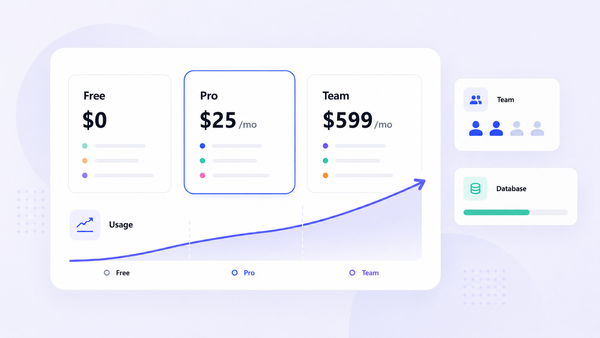
| Plan | Price | Monthly active users | Database / storage | Egress | Notable |
|---|---|---|---|---|---|
| Free | $0 | 50,000 | 500 MB database, 1 GB files | 5 GB + 5 GB cached | Shared CPU, 500 MB RAM. Projects pause after 1 week idle; 2 active projects |
| Pro | From $25/month | 100,000, then $0.00325/MAU | 8 GB disk/project then $0.125/GB; 100 GB files then $0.0213/GB | 250 GB then $0.09/GB; 250 GB cached then $0.03/GB | First project included, additional from $10/month. $10/month compute credits. 7-day backups, 7-day logs |
| Team | From $599/month | As Pro | As Pro | As Pro | SOC 2, ISO 27001, dashboard SSO, read-only and project-scoped access, HIPAA add-on, 14-day backups, 28-day logs |
| Enterprise | Custom | Custom | Custom | Custom | Designated support manager, uptime SLAs, AWS PrivateLink, 24×7×365 support |
Compute is configured per project and scales through published steps — $10, $15, $60, $110, $210, $410, $960, $1,870, $2,800 and $3,730 a month. Log Drains are an additional $60 per drain per project.
A worked example. One production project on Pro with a Small compute instance is $25 plus the compute step above the included $10 — so the platform fee is the smaller line once you are past Micro. Two projects with real compute can easily reach several hundred a month while still reading as "from $25" on the pricing page. And none of that approaches Team's $599, which you pay for certificates rather than capacity.
Jet Admin vs. Supabase: which should you evaluate?
These are complementary rather than competing. Supabase holds your data and handles auth; Jet Admin builds the internal interface your team uses to work with it.
| Need | What to use |
|---|---|
| A Postgres backend with auth, storage and functions | Supabase |
| An admin panel or internal tool over that database | Jet Admin connects to Postgres directly |
| Letting non-technical staff work with the data safely | Jet Admin, with permissions, on top of Supabase |
| Unlimited users on the internal tool | Jet Admin includes them on every plan |
| SOC 2 and ISO 27001 on the data layer | Supabase Team at $599/month |
| Both | A very common pairing: Supabase for the backend, Jet Admin for the operational screens |
Sources: Supabase pricing, Jet Admin pricing, checked September 26, 2026.
When Supabase is the right choice
If you need a backend — database, auth, storage — Supabase is an excellent one and Jet Admin does not replace it. The open-source core and published rates make it one of the lower-risk platform commitments in this whole series.
Who should use Supabase — and who should compare alternatives?
Good fit: applications needing Postgres with auth included; teams who value an open-source core and a real exit; projects whose compute needs are modest; anyone who wants to model costs precisely before committing.
Compare alternatives if: you need something reachable at all times on a free tier — the inactivity pause rules that out; your workload is compute-heavy and provisioned instances elsewhere may be cheaper; or you need certifications but cannot justify $599 a month for them.
If you already have Postgres and need the interface layer, connect Jet Admin to it — that is a separate decision from choosing a backend.
Supabase review FAQ
Is Supabase free?
Yes — unlimited API requests, 50,000 monthly active users, 500 MB database and 1 GB file storage. But projects pause after one week of inactivity and you are limited to two active projects.
How much does Supabase Pro cost?
From $25 a month, including the first project and $10 of compute credits — enough for one Micro instance. Additional projects start at $10 a month, and compute above Micro is charged separately.
Why is Supabase Team $599?
Because it is a compliance tier: SOC 2, ISO 27001, dashboard SSO, project-scoped and read-only access, HIPAA as an add-on, and longer backup and log retention. The resource allowances are not 24× Pro's.
What happens to an idle free project?
It is paused after a week of inactivity. If something needs to stay reachable, it belongs on a paid plan.
Does Supabase publish its overage rates?
Yes, in detail — per MAU, per GB of disk, egress, cached egress and file storage. That is unusually transparent for this category.
How does Supabase work with Jet Admin?
Supabase stores your data and handles auth; Jet Admin connects to Postgres and builds the internal tools your team uses. They are typically used together rather than chosen between.
Price the compute, not the plan
Supabase's "from $25" covers the platform and one Micro instance. Work out the compute step your project actually needs, add any extra projects at $10 each, and compare that total. Then decide separately whether you need Team's certifications — that is a $574 question with no capacity attached.
For the operational interface over that data, connect Jet Admin.