Retool is worth shortlisting when your team needs custom business software connected to real data and someone can own its technical behavior. Its appeal is the combination of app building, data access, automation, and administration. The trade-off is that a working interface still needs careful testing, and the features you need can determine the plan you buy.
This Retool review covers its current features, pros and cons, pricing, and best-fit users—including the difference between its new AI app builder and classic editor.
Reviewed September 26, 2026. This is a research-based review of official documentation, public demos, pricing, and published customer feedback, not a hands-on performance benchmark. Screenshots show Retool’s own examples. Jet Admin publishes this article and is an alternative discussed below.
Retool review: the quick verdict
Choose Retool if you want a platform for data-connected applications and have the technical ownership to maintain them. It can suit engineering, data, and operations teams replacing repeated manual work with shared software. For a team already invested in Retool, extending a reliable existing app may be more sensible than migrating.
Compare alternatives if the main requirement is broader participation without seat-based growth, or if you need a particular feature in the new builder that is currently available only in classic apps. Evaluate the exact building experience and deployment you intend to use.
| Strong reasons to consider Retool | Trade-offs to evaluate |
|---|---|
| AI app generation and an established classic editor | The two builders have different capabilities and architectures |
| Interfaces connected to databases and APIs | Queries, permissions, and business rules still need an owner |
| Visual workflows with code and execution logs | Automation must be tested beyond whether a run succeeds |
| Business and enterprise administration options | Governance requirements can push the purchase to a higher tier |
What is Retool?
Retool is a platform for building applications and automations around business data. Its classic apps combine predefined interface components with queries and JavaScript. That makes it useful for tools where employees need to inspect records, update information, or trigger an action—not just view a chart. See Retool’s classic app documentation.
In 2026, “Retool” also includes a newer AI-first app builder. Retool’s current app documentation labels this experience public beta on Cloud. Reviews describing every Retool app as a fixed drag-and-drop interface miss that distinction.
Retool’s key features
1. An AI app builder with editable code
The new builder generates React applications from natural-language instructions. You can describe the records to use, the interface to show, and the actions people should take. Retool’s quickstart then walks through previewing, refining, approving functions, and publishing.
The example below is Retool’s recorded customer-success dashboard demo. It illustrates the experience; it does not establish how accurately Retool would build your own application.
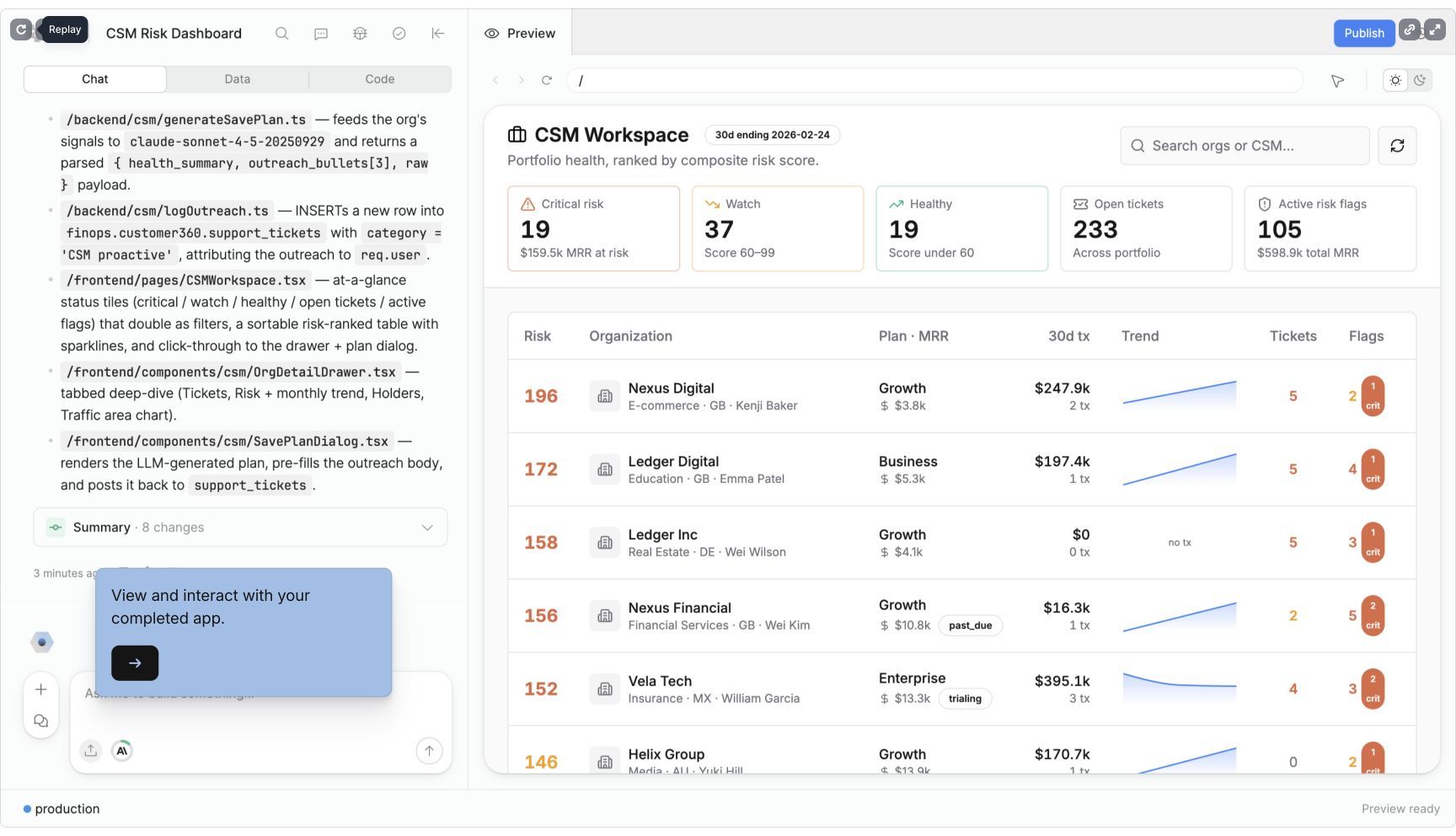
The editor separates Chat, Data, and Code. That matters when a generated screen looks correct but behaves incorrectly: a technical owner can inspect the connected functions and source instead of relying only on another prompt. The app-builder reference also documents previews, change history, and debugging.
2. A classic editor for component-based applications
Classic apps remain a distinct option. They use configured Retool components, query panels, and expressions. The newer builder uses React source and supports a different layout and extension model. Both share Retool’s resource and permission concepts. Retool explains these differences in its apps-versus-classic comparison.
For an existing team, this creates a practical decision: keep a stable application in its current form, or rebuild it when the newer approach solves a specific problem. “New” alone is not a migration case.
3. Data-connected screens and actions
Retool’s classic model connects APIs and databases, lets you read and write data, and adds logic through JavaScript. Its value is particularly clear when a process spans more than one system. A support screen, for example, might need account details beside an order record and an action that updates its status. That is an illustrative use case, not a claim that we built or tested that screen.
During evaluation, inspect the hardest action first. A searchable table is often straightforward; a correctly authorized update with useful error messages is the more revealing test.
4. Workflows for recurring background work
Retool Workflows connects blocks that query resources, transform data, and perform actions. Schedules and webhooks can trigger execution without an employee opening an app.
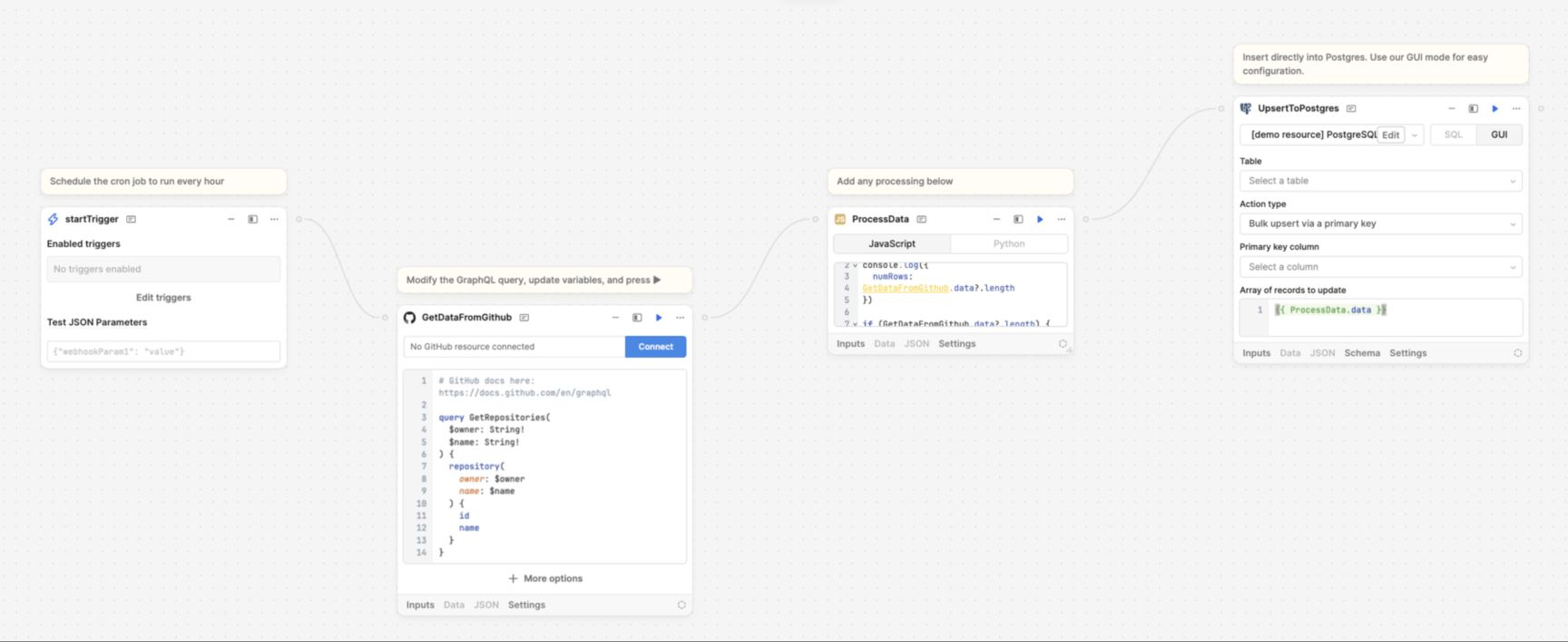
The workflow quickstart describes branches, reusable functions, versioned releases, run history, and error handlers. It also makes a useful distinction: a successful query did not return an error, but that does not prove the workflow produced the business outcome you intended.
For an approval or synchronization process, test repeated events, missing values, and partial failures. Decide who receives an alert and how someone safely retries the operation.
5. Controls around AI-assisted development
Retool’s app security documentation says AI resource access follows the builder’s permissions. It describes approval requests before the agent runs functions that change data. It also explains what can be sent to model providers during building, including resource schemas, function outputs, and source files.
For buyers, the useful question is what data the builder can access during development. Review the organization’s configuration and model-provider arrangement before connecting a sensitive production workflow.
Retool pros
It brings interfaces and operational logic together
A team can evaluate its data screen and the action behind it as one workflow. Our assessment is that this is Retool’s strongest fit: replacing an operational process that currently requires several people or systems, while retaining technical control over what happens.
It offers more than one way to build
The new app builder gives Retool a credible AI-led path, while classic apps support teams with existing component-based applications. This makes blanket claims that Retool “requires every screen to be hand-coded” or “has no AI builder” misleading.
It supports an incremental adoption decision
You do not have to start by replacing every internal system. Pick a bounded process, agree on success criteria, and prove it with the people who will use it. Retool’s combination of applications and workflows gives that pilot room to grow if it succeeds.
Retool cons and limitations
The new builder does not have full classic-app parity
The current limitations list excludes native React Native app building, modules, classic custom-component libraries, and private npm packages from the new builder. This is a limitation of that experience, not a claim that the entire Retool platform lacks mobile apps or reusable components.
Write down your must-have features before choosing a builder. An impressive generated prototype is not enough if the required extension or deployment path is unavailable.
Migration requires validation
Retool can convert a classic app while preserving the original. However, its conversion guide explicitly tells teams to test key use cases and address missing functionality. It also lists unsupported conversion scenarios, including some resource types and mobile apps.
Treat conversion as a software change with acceptance criteria. Compare calculations, write operations, access behavior, and error states before replacing a working tool.
AI does not remove technical ownership
A prompt can express intent, but someone still needs to decide whether the resulting behavior is correct. Who should edit a record? What happens when the API rejects it? Which fields may be shown to another team? These questions apply to any app platform, including Jet Admin.
Our assessment: Retool is easier to justify when the team can assign a clear owner for maintenance. If nobody can diagnose a failed query or review a permission change, include that support requirement in the purchase decision.
The total cost depends on access and governance
Estimate cost from the people who will build and use the application, the controls your organization requires, and the expected automation or AI usage. Do not choose a tier solely from the first price displayed.
What do Retool users say?
Public feedback on G2’s Retool reviews includes praise for building useful interfaces quickly and connecting data sources. Critical feedback includes learning difficulty for less technical users and customization constraints. These are reported experiences, not findings from our own testing.
Read the date and context of each review. A complaint about the classic editor may not describe the newer React builder; equally, a positive AI demo does not prove that an older production application will convert cleanly. Look for reviewers with a similar role, application complexity, and team setup.
Retool pricing in 2026
The following public Cloud rates are in USD per month, billed annually, checked September 26, 2026.
| Plan | Builder | Internal user | Main purchasing distinction |
|---|---|---|---|
| Free | $0 | $0 | Up to five users |
| Team | $10 | $5 | Staging and release versions |
| Business | $50 | $15 | Audit logging, richer permissions, portals |
| Enterprise | Custom | Custom | SAML/OIDC SSO and Git source control |
Example: two builders and 20 internal users cost $120/month equivalent on Team or $400 on Business, before extras. This is seat arithmetic, not a quote or a claim that the plans are interchangeable.
AI credits are pooled, renew monthly, and do not roll over; Agents are billed separately. Confirm seat definitions and deployment terms for your contract. Source: Retool pricing. For the fuller breakdown, read Retool Pricing in 2026.
Jet Admin vs. Retool: which should you evaluate?
Consider Jet Admin when you want to build business apps with AI and invite more users without adding per-user fees. Its current pricing is based on AI credits and plan features, with unlimited apps, users, and workflows across plans. Pro lists GitHub sync and code editing; Business adds permissions, SSO, and audit logs. Check the selected credit allowance and billing period on Jet Admin’s pricing page.
| Your priority | What to evaluate |
|---|---|
| A working Retool estate | Start with the cost and risk of extending it; migration needs a concrete benefit |
| AI-generated business apps | Run the same real workflow through both builders and inspect the result |
| Broad employee or customer access | Compare Retool’s applicable user charges with Jet Admin’s credit allowance and plan requirements |
| Governance and deployment | Map each required control to an actual plan and supported deployment |
| Ongoing ownership | Have the future maintainer change a field, fix an error, and review access in each tool |
Neither a lower starting price nor a faster first draft establishes the better fit. A useful comparison includes the second version of the application: a changed requirement, a new user role, and a failing integration.
If Jet Admin matches your requirements, start with one business app. If you are still choosing a shortlist, see our Retool alternatives guide.
Who should use Retool—and who should compare alternatives?
Retool deserves a close look when engineers or technical operations staff own an application, the workflow needs custom actions against existing data, and the selected plan covers the organization’s requirements.
Compare alternatives before committing when you expect many occasional users, cannot assign a technical maintainer, or depend on capabilities absent from the particular builder you are considering. These are evaluation triggers, not proof that Retool cannot serve the use case.
Retool review FAQ
Is Retool no-code or low-code?
It depends on the experience. The newer builder starts with natural-language prompts and editable React code. Classic apps combine visual components with queries and JavaScript. You can begin without writing every line, but complex behavior still needs verification.
Is Retool good for non-developers?
It can help a business user describe and iterate on an application. Whether that user can maintain it independently depends on the data, integrations, and rules involved. Test a realistic change request rather than judging only the initial demo.
What are Retool’s biggest drawbacks?
The main issues to evaluate are technical maintenance, plan-dependent total cost, and differences between the new and classic builders. Customer reviews also report learning and customization friction, but those reports vary by experience and date.
Does Retool have a free plan?
Yes. Its public Free plan supports up to five users. Check current limits before treating it as the long-term home for a growing team.
Is Retool better than Jet Admin?
There is no universal winner. Retool may be the practical choice for an established Retool team. Jet Admin is worth evaluating when AI-led business app creation and access without per-user pricing are central requirements. Compare both with the same data and acceptance criteria.