
My shortlist starts with your app’s hardest requirement - not the lowest price. I’d compare Jet Admin for access controls, Glide for mobile-first tools, and Noloco or Stacker for client portals. For custom apps, I’d consider Bubble or WeWeb; for developer-led internal tools, Retool, Appsmith, or UI Bakery. Airtable fits simple internal dashboards when your data already lives there.
Across these 10 Softr alternatives, I compare data connections, permissions, design control, workflows, build effort, deployment, and total cost. Some options require JavaScript, so “no-code” doesn’t describe every tool here.
Quick Comparison
| Platform | Where I’d start | Main trade-off |
|---|---|---|
| Jet Admin | Database-backed tools with access controls | Sales quote required; verify security features by plan |
| Glide | Mobile-first apps | Usage charges and user types affect cost |
| Bubble | Custom SaaS products | More setup and usage-based billing |
| Noloco | Client portals with record-level rules | Structured layouts and plan limits |
| Stacker | Customer and partner portals | Connections and pricing differ by version |
| WeWeb | Custom front ends | Separate backend and hosting costs |
| Retool | Data-heavy internal tools | JavaScript and developer time |
| Appsmith | Self-hosted internal apps | Coding needed for custom logic |
| UI Bakery | Internal tools with self-hosting | Check permissions and user billing |
| Airtable | Internal dashboards and forms | Limited layouts and paid editor seats |
My advice: <u>test access rules and data writes before switching</u>, then price 12–18 months of use. The pricing research is dated September 26, 2026, and was not independently verified on October 23, 2026 - so I’d confirm current plans before buying.
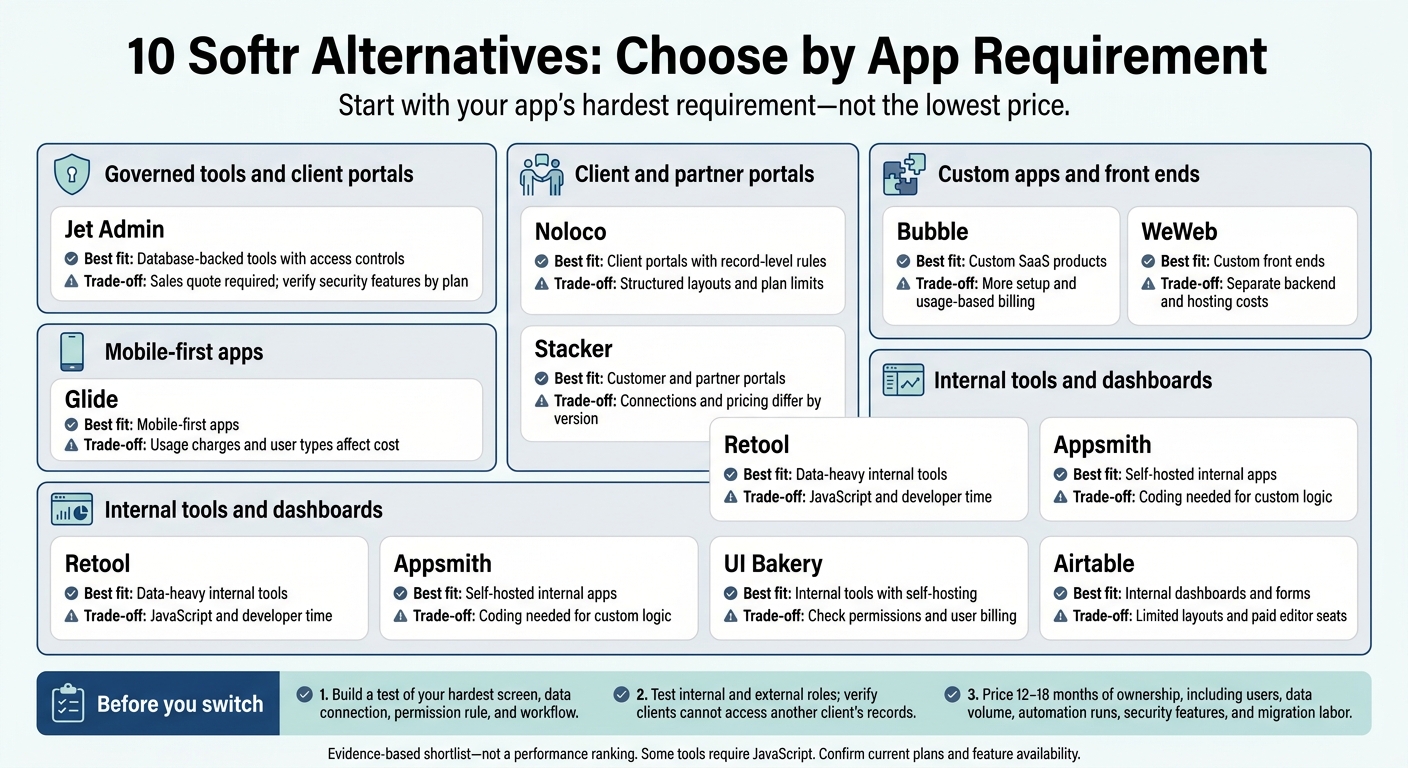
10 Softr Alternatives: Choose by App Requirement
The BEST No Code App Builder in 2026 (I Tested Them All)
sbb-itb-8346adb
Softr Alternatives at a Glance
Pricing note: These figures come from research dated September 26, 2026. They were not independently verified on October 23, 2026.
Compare how each tool connects to your data, controls access, and lets you shape the UI.
| Platform | Best-fit use case | Data connections | Permissions | Customization | Starting price and limits (USD) | Deployment |
|---|---|---|---|---|---|---|
| Jet Admin | Governed internal tools and client portals | Direct database/API access; Postgres, MySQL, MongoDB, Airtable, and more | Row- and field-level controls; role-based access | Granular UI controls and branded themes | Contact sales | Cloud, self-hosted, or on-premises |
| Glide | Mobile-first internal tools | Synced Sheets and tables | Row-based access | Structured, opinionated layouts | $25/month; 2 apps and 100 credits | Not disclosed in supplied research |
| Bubble | Full SaaS products | Built-in proprietary database | App privacy rules | Full visual canvas | $69/month; monthly/annual options; 175,000 Workload Units | Not disclosed in supplied research |
| Noloco | Airtable-backed portals | Synced Airtable and database records | Record- and field-level access | Structured layouts | $79/month; monthly/annual options; 10 team seats and 1,000 clients | Not disclosed in supplied research |
| Stacker | Business portals | Synced Airtable and Salesforce data | Per-user and record access | Portal-focused layouts | $50/month; monthly billing; 250 credits | Not disclosed in supplied research |
| WeWeb | Custom front ends on an existing backend | API/SQL connections | Backend-dependent | Full visual canvas | $33/month combined; $20 builder + $13 hosting | Hosting priced separately |
| Retool | Not disclosed in supplied research | Not disclosed in supplied research | Not disclosed in supplied research | Not disclosed in supplied research | About $30/user/month | Not disclosed in supplied research |
| Appsmith | Not disclosed in supplied research | Not disclosed in supplied research | Not disclosed in supplied research | Not disclosed in supplied research | Not disclosed in supplied research | Not disclosed in supplied research |
| UI Bakery | Not disclosed in supplied research | Not disclosed in supplied research | Not disclosed in supplied research | Not disclosed in supplied research | Not disclosed in supplied research | Not disclosed in supplied research |
| Airtable | Internal dashboards and interfaces | Native Airtable data | Internal access; external access not disclosed in supplied research | Constrained Interfaces layouts | Team $24/user/month; Business $54/user/month | Not disclosed in supplied research |
Look beyond the sticker price. The connection model, permission depth, and total cost matter more. Check how often data syncs, how changes write back to the source, and whether access rules block edits at the data layer.
The next sections examine setup speed, customization, permissions, and cost for each platform.
1. Jet Admin
Jet Admin is best suited to internal tools with access controls and client portals that rely on direct database actions.
Evidence note: The supplied sources don’t fully verify CRUD or rollback behavior. Test both before using the app in production.
Data Connections and Sync
The materials describe real-time reads and writes. Test create, read, update, and delete actions against your own data source, along with error handling and refresh behavior. Workflows and permission rules depend on how reliably that data stays in sync.
App Design and Workflows
AI Builder turns prompts into a first draft - not a finished app. Documented features include multi-branch workflows, scheduled jobs, and approval steps. Jet Admin also lists server-side functions for secrets, external API calls, and business logic.
Version history is available, but confirm what a restore includes before relying on it. Once the workflow logic is ready, access controls need testing before launch.
Permissions and Deployment
Jet Admin lists SSO, SAML, role-based access control, and audit logs. However, the supplied materials don’t fully document which plans include them. For client portals, test access using separate user accounts rather than relying on UI-only restrictions.
Build Effort and Cost
The learning curve is low to medium, though granular UI controls take extra setup time. Pricing requires contacting sales. Ask for an itemized quote covering users, SSO/SAML, support, and infrastructure.
2. Glide
Data Connections and Sync
Glide charges for updates tied to Google Sheets and Airtable syncs, data changes, integrations, and API calls. Update volume affects cost, so estimate it before launch - especially if your app syncs often or relies on heavy automation.
App Design and Workflows
Glide suits mobile-first apps, while Softr is a better fit for website-style portals. Glide’s computed columns and workflow builder let you add business logic beyond basic record actions. That flexibility still depends on how you divide access among user types.
Permissions and Deployment
On some tiers, Glide charges different rates for business and personal users.
Build Effort and Cost
The Maker plan costs $60 per month and includes unlimited personal users and 25,000 rows. The sources don’t specify included update credits or overage rates, so confirm both before buying.
3. Bubble
Data Connections and Sync
Bubble connects to external sources through plugins or the API Connector, but it doesn’t offer native sync. You’ll still need to build workflows to keep external data in sync, so it’s a better fit if you can handle that work yourself. Its strength is complex app logic rather than fast, database-first portals.
App Design and Workflows
Bubble’s visual canvas gives you more control over responsive pages than Softr’s prebuilt blocks. It also supports complex, multi-step workflows. The trade-off is setup time: expect days to weeks, not a quick build.
Permissions and Deployment
For team builds, version control and editor seats affect how you work together and manage releases. Starter includes basic version control. Growth adds premium version control with up to 10 custom branches, while higher plans increase branch limits and editor seats.
Build Effort and Cost
Watch Workload Units (WU) closely and cap overages before launch to keep usage-based costs in check. If you want simpler database-first app building, the next option takes a different approach.
4. Noloco
Noloco suits teams that need structured, database-backed client portals with tighter permissions than a basic portal builder offers.
Data Connections and Sync
Noloco connects natively to Noloco Tables, Airtable, SmartSuite, Xano, and Google Sheets. PostgreSQL, MySQL, and HubSpot require Business or above. REST API integration is available only on Enterprise. Airtable schema changes may take time to appear in the app.
This setup helps teams build faster, but leaves less room to customize the design.
App Design and Workflows
Noloco’s canvas is more structured than Softr’s block-based builder. Its built-in workflow engine supports multi-step professional services workflows, with 3,000 workflow runs on Pro and 10,000 on Business.
Permissions and Deployment
Pro includes record- and field-level permissions, while Business adds unlimited user roles. Built-in multi-tenancy keeps each client limited to its own records.
You can use a custom domain on Pro. However, Noloco is SaaS-only: there’s no code export or self-hosting option.
Build Effort and Cost
Starter is listed at $49 per month. Pro costs $149 per month with monthly billing and includes 10 team seats, 50 client seats, 50,000 rows, 25,000 synced rows, and 3,000 workflow runs. Check those limits against your portal’s user count, data volume, and automation needs.
Business is listed at around $319 per month, with 10,000 workflow runs, unlimited user roles, and priority sync. Extra team seats cost about $10 per month, and extra client seats cost about $1 per month. Whether those costs make sense depends on whether you need workflow automation or just a simple portal.
5. Stacker
Data Connections and Sync
Check the version first. Classic supports Airtable and Google Sheets. Astra focuses on Salesforce and database connections and drops Airtable support. In Classic, portal users can view, edit, and submit records through forms that write back to the source. Users have reported real-time sync gaps, so test how soon changes appear before using it in production.
App Design and Workflows
Stacker works well for branded customer or partner portals with filtered records and forms. It requires more manual page building than Softr’s blocks. The sources don’t confirm native approvals or automation caps, so check both before choosing it for workflow-heavy apps.
Permissions and Deployment
Granular permissions are a core strength, especially when sharing existing Airtable records with external users through Classic. Test access with separate customer accounts. A filtered page alone doesn’t prove that users can’t access one another’s records.
Build Effort and Cost
Keep Classic and Astra pricing separate. Classic reportedly costs $9/month for 20 portal users, with Pro at $199/month. The newer credit plan costs $50/month for 250 credits, or $0.20 per credit, and includes $100 in trial credits. Credit rules and internal-user pricing aren’t specified, so costs can climb fast for portals with external users and frequent updates.
The next option offers more front-end control, shifting the trade-off toward flexibility.
6. WeWeb
Data Connections and Sync
WeWeb builds the front end; you supply the backend. It connects to Xano, Supabase, and REST APIs, letting you use live data and build CRUD workflows for database-backed screens. You get more control, but your team takes on more work.
App Design and Workflows
Responsive layouts, reusable components, and spacing controls offer more design flexibility than Softr’s prebuilt blocks, with less built-in structure. Visual workflows handle branching logic for complex interactions. Expect more time spent building.
Permissions and Deployment
WeWeb supports Xano Auth, Supabase Auth, OAuth, and OpenID for authentication. Enforce record access in the backend, rather than relying on front-end restrictions, for stricter data control. You can deploy through WeWeb’s cloud or export your code, but either option still requires an external backend.
Build Effort and Cost
Your costs cover the builder, hosting, and backend. Sources disagree on code-export pricing, so check export eligibility and self-hosting costs before you buy.
The next platform takes a different approach, with more of the backend included.
7. Retool
Retool suits teams that need more control than a block builder offers.
Data Connections and Sync
Retool connects to SQL databases, APIs, data warehouses, and GraphQL, making it a good fit for data-heavy internal apps. It works well for teams that want direct database control instead of a prebuilt portal structure. Before building, decide whether you need live reads, scheduled syncs, or write-back logic.
App Design and Workflows
Retool is low-code, not no-code. Its canvas UI and JavaScript support multi-step forms, filters, and custom logic, but technical teams will get more out of these tools. Expect more development work than with Softr’s simpler block-based approach.
Permissions and Deployment
Retool includes version control, audit logs, environments, and cloud or self-hosted deployment. Availability and limits vary by plan, so check which tier includes the controls you need.
Build Effort and Cost
Budget for developer time and backend setup - not just the subscription. The supplied research lists pricing at about $30 per user per month, but pricing details for builders, users, AI, workflows, and self-hosting are incomplete. Confirm those costs before setting your budget. Developer time is the main additional cost driver.
8. Appsmith
Appsmith suits teams that want more control than a block builder offers - and are willing to spend more time building to get that flexibility.
Data Connections and Sync
Appsmith is an internal app builder for tools that need custom interactions with user data. The supplied research does not confirm which connectors it supports or how CRUD refreshes work.
App Design and Workflows
The canvas includes over 45 prebuilt widgets, such as Tables, Charts, Forms, and Modals. Events like onRowSelected and onClick trigger actions, giving you finer control than Softr’s block-based system.
Appsmith is low-code, but you’ll need JavaScript for custom logic and data transformations.
Permissions and Deployment
Appsmith supports Git workflows, audit logs, and self-hosted or on-premises deployment. Softr, by comparison, is SaaS-only.
Build Effort and Cost
The supplied research includes no verified pricing, so leave Appsmith out of the pricing comparison table.
The next platform offers similar control with a stronger focus on UI, changing the trade-off again.
9. UI Bakery
Data Connections and Sync
UI Bakery balances speed and control. It suits database-backed internal tools when you need self-hosting. The research doesn’t confirm connector coverage or CRUD reliability, so test write-backs and check that changes persist after reloading before launch.
App Design and Workflows
UI Bakery is low-code, but custom logic requires JavaScript. That means more setup than Softr. The research doesn’t confirm SQL support, conditional visibility, or how much its workflows can handle.
Permissions and Deployment
Self-hosting is supported, but the research doesn’t confirm cloud deployment, granular permissions, dev/prod separation, or audit logs by plan. These unknowns matter most for internal tools with strict governance requirements. If self-hosting and JavaScript work for your team, pricing is the next filter.
Build Effort and Cost
The research lists a free plan and paid plans starting at $20 per user per month. It doesn’t verify whether developers and end users are charged separately, so total costs remain unclear. Next, the comparison moves to a more data-first option.
10. Airtable
Data Connections and Sync
Airtable Interfaces runs on an Airtable base. Data from other sources must first be imported or synced through integrations or APIs.
App Design and Workflows
Airtable offers prebuilt blocks for dashboards and forms. Built-in automations handle task routing and alerts without external automation tools. Layout control stops at Airtable’s blocks - you don’t get a fully custom canvas. This simpler setup works best when access stays internal.
Permissions and Deployment
Access follows collaborator permissions, and editors need paid seats. Airtable works well for internal tools, but external portals require another layer of permissions on top.
Build Effort and Cost
The interface layer comes with paid Airtable plans, so you can build simple internal apps fast. But per-user editor charges can increase costs as your team grows. That trade-off matters most when comparing Airtable with more flexible app builders.
Pros, Cons, and Which Platform Fits
Pros, Cons, and Best Fit
Choose the platform that meets your toughest requirement after testing its core workflows. Compare setup speed, permissions, database handling, and workflow depth to narrow your options.
| Platform | Main advantage | Main drawback | Best fit |
|---|---|---|---|
| Jet Admin | Direct database access and governance | Limited fit for public marketing sites | Governed portals and internal tools |
| Glide | Fast spreadsheet-to-app setup | Credit-metered; no public apps | Mobile-first field operations |
| Bubble | Custom interfaces and business logic | Steep learning curve and proprietary runtime | Full SaaS products |
| Noloco | Separate team and client pricing | Structured data model limits layout freedom | Database-backed client portals |
| Stacker | External-user portals | Hard-to-predict usage costs | Portals with many external users |
| WeWeb | Design freedom and code export | You remain responsible for backend maintenance | Custom front ends on an existing backend |
| Retool | Broad database and API support | Requires JavaScript knowledge | Engineering-led internal tools |
| Appsmith | Open-source flexibility | More technical than no-code tools | Internal administration apps |
| Airtable | Fastest when your data already lives in Airtable | High per-seat cost for external users | Internal-only dashboards |
| Softr | Fastest block-based launch | Limited workflow depth; data caps | Fast MVPs |
If two tools look close, use the next table to break the tie.
Match the Platform to Your Requirements
This is an evidence-based shortlist, not a performance ranking. Run the same acceptance check on every platform you’re considering.
| Requirement | Shortlist supported by the findings | Acceptance check |
|---|---|---|
| Ease of use | Glide, Noloco | Can your builder complete the core workflow without code? |
| Database integrations | Jet Admin, Retool, WeWeb | Confirm reads and writes against your database or API. |
| Customization | Bubble, WeWeb | Reproduce your hardest screen and business rule. |
| Permissions | Jet Admin | Verify that users cannot access records outside their permissions - not just that those records are hidden. |
| Internal tools | Retool, Appsmith, Jet Admin | Complete the administrative workflow using the operator’s role. |
| Client portals | Noloco, Stacker, Jet Admin | Check client isolation and external-user billing. |
| Budget | No reliable winner from the supplied pricing | Price an authenticated app you can deploy, not just an editor. |
Once you’ve checked fit, compare ownership costs. They can change which platform makes sense.
Check the Total Cost
Low initial cost means the minimum recurring spend needed to launch an authenticated app that users can actually use. Count seats, users, data updates, workflow runs, credits, custom domains, authentication, hosting, support, and maintenance.
The supplied pricing does not establish reliable costs for October 2026. When budgeting for your app and team, confirm current limits, billing terms, and who will handle maintenance.
Final Verdict: Choose for Your App, Team, and Budget
Use the comparison above to choose based on your data source, permissions, workflow needs, and budget - not a feature checklist. Keep Softr only if your app is mostly for reading data, uses simple forms, and doesn’t need row-level rules or audit logs.
For growing operations teams that have outgrown simple portals, switch only when the replacement solves a confirmed problem. That might mean removing reporting and filtering limits or working around Airtable’s row, record, or automation limits.
For security-conscious enterprises, treat SSO, SAML, and audit trails as launch requirements. Check that your chosen plan includes each one.
Before switching, spend 20–30 minutes building a test version of your hardest screen, data connection, permission rule, and workflow. Test with both internal staff and external client roles, and verify that clients cannot access another client’s records. Choose only after the test passes and you’ve priced 12–18 months of ownership in USD, including users, data volume, automation runs, security features, and migration labor.
FAQs
How can I migrate my app without downtime?
You can migrate without downtime by rebuilding the front end while keeping your existing database. Connect the new platform to your current Airtable, Google Sheets, or SQL data source. Your data stays where it is.
Start with one key workflow or user group. Check permissions and performance, then switch over in phases. Watch for data sync issues and train your internal teams to use the new platform.
How do I test client data isolation?
Test permissions yourself instead of relying only on vendor descriptions. Connect your actual data source in a test environment with one internal staff member and two external client users.
Check that each client can view, edit, or access only their organization’s records. Confirm that row-level permissions keep clients from seeing each other’s data - even when submitting, reviewing, and approving requests.
How can I estimate costs as my app grows?
Estimate costs based on expected growth over the next 12 to 18 months, not just today’s headcount. Review per-user and usage-based charges, whether internal and external seats have separate prices, and any limits on records or database actions.
Include higher-tier plans needed for must-have features, possible seat or data overage fees, and maintenance time. Usage-based charges, such as workload units or AI credits, can be harder to predict as traffic grows.