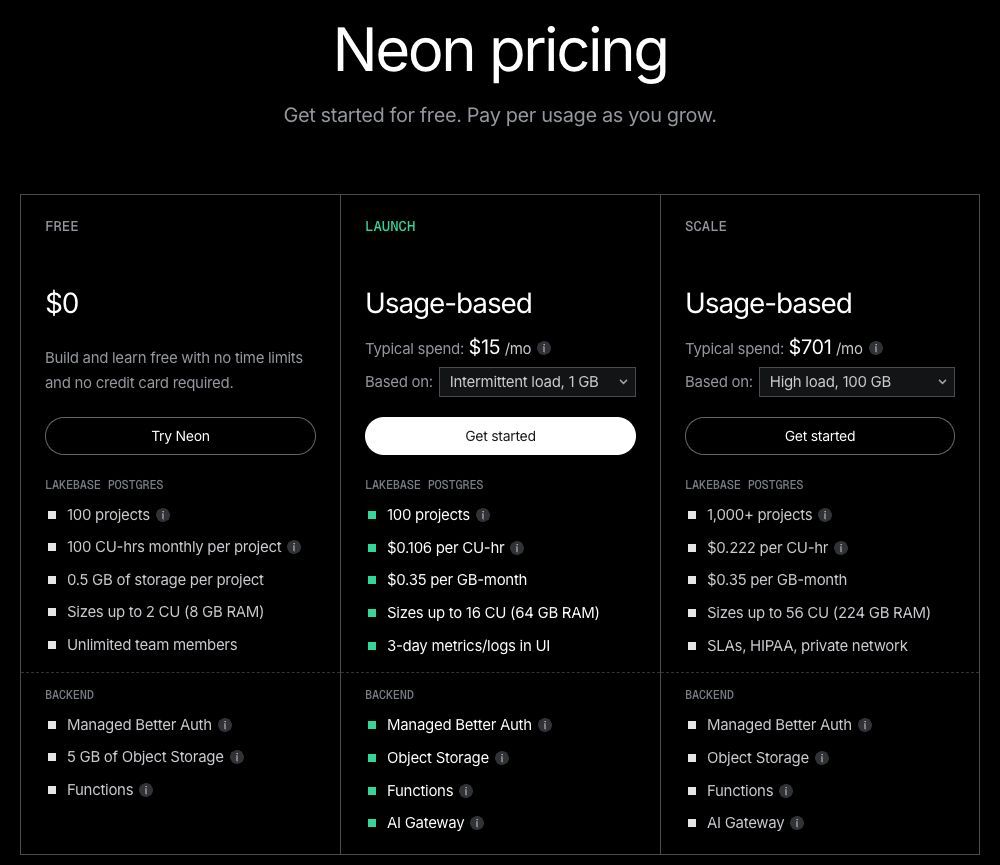
Neon pricing starts with a free plan; paid Launch and Scale plans charge for actual usage with no monthly minimum. Database compute costs $0.106 per CU-hour on Launch and $0.222 on Scale, with storage billed separately. The main budget question is how much compute runs, and for how long—not how many colleagues log in.
Pricing checked September 25, 2026. US dollars; taxes excluded from illustrative calculations. Annual rates are monthly equivalents, not monthly invoices.
Neon pricing at a glance
| Plan | Billing | Database allowance or rate | When it fits |
|---|---|---|---|
| Free | $0; no annual commitment | 100 CU-hours and 0.5 GB storage per project | Experiments and small workloads within every free limit |
| Launch | Usage billed monthly; no fixed annual equivalent | $0.106/CU-hour; $0.35/GB-month | Applications that exceed Free without requiring Scale controls |
| Scale | Usage billed monthly; no fixed annual equivalent | $0.222/CU-hour; $0.35/GB-month | Workloads needing stronger operational and network controls |
Source: Neon pricing. The “typical spend” figures on the website are modeled workloads, not subscription minimums. Your bill can differ substantially.
What each plan includes
Free: validate the workload first
Free provides 100 projects and scales an individual compute up to 2 CU. Its database storage and compute allowances apply per project. That makes it useful for development, but a database that fits today can exceed the storage allowance as application records accumulate. Free compute suspends after five minutes of inactivity.
Launch: pay for resources as the app grows
Launch increases available resources and allows you to disable scale-to-zero. Keep the idle behavior aligned with the application: a background process that repeatedly queries the database can reduce the time it spends suspended. Estimate production, development, and replica compute separately before adding them together.
Scale: choose it for requirements as well as traffic
Scale adds capabilities such as private networking and longer operational visibility. A higher compute rate does not automatically make it the right choice for every larger database. Start with the required controls and capacity, then model the same workload on the qualifying plan.
How Neon calculates your bill
A CU-hour is compute size multiplied by running time: 0.25 CU running for four hours uses one CU-hour. For autoscaling, sum usage over each interval at its actual size. Suspended compute incurs no compute charge, but stored data can still cost money.
Database subtotal = CU-hours × compute rate + GB-months × storage rate + history storage + snapshots + extra branches + chargeable transfer. Other backend services are additional when used. Neon meters paid usage hourly and bills at month end. See Neon plan documentation.
What does Neon cost for an application?
These are illustrative resource budgets, not performance benchmarks. Both examples use Launch, one project, no read replicas, no billable extra branches, and public egress within the included allowance. History and snapshot quantities are explicit assumptions; they are not inferred from database size.
Scenario 1: an intermittently used operations app
| Input | Calculation | Monthly cost |
|---|---|---|
| Compute: 0.25 CU for 160 hours | 40 CU-hours × $0.106 | $4.24 |
| Database storage: 5 GB-months | 5 × $0.35 | $1.75 |
| History storage: 1 GB-month | 1 × $0.20 | $0.20 |
| Snapshot storage: 5 GB-months | 5 × $0.09 | $0.45 |
| Known database subtotal | 4.24 + 1.75 + 0.20 + 0.45 | $6.64 |
Scenario 2: the app runs continuously
| Input | Calculation | Monthly cost |
|---|---|---|
| Compute: 1 CU for a 730-hour month | 730 × $0.106 | $77.38 |
| Database storage: 50 GB-months | 50 × $0.35 | $17.50 |
| History storage: 10 GB-months | 10 × $0.20 | $2.00 |
| Snapshot storage: 50 GB-months | 50 × $0.09 | $4.50 |
| Known database subtotal | 77.38 + 17.50 + 2.00 + 4.50 | $101.38 |
Neither subtotal includes a front end, implementation, Functions, Object Storage, AI Gateway, paid support, or taxes. Actual calendar hours and average stored quantities change the result. Adding another always-on compute means adding its usage; it is not covered by the first compute’s bill.
Add-ons and costs beyond database compute
Paid plans include 500 GB of public transfer per project, then charge $0.10/GB. Extra branches above the included count cost $1.50 per branch-month, prorated hourly. History, snapshots, and any additional backend services deserve separate budget lines. Verify current rates in the official billing table.
For cost control, review unused branches, cap autoscaling, and distinguish production uptime needs from development convenience. Spending alerts help you notice a trend; they should not be treated as a universal hard spending cap. Neon’s cost optimization guide explains the controls.
Where Jet Admin fits alongside Neon
Neon supplies the database and backend services. Jet Admin can supply an operational interface over connected data. A support team might need a searchable customer table, a record detail page, and a controlled update action. That is a separate layer from keeping Postgres available.
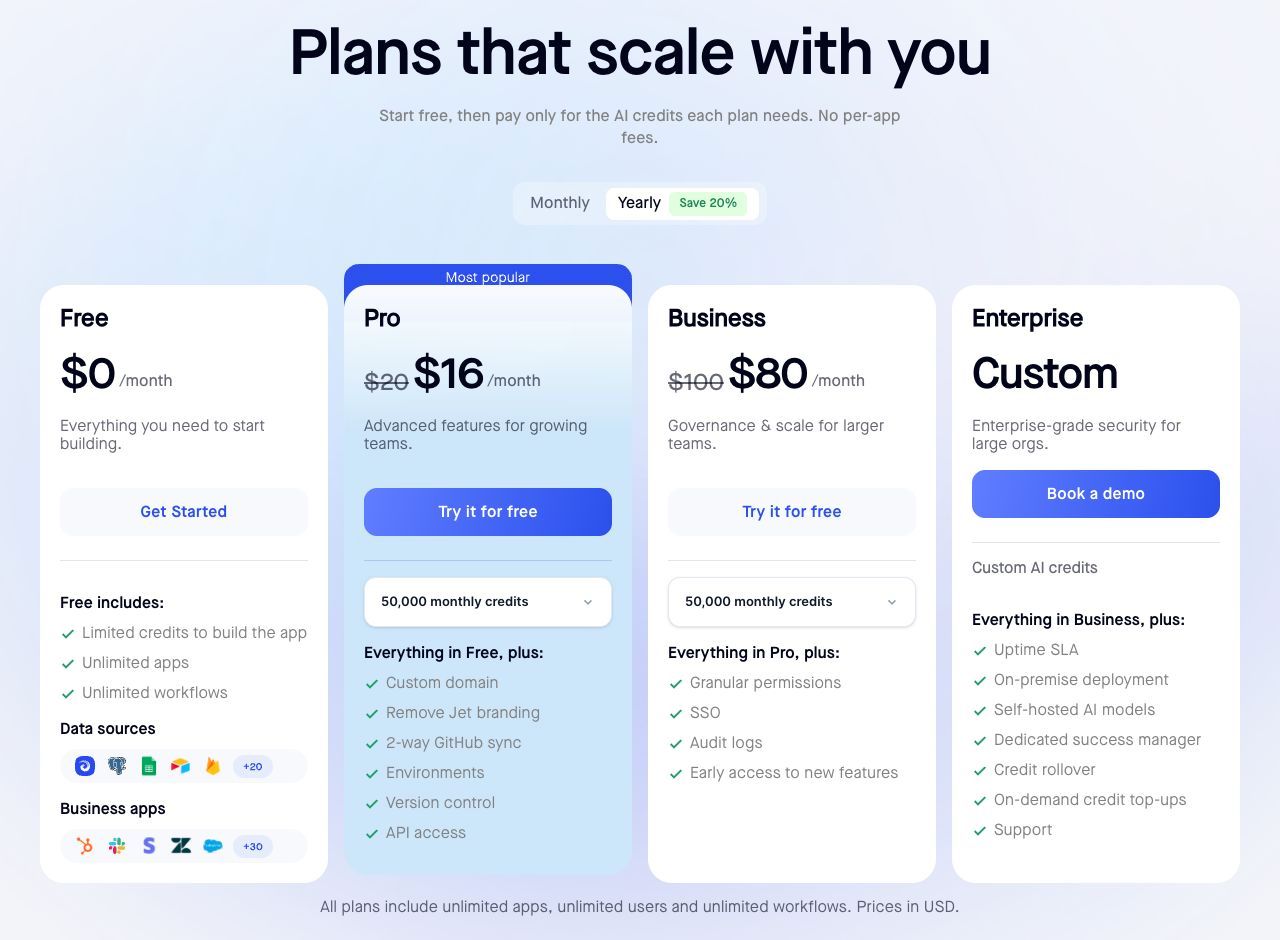
Jet Admin Pro is $20/month on monthly billing, or $192/year ($16/month equivalent); Business is $100/month or $960/year ($80/month equivalent). Business includes granular permissions, SSO, and audit logs. Check Jet Admin’s current plan gates.
For scenario 1 plus monthly Jet Admin Pro, the known subscription/resource subtotal is $6.64 + $20 = $26.64/month. If Business governance is required instead, it is $106.64. Neon remains in the bill. These examples exclude other usage and setup, and do not establish that Pro meets every workflow requirement.
Which plan should you choose?
Use Free while the real workload fits its per-project limits. Move to Launch when storage, compute, or idle behavior requires it. Choose Scale when its controls or capacity are necessary. Measure a representative week—including background jobs—before projecting a full month.
Frequently asked questions
Is Neon really free?
Yes, within the Free plan allowances. Free is not a time-limited trial; paid resources and higher requirements change the budget.
Does Neon charge per user?
The plans list unlimited organization members. Database spending is driven by resources, not a seat charge for each colleague.
Does scale-to-zero make the whole bill zero?
No. It stops compute charges while suspended; storage and other applicable charges can remain.
Is Launch a $15 monthly subscription?
No. The displayed typical-spend example is not a fixed plan fee. Calculate your usage at the published rates.
If your team needs an interface over its database, explore Jet Admin’s PostgreSQL integration and test the connection and permissions with your Neon deployment before rollout.