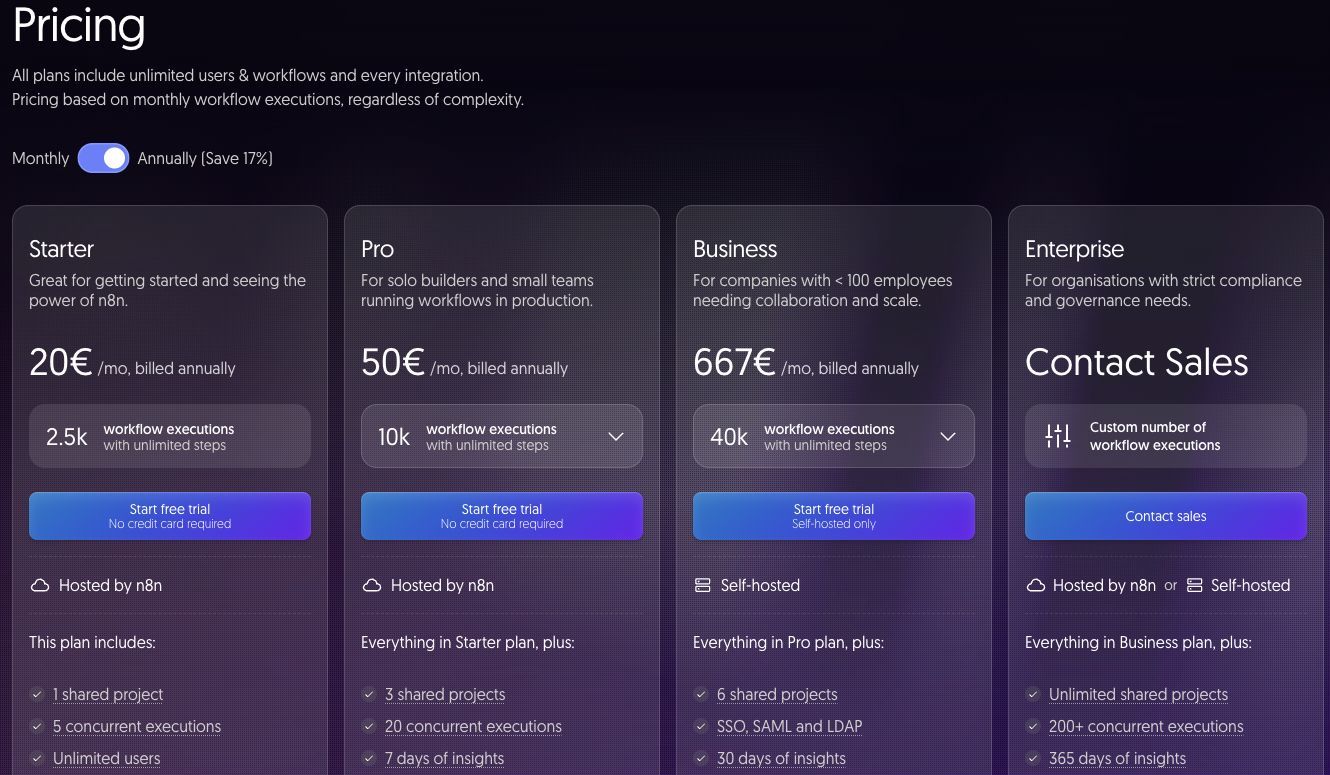
Pricing checked September 26, 2026. n8n publishes cloud prices in euros; Jet Admin comparisons are in USD and are not currency-converted. Calculations exclude taxes and negotiated discounts.
n8n Cloud starts at €20 per month for Starter or €50 for Pro on annual billing. Business is a separate self-hosted license at €667 per month billed annually; Enterprise requires a quote. A free, self-hostable Community Edition is also available. n8n pricing
The detail that separates n8n from most automation tools is what it counts. An execution is a single run of your entire workflow — it does not matter how many steps it contains or how much data it processes. A twenty-step workflow and a two-step workflow cost the same per run.
That one rule changes which workloads are cheap here and which are not. This guide works through the arithmetic, then separates cloud subscriptions from the real cost of self-hosting.
n8n pricing at a glance
| Plan | Monthly price, billed annually | Included executions | Concurrency | Key inclusions |
|---|---|---|---|---|
| Community Edition | €0, self-hosted | No vendor limit | Your infrastructure | Source-available; you run and maintain it |
| Starter | €20 | 2,500/month | 5 | 1 shared project, unlimited users, 2,300 AI credits, forum support |
| Pro | €50 | 10,000/month | 20 | 3 shared projects, admin roles, up to 13,700 AI credits, 7-day insights |
| Business | €667 | 40,000/month | Higher; confirm for your account | 6 shared projects, SSO/SAML/LDAP, Git version control, environments, 30-day insights |
| Enterprise | Not published | Custom volume | 200+ | n8n-hosted or self-hosted, unlimited projects, 365-day insights, SLA, invoice billing |
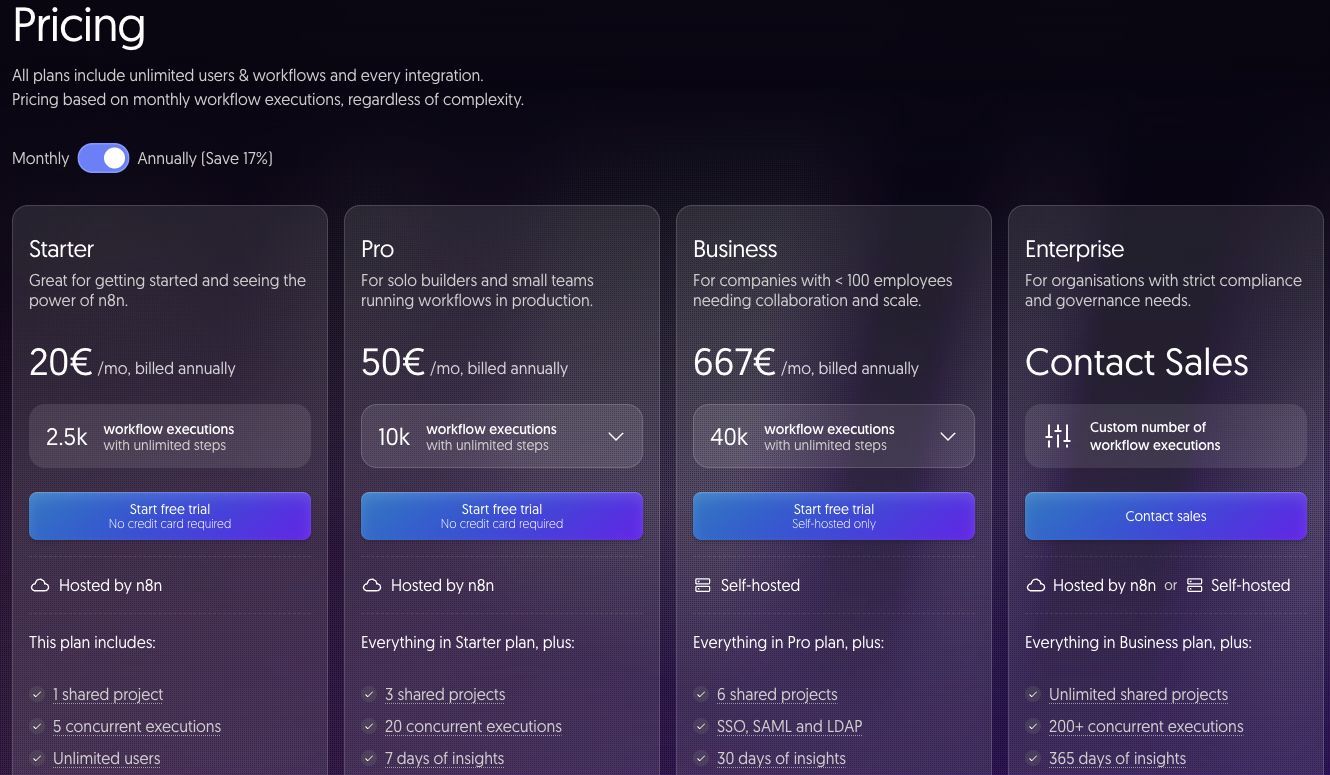
Unlimited users are included on the paid cloud plans, so adding colleagues does not change the subscription. The plan comparison lists Business as a self-hosted offering — confirm the deployment model for your account before budgeting, as it affects whether you also carry infrastructure cost. Official plan comparison
What each plan includes
Community Edition: free software, not free operation
The Community Edition is genuinely free and imposes no vendor execution limit. What it does not remove is cost: you provide the server, the database, backups, monitoring, upgrades and somebody's time when a queue backs up at 2am.
This is the right choice when you already run infrastructure competently and your workflows touch data that cannot leave your environment. It is the wrong choice if "free" is the main attraction, because the operational load lands on whoever is least able to refuse it.
Starter: 2,500 executions and a concurrency ceiling
Starter suits one team automating a handful of processes. At 2,500 executions per month you have roughly 83 runs per day to distribute.
The limit that bites first is usually concurrency, not volume. Five concurrent executions is comfortable for scheduled work spread through the day and uncomfortable for anything bursty — a webhook that fires thirty times in a minute will queue.
Pro: the volume-per-euro step change
Pro quadruples executions to 10,000 for 2.5× the price, and lifts concurrency to 20. On a per-execution basis it is the best value in the published range, which makes it the default for teams running automations in production.
It also adds admin roles and three shared projects, which matter once more than one person maintains workflows.
Business: a large jump, for governance
Business is €667 per month against Pro's €50 — a 13× increase for 4× the executions. Nobody should buy it for volume alone. What it actually sells is governance: SSO with SAML and LDAP, Git version control, separate environments and 30-day insights.
If you need environment separation and source control because workflows are business-critical, that is the case for Business. If you need executions, buy Pro and model the overage or talk to sales.
Enterprise: hosting choice and concurrency
Enterprise pricing is not published. It offers either n8n-hosted or self-hosted deployment, 200+ concurrent executions, unlimited projects, 365-day insights, an SLA and invoice billing.
Concurrency is the number to negotiate on if your load is spiky, since it — not monthly volume — determines whether bursts complete on time.
How n8n calculates your bill
One execution counts a complete workflow run rather than charging separately for each step. n8n pricing
The formula is therefore simpler than most:
Monthly executions = sum of (runs per month) for every active workflow
Additional steps do not add a separate execution fee, although runtime, memory and infrastructure limits still apply. This is the opposite of step-metered tools, and it inverts the usual optimisation advice: on n8n there is no billing reason to consolidate steps or avoid a branch. There is a strong billing reason to avoid running workflows more often than the business needs — a schedule set to every five minutes instead of every hour costs twelve times as much for identical output.
What does n8n cost for a real workflow?
These are illustrative calculations for a 30-day month using the documented execution rule, not invoices. Annual Starter costs €240 and annual Pro €600; €20 and €50 are monthly equivalents.
Example 1: three scheduled workflows plus a webhook
| Workflow | Frequency | Monthly executions |
|---|---|---|
| Hourly CRM sync | Every hour | 720 |
| Daily report build | Once daily | 30 |
| Nightly data cleanup | Once daily | 30 |
| Inbound form webhook | ~15/day | 450 |
| Total | 1,230 |
Starter at €20/month covers this with headroom, regardless of how many steps each workflow contains. Note that the hourly sync alone is 59% of consumption — the highest-frequency schedule almost always dominates.
Example 2: the same stack at higher frequency
The CRM sync moves to every 15 minutes, the cleanup runs hourly, and form volume triples:
| Workflow | Frequency | Monthly executions |
|---|---|---|
| CRM sync | Every 15 min | 2,880 |
| Daily report build | Once daily | 30 |
| Data cleanup | Hourly | 720 |
| Inbound form webhook | ~45/day | 1,350 |
| Total | 4,980 |
That exceeds Starter's 2,500 and needs Pro at €50/month. The workflows did not get more complex — only more frequent. Before upgrading, check whether the CRM sync genuinely needs a 15-minute interval; moving it back to hourly reduces usage to 2,820 executions, still above Starter's 2,500 limit. Moving cleanup back to daily as well reduces the total to 2,130, which fits Starter on volume if its other limits also fit.
Self-hosting the same workload
Community Edition removes the subscription but adds components you must price yourself: a server sized for your concurrency, a database, backups, monitoring, TLS and upgrades. A total that omits any of these is incomplete. The honest comparison is Pro's €50 against your infrastructure bill plus the hours someone spends operating it — and those hours are usually the larger number at this scale.
Add-ons and costs beyond the base plan
AI credits are included and differ by plan: 2,300 per month on Starter and up to 13,700 on Pro. Workflows calling external models may also incur charges from that provider, billed separately by them.
If you self-host, Business and Enterprise features require license keys — the software being source-available does not make the governance tier free.
Where Jet Admin fits alongside n8n
n8n is a workflow engine; Jet Admin is an application layer over your data. This is a stack comparison, not a replacement. n8n decides what happens when an event fires; it also offers forms and chat interfaces, while a dedicated record-management app may serve a different operational need.
The pairing is straightforward: n8n handles scheduled syncs, enrichment and integrations; Jet Admin gives people a place to review records, approve exceptions and act on what the automations produced.
| Consideration | n8n | Jet Admin |
|---|---|---|
| Billing unit | Executions — one per workflow run, any complexity | AI credits consumed while building |
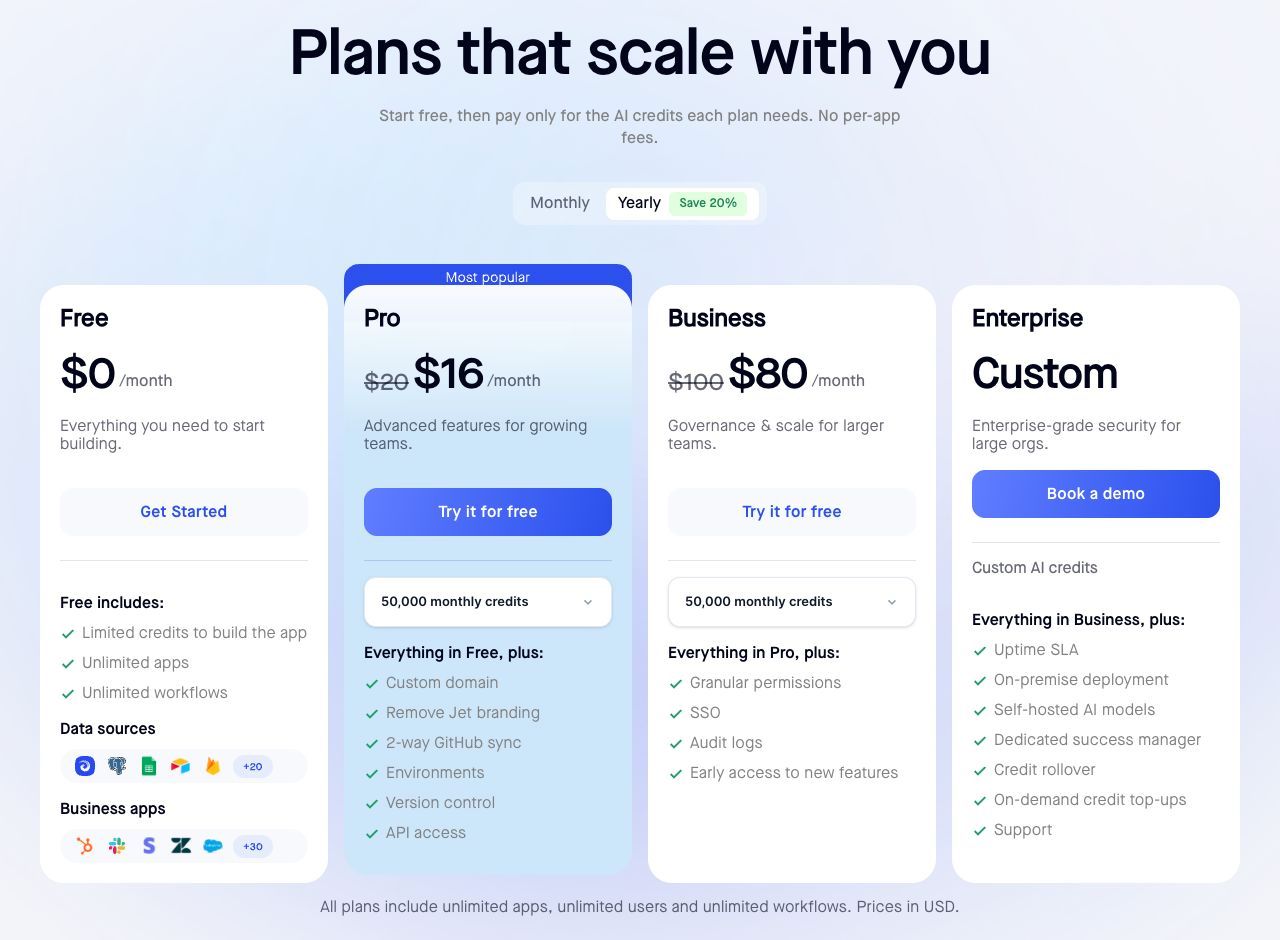
| Entry paid plan | Starter €20/month, billed annually | Pro $20/month, or $16/month annually |
| Cost of more users | Unlimited users included | Unlimited users included |
| Cost of more frequency | Rises directly with run count | Not billed per end-user action |
| SSO and audit controls | SSO/SAML/LDAP from Business (€667/month) | SSO and audit logs on Business ($100/month, $80 annually) |
| Self-hosting | Community Edition free; licensed tiers for governance | On-premise on Enterprise |
| Human-facing interface | Workflow editor, forms and chat interfaces; assess the specific review workflow | Yes — this is the product |
Sources: n8n pricing, Jet Admin pricing. Currencies are as published and not converted; annual figures are monthly equivalents.
One cost interaction is worth testing rather than assuming. Workflows whose only purpose is to copy records somewhere a human can read them are pure execution cost. If that data gets a real interface, some of those scheduled syncs stop being necessary — but verify it against your own workflow list instead of treating it as a guaranteed reduction.
When to keep n8n unchanged
If your automations are genuinely machine-to-machine, or you self-host for data-residency reasons, n8n's model is hard to beat and there is nothing to substitute. Its per-run pricing is especially favourable for complex workflows that step-metered competitors would charge heavily for.
Which plan should you choose?
Use Community Edition when you have real infrastructure capability and a data-residency requirement — not to avoid €20 a month.
Choose Starter for a first production deployment under roughly 2,500 runs per month with non-bursty traffic.
Choose Pro when you cross 2,500 executions or need more than five concurrent runs. It is the strongest value per execution in the published range.
Choose Business for SSO, Git version control and environment separation — governance, not volume. If you only need throughput, ask sales about Pro with higher limits before accepting a 13× price step.
Request an Enterprise quote for spiky load needing 200+ concurrency, or when you want n8n-hosted deployment with an SLA.
Frequently asked questions
Is n8n free?
The Community Edition is free to self-host with no vendor execution limit. Cloud plans start at €20 per month billed annually. Free software still carries hosting and maintenance costs.
How does n8n count executions?
One execution per workflow run, regardless of step count or data volume. Complexity does not increase the bill; frequency does.
Why is Business so much more than Pro?
Business is priced for governance — SSO/SAML/LDAP, Git version control, environments — rather than for its 4× execution increase. Buy it for those capabilities.
Does n8n charge per user?
No. Unlimited users are included on the paid cloud plans, which is a meaningful difference from seat-based automation tools.
How much does n8n Enterprise cost?
Not published. Request a quote covering execution volume, concurrency, deployment model and support. Negotiate on concurrency if your traffic is bursty.
Is self-hosting cheaper than Cloud?
Only if you already have the infrastructure and operational capacity. Price the server, database, backups, monitoring, upgrades and the staff time honestly before comparing against €20 or €50 a month.
Check your intervals before you upgrade
Because n8n bills per run, the cheapest optimisation is almost always a schedule review: list every active workflow, its interval and its monthly executions, and ask whether the business genuinely needs that frequency. Many teams find a tier's worth of savings in one over-eager cron.
If that list shows workflows built mainly to give someone something to look at, build that view directly on your data with Jet Admin and see which schedules you can retire.