Pricing checked September 26, 2026. USD; calculations exclude taxes and negotiated discounts.
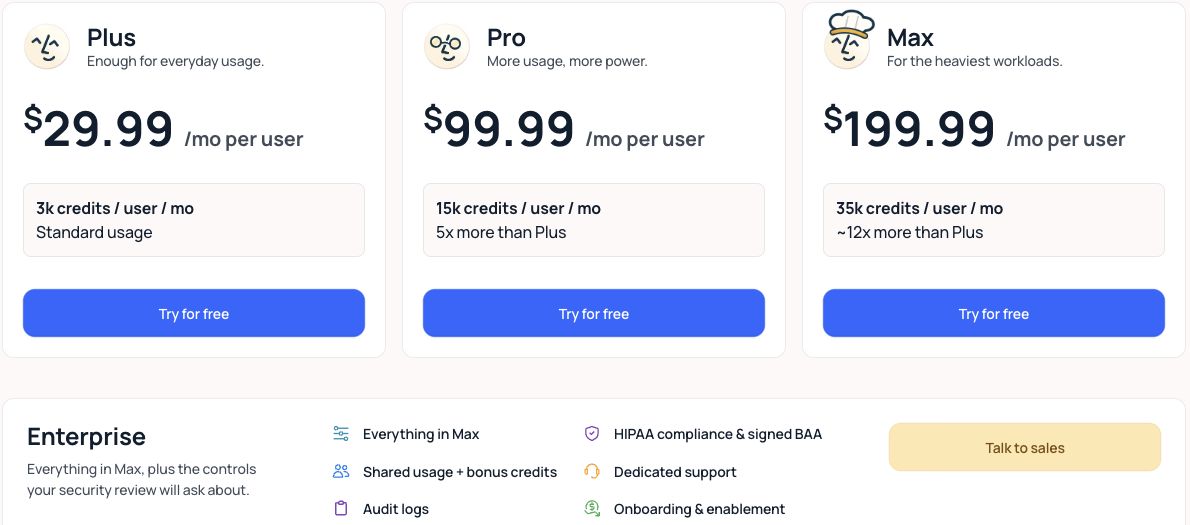
Lindy pricing is per user: $29.99 per month for Plus, $99.99 for Pro and $199.99 for Max, with Enterprise on a quote. Each seat brings a credit allowance — 3,000, 15,000 and 35,000 credits per user per month respectively — and those credits pool across the whole workspace. No permanent free plan is listed. New teammates joining through Slack get a one-time seven-day trial; direct signups are billed immediately. Lindy pricing
Two things about that structure drive the real cost. Buying a seat is really buying credits, because the allowance scales with headcount. And the tiers differ sharply in value per credit — Max costs 6.7× more per seat than Plus but delivers nearly 12× the credits.
This guide works out the per-credit rates, explains why forecasting Lindy usage is genuinely hard, and shows what happens when the pool runs dry.
Lindy pricing at a glance
| Plan | Price per user/month | Credits per user/month | Effective cost per credit | Positioned for |
|---|---|---|---|---|
| Plus | $29.99 | 3,000 | $0.0100 | "Enough for everyday usage" |
| Pro | $99.99 | 15,000 | $0.0067 | "More usage, more power" |
| Max | $199.99 | 35,000 | $0.0057 | "The heaviest workloads" |
| Enterprise | Not published | Shared usage with bonus credits | Negotiated | Compliance-bound organisations |
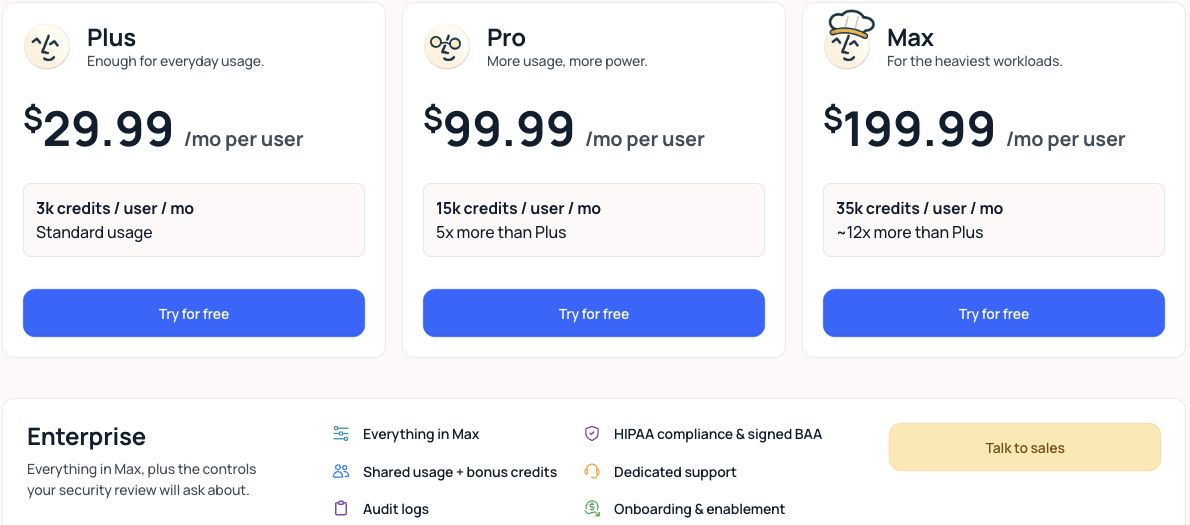
Effective cost per credit is calculated from the published seat price divided by the included allowance; Lindy does not quote it directly. On that basis Max is about 43% cheaper per credit than Plus, which inverts the usual assumption that the entry plan is the economical choice. Official plan comparison
Enterprise adds HIPAA compliance, a signed BAA, shared usage with bonus credits, audit logs and dedicated support.
What each plan includes
Plus: a genuinely small allowance
At 3,000 credits per user per month, Plus is best understood as an evaluation tier for individuals. Whether that is 12 tasks or 1,500 depends entirely on what your agents do — see the credit bands below — but for anything involving research or triage it goes quickly.
Use Plus to measure consumption on your actual workload rather than to run it.
Pro: the usual working tier
Pro's 15,000 credits per user is five times Plus for 3.3× the price, so it is both more capacity and better value per credit. For most teams running agents on real work, this is the realistic starting point.
Max: for reasoning-heavy agents
Max's 35,000 credits per user is roughly 12× Plus for 6.7× the price — the best published rate per credit. It makes sense when your agents do deep research or complex multi-step builds, where a single task can consume thousands of credits.
Enterprise: compliance and pooled bonus credits
Enterprise pricing is not published. Its distinguishing features are regulatory — HIPAA and a signed BAA — plus audit logs and shared usage with bonus credits. If you handle protected health information, this is the only tier that applies, and the compliance requirement rather than the credit volume will drive the decision.
How Lindy calculates your bill
Credits measure Lindy's work output. The published bands are wide: Lindy pricing
| Work type | Credits per task | Examples |
|---|---|---|
| Everyday tasks | 2–250 | Answers, summaries, drafting |
| Deep work | 250–1,000 | Research, triage, proposals |
| Big builds | 1,000–2,500 | Dashboards, complex workflows |
Be honest about what those ranges mean for planning: the everyday band spans a 125× spread. A forecast built on the midpoint is not a forecast. The only reliable approach is to run your real agents for a week and read the actual consumption.
The structural formula is straightforward:
Monthly credit pool = seats × per-seat allowance
Monthly consumption = Σ (tasks × credits per task) across the workspace
Credits pool across the entire workspace team, and admins can set per-seat allocations to stop one heavy user draining the shared pool. Credits refresh monthly and do not roll over.
What happens when the pool empties
Lindy pauses until the next cycle. There is no overage billing and no surprise invoice.
That is a real advantage over usage-based competitors where an agent loop can generate a large unplanned charge — but the trade is availability. Running out means your agents stop, which is a worse failure mode than a small overage if they sit in a live business process. Per-seat allocations and monitoring matter more here than on platforms that simply bill you for the excess.
What does Lindy cost for a real team?
Illustrative calculations using the published credit bands and stated assumptions. Not invoices. Your per-task consumption must be measured.
Example 1: three people, inbox triage and drafting
| Line | Plus |
|---|---|
| Seats | 3 |
| Subscription (3 × $29.99) | $89.97/month |
| Pooled credits (3 × 3,000) | 9,000 |
| 40 triage tasks at ~400 credits (deep work) | 16,000 credits |
| Outcome | Exceeds the pool — agents pause |
Forty triage tasks a month is a modest workload, and it already breaks Plus for a three-person team. This is the most common surprise with Lindy: the seat price looks approachable, and the credit allowance is what actually constrains you.
Example 2: the same team on Pro
| Line | Pro |
|---|---|
| Seats | 3 |
| Subscription (3 × $99.99) | $299.97/month |
| Pooled credits (3 × 15,000) | 45,000 |
| 40 triage tasks at ~400 credits | 16,000 credits |
| 150 drafting tasks at ~100 credits | 15,000 credits |
| Total consumption | 31,000 credits |
| Headroom | 14,000 credits |
| Monthly total | $299.97 |
Note the shape of the decision. Going from Plus to Pro costs 3.3× more but buys 5× the credits and absorbs a much larger workload. When you are credit-constrained rather than seat-constrained, upgrading the tier is better value than adding seats — and because allowances are per user, adding a seat you do not need for access is an expensive way to buy credits.
Add-ons and costs beyond the base plan
The pricing page reviewed for this guide did not publish separate charges for AI models, voice or telephony; model usage appears to be expressed through credits rather than billed separately. If your use case depends on voice or phone agents, confirm the current treatment directly with Lindy before budgeting — it was not verifiable from the published plan comparison.
Enterprise adds bonus credits on top of shared usage, which is the lever to negotiate if your consumption is steady and predictable.
Where Jet Admin fits alongside Lindy
Lindy runs AI agents and assistants; Jet Admin is an application layer over your existing data. Restricting the comparison to what both actually do: the overlap is workflows where an agent produces output a person then has to check, correct or approve.
The clearest structural difference is in how each treats people. Lindy charges per user and grants credits per user. Jet Admin includes unlimited users on every plan and bills on AI credits consumed while building. For a process where many colleagues need to see results but few need to run agents, that distinction dominates the budget.
| Consideration | Lindy | Jet Admin |
|---|---|---|
| Billing unit | Per seat, each with a credit allowance | AI credits consumed while building |
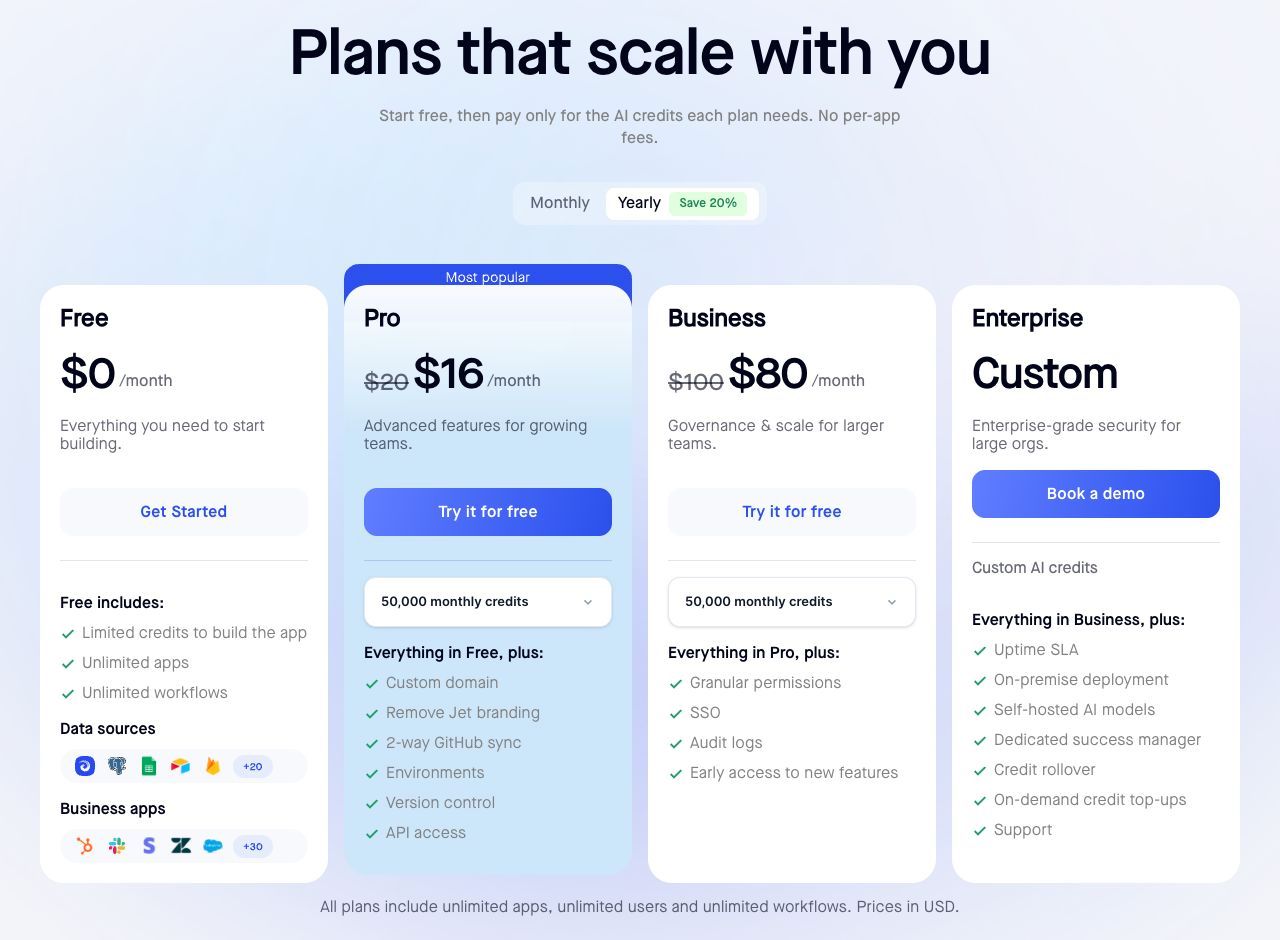
| Entry paid plan | Plus $29.99 per user/month | Pro $20/month, or $16/month annually |
| Free tier | None — one-time 7-day trial for new Slack-joining teammates; direct signup billed immediately | Free plan with limited build credits |
| Cost of 20 people needing access | 20 seats — from $599.80/month on Plus | Unlimited users included |
| Behaviour at the limit | Agents pause; no overage billing | Credit rollover on Pro and Business |
| Credit rollover | None; Enterprise negotiates bonus credits | 1-month rollover on Pro and Business |
| Audit logs and SSO | Audit logs on Enterprise | SSO and audit logs on Business ($100/month, $80 annually) |
| HIPAA and signed BAA | Enterprise | Confirm current terms with Jet Admin |
Sources: Lindy pricing, Jet Admin pricing. Annual figures are monthly equivalents. Matching plan names do not imply matching capabilities.
These are not substitutes, and the seat comparison above is a subscription comparison rather than a quote for equivalent deployments. Where they interact usefully is the review surface: if colleagues are reading agent output and making decisions, a separate review interface may avoid agent-seat costs for colleagues who do not use Lindy. Include integration, implementation and any remaining Lindy seats before claiming a saving. Test that against one workflow before assuming it.
When to keep Lindy
If the value is in the agents themselves — meeting prep, inbox triage, research assistants working on unstructured input — Lindy is doing something an application platform does not do, and there is nothing to replace. Its no-overage model is also genuinely attractive if predictable billing matters more than uninterrupted throughput.
Which plan should you choose?
If eligible as a new teammate joining through Slack, use the seven-day trial to measure credits per task. Direct signups are billed immediately. Every other decision depends on that number, and the published bands are too wide to substitute for it.
Choose Plus only for individual evaluation, or for genuinely light everyday tasks at the low end of the credit band.
Choose Pro for most real team deployments. It is better value per credit than Plus and absorbs deep-work tasks that Plus cannot.
Choose Max when agents routinely do research or complex builds. At $0.0057 per credit it is the best published rate, so if you are consistently exhausting Pro, Max is cheaper than adding seats you do not need.
Request an Enterprise quote if you need HIPAA, a BAA or audit logs — those are not available lower down at any volume.
Frequently asked questions
Does Lindy have a free plan?
No permanent free plan is listed. New teammates joining through Slack receive a one-time seven-day trial; direct signups are billed immediately. Plus is $29.99 per user/month.
How are Lindy credits consumed?
By work output: 2–250 credits for everyday tasks, 250–1,000 for deep work such as research and triage, and 1,000–2,500 for big builds. The ranges are wide, so measure rather than estimate.
Do credits pool across my team?
Yes. Allowances are granted per seat but pool across the workspace, and admins can set per-seat allocations to prevent one user draining the pool.
What happens when I run out of credits?
Lindy pauses until the next monthly cycle. There is no overage billing, so no unexpected invoice — but agents stop working, which needs monitoring if they sit in a live process.
Which plan is cheapest per credit?
Max, at about $0.0057 per credit, against $0.0067 on Pro and $0.0100 on Plus. Higher tiers are better value per credit, not worse.
How much does Lindy Enterprise cost?
Not published. Request a quote if you need HIPAA compliance, a signed BAA, audit logs or negotiated bonus credits.
Measure credits per task before you buy seats
Run your real agents through an eligible trial or a measured paid pilot, record credits consumed per task type, then multiply by monthly volume and divide by the per-seat allowance. That tells you which tier you need — and it will often show that you are buying credits, not seats.
If the count includes a lot of people who only need to read and approve what an agent produced, give them that interface instead of a seat and compare the two costs directly.