Google Forms is free to use with a personal Google account. Businesses can also use Forms through Google Workspace, whose standard US Business plans start at $7 per user per month with a one-year commitment, or $8.40 on the Flexible Plan. You pay for Workspace accounts and business capabilities, not a standalone Google Forms subscription or a fee for each response.
Checked September 25, 2026. USD unless stated otherwise. Examples exclude taxes, temporary promotions, and separately purchased services.
Google Forms pricing at a glance
| Option | Flexible monthly rate | Annual commitment | What you are buying |
|---|---|---|---|
| Personal Google account | $0 | $0 | Forms for basic surveys, quizzes, and intake |
| Workspace Business Starter | $8.40/user | $7/user/month; $84/user/year | Business accounts; 30 GB pooled storage per user |
| Workspace Business Standard | $16.80/user | $14/user/month; $168/user/year | Workspace collaboration; 2 TB pooled storage per user |
| Workspace Business Plus | $26.40/user | $22/user/month; $264/user/year | More administration and retention capabilities; 5 TB pooled storage per user |
| Workspace Enterprise | Custom quote | Custom quote | Enterprise requirements and contract |
Sources: Google Workspace plan comparison and Google billing documentation. These are standard list prices. Annual commitment does not necessarily mean an upfront annual invoice: Google supports monthly payments on annual commitments as well. Promotional discounts are excluded so the comparison does not mistake an introductory rate for the ongoing cost.
What each option includes
Free Google Forms
For a contact form, event registration, or a straightforward customer survey, start with the free option. Google describes Forms as available to anyone with a Google account. Its core workflow is to create a form, share it, and review responses or send them to a spreadsheet. The commercial question is whether you need a managed business account, not whether your first form requires a paid subscription. Google Forms product details.
Workspace Starter
Starter is the entry point when your organization needs business email and centrally managed accounts alongside Forms. Treat it as a suite purchase. If your company already licenses everyone who will own and manage the forms, adding another form does not require buying a second Forms product.
Workspace Standard and Plus
Choose Standard or Plus because the organization needs the additional storage, collaboration, or administration capabilities. A larger Workspace subscription is not documented as a way to buy a higher Google Forms response quota. Map each required capability to its edition before upgrading the entire team.
Enterprise
Request an Enterprise quote for organization-wide requirements that the Business editions do not meet. Keep the scope explicit: account count, data policies, retention, and support. A custom suite quote cannot be divided by expected form responses and presented as a vendor per-response price.
How Google calculates your bill
For a full month at a stable headcount, the basic calculation is licensed Workspace accounts × the applicable per-user rate. Form respondents do not become paid Workspace seats simply by submitting a form. On an annual commitment, reducing staff does not automatically reduce the committed license bill before renewal; Flexible billing allows the account count to change. Google explains the billing rules here.
Keep ownership and response access separate. For example, the option to limit someone to one response requires Google sign-in. That is an authentication condition, not a charge for creating a respondent license. Before inviting customers, test the published form with an external account. Google Forms sharing settings.
What does Google Forms cost for an intake workflow?
These illustrative scenarios use the same service-request workflow at two organization sizes. Assume Starter meets the business-account requirements and no paid add-ons are installed.
| Input or result | Small team | Larger team |
|---|---|---|
| Workspace accounts | 10 | 25 |
| Illustrative monthly responses | 500 | 5,000 |
| Starter, annual commitment | 10 × $7 = $70/month | 25 × $7 = $175/month |
| Full-year license commitment | $840 | $2,100 |
| Starter, Flexible Plan | 10 × $8.40 = $84/month | 25 × $8.40 = $210/month |
| Standalone Forms response charge | $0 | $0 |
The bill rises because the organization adds 15 licensed accounts, not because submissions rise from 500 to 5,000. If both teams already pay for those licenses, the incremental Forms subscription expense is $0 in both cases. For a personal-account workflow that needs none of the Workspace capabilities, the Forms subscription remains $0; labor, storage, and connected services can still create costs.
Google Forms limits are not paid response tiers
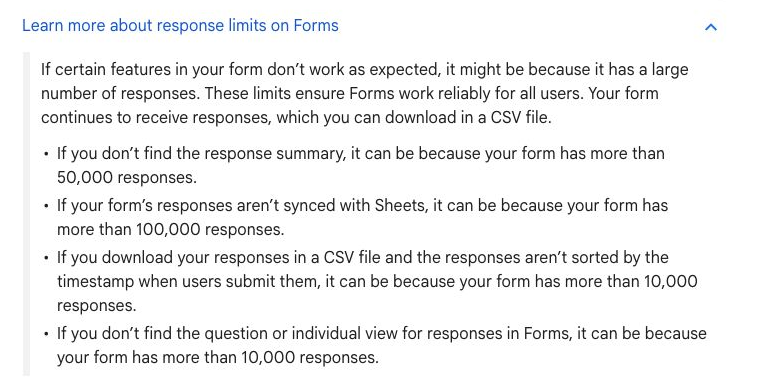
Google documents performance thresholds for large forms: question and individual response views may be unavailable above 10,000 responses; summaries may be unavailable above 50,000; and Sheets synchronization may stop above 100,000. CSV ordering can also change above 10,000. Forms can continue receiving responses, with CSV download available. These are feature thresholds, not a published monthly response allowance that an upgrade resets. Official response-limit documentation.
For a long-running intake form, plan how records leave the collection layer. Test exports, data ownership, and the downstream review process before a large campaign. File uploads and connected spreadsheets introduce their own storage and operating constraints; a response count alone is not a complete capacity estimate.
Costs beyond the free form
Budget separately for any paid form add-on, external automation platform, additional storage, and the work needed to maintain integrations. Those are not universal Google Forms charges. A payment or approval tool may have its own subscription and usage model, so confirm the specific product rather than assigning an invented Google Forms transaction fee.
Where Jet Admin fits alongside Google Forms
Google Forms handles collection. An operational app becomes useful when staff need to assign requests, update their status, search existing records, and control access to different data. In that setup, evaluate Jet Admin as the internal review interface; keep Google Forms if it already provides the intake experience you need. Validate the chosen data connection and permission rules with a working example.
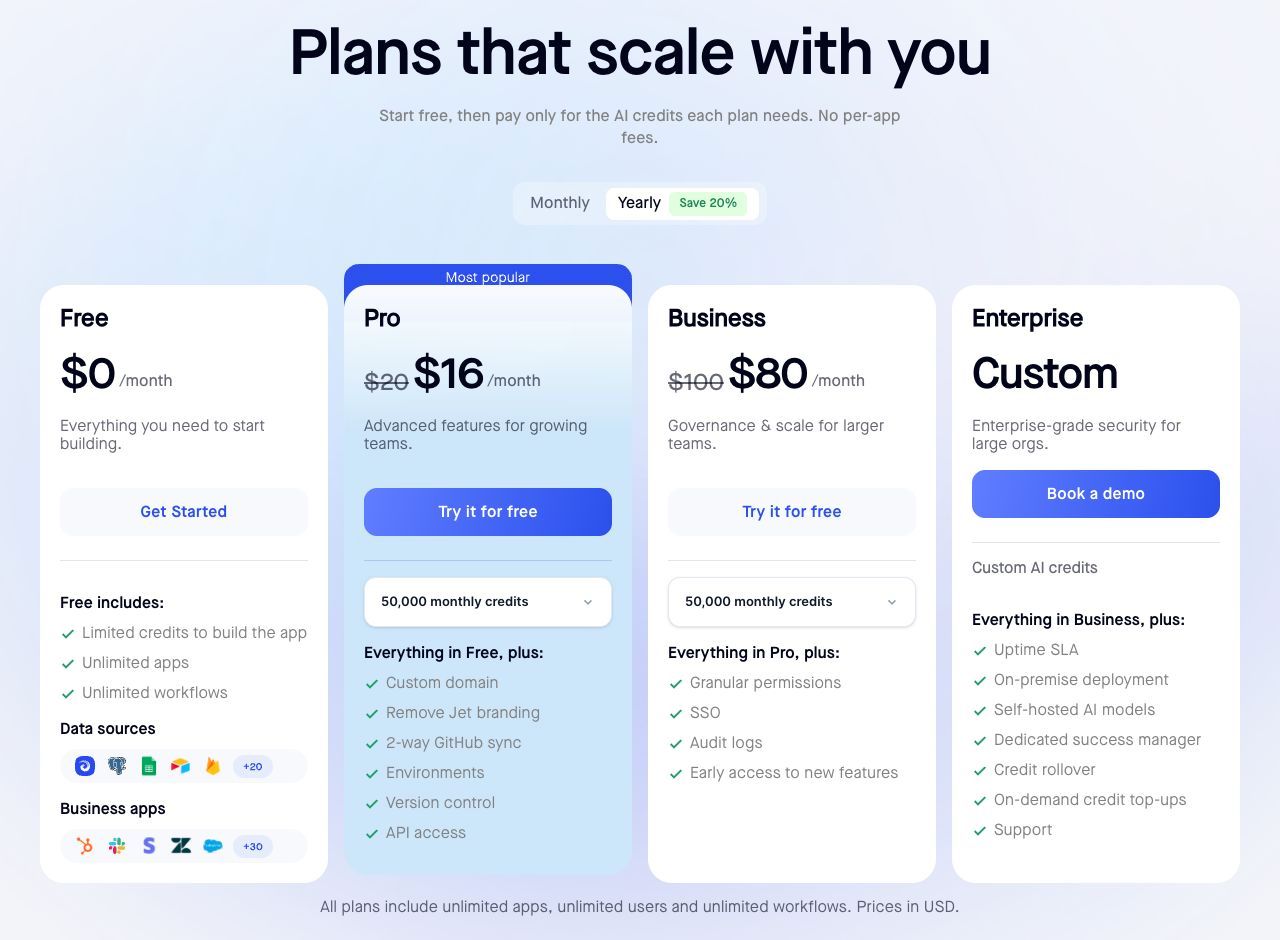
For the displayed 50,000-credit selections, Jet Admin Pro costs $20 month to month or $16 per month with annual billing ($192 a year). Business costs $100 month to month or $80 per month annually ($960 a year). Business adds granular permissions, SSO, and audit logs. All plans include unlimited users, apps, and workflows; AI building allowances and other resources still have limits. Enterprise deployment is quoted separately.
For the 10-account annual Starter scenario, adding Jet Admin Business would make the known base subscriptions $70 + $80 = $150 per month equivalent, or $1,800 a year. That is an added operational layer, not a $70 Workspace saving. Any integration expense and implementation work are additional. Stay with Forms and Sheets alone when the team can manage the process there without a separate app.
Which option should you choose?
Use free Forms for uncomplicated collection with a suitable account and sharing setup. Choose Workspace for organization-level account management and suite capabilities, then pick the edition for those needs. Add an operational interface when managing the submitted records has become the hard part. Paying for the highest Workspace edition does not by itself design that workflow.
Frequently asked questions
Is Google Forms really free?
Yes. Anyone with a Google account can use Forms. Paid Workspace plans provide a business suite and managed accounts; they are not required for every form.
Does Google Forms charge per response?
The reviewed official material does not list a standalone per-response charge. The large-response thresholds affect features, not a published response-based bill.
Do respondents need paid Workspace accounts?
Submitting a form does not itself require a paid Workspace seat. Access and sign-in requirements depend on the form settings.
Does Workspace remove the Google Forms limits?
The response-limit documentation does not promise higher thresholds for paid Workspace editions. Do not upgrade on that assumption.
Is annual billing always paid upfront?
No. An annual commitment and an annual invoice are different. Google documents monthly and yearly payment schedules for its Annual/Fixed-Term Plan.
Need a shared workspace for the requests your forms collect? Build a review app in Jet Admin and test it against your real intake workflow.