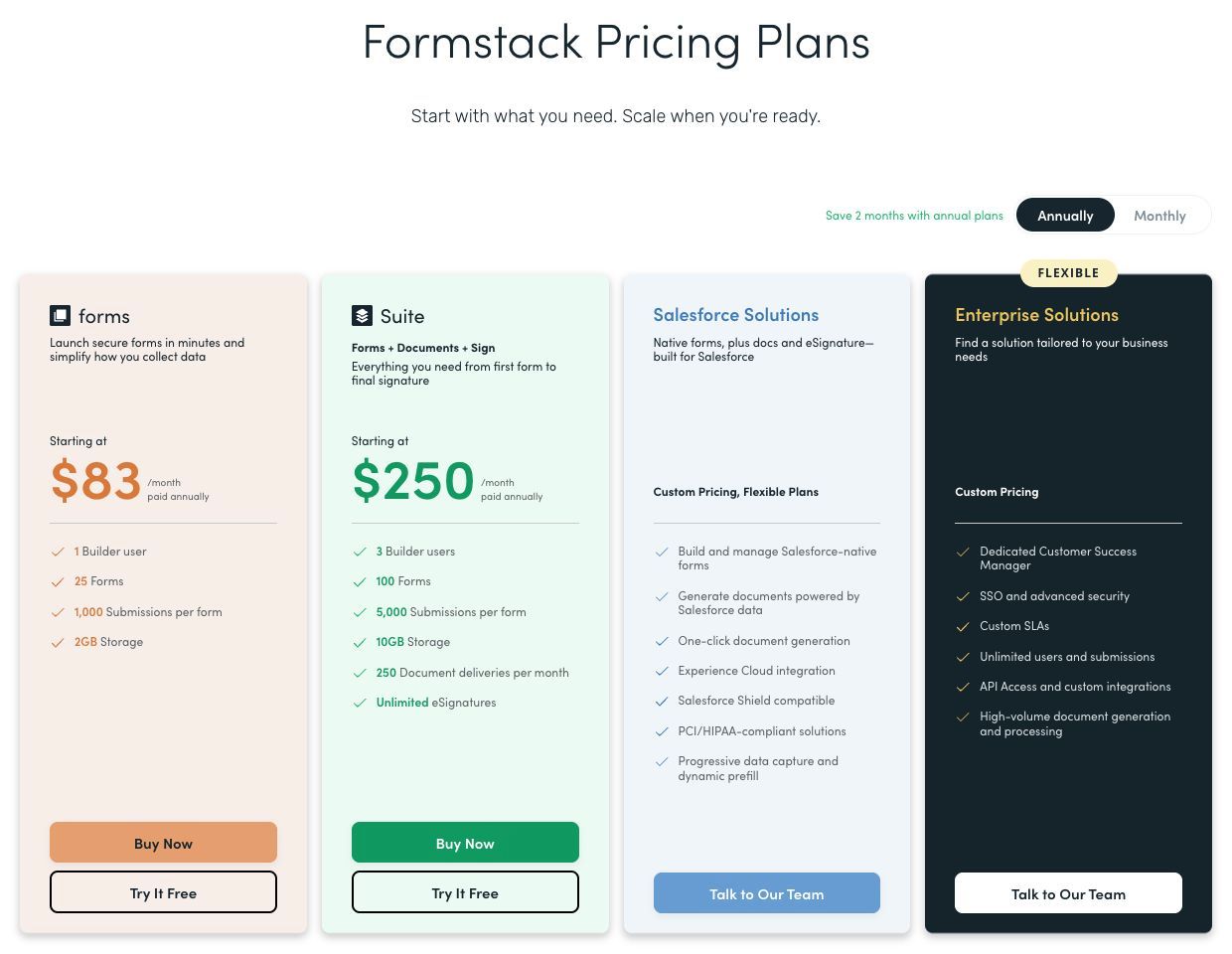
Formstack pricing starts at $99/month for Forms or $299/month for Suite on monthly billing. The annual plan cards display $83 and $250 per month respectively. Suite combines forms, document generation, and signing, so the first decision is which products the workflow actually needs.
Pricing checked September 25, 2026. US dollars; taxes excluded from illustrative calculations. Annual rates are monthly equivalents, not monthly invoices.
Formstack pricing at a glance
| Offer | Monthly billing | Annual displayed equivalent | Starting scope |
|---|---|---|---|
| Forms | $99 | From $83/month; approximately $996/year at displayed rate | 1 builder, 25 forms, 1,000 stored submissions/form, 2 GB storage |
| Suite | $299 | From $250/month; approximately $3,000/year at displayed rate | 3 builders, 100 forms, 5,000 stored submissions/form, 10 GB storage |
| Salesforce Solutions | Quote | Quote | Salesforce-native scope |
| Enterprise Solutions | Quote | Quote | Contract-specific scale, controls, and support |
The annual cards use rounded “starting at” figures; confirm the exact annual invoice at checkout. Suite also includes 250 document deliveries per month and unlimited eSignatures. Do not add separate Forms, Documents, and Sign subscriptions on top of a Suite price for the same included scope. Source: Formstack pricing.
What each offer includes
Forms: collect the data
Forms is the starting point when a single builder needs online intake without the bundled document and signing workflow. Before choosing it, list the number of active forms, retained records on the busiest form, and uploaded files. These are different constraints.
Suite: connect intake, documents, and signatures
Suite is relevant when submissions need to become documents and move through a signature process. Its three builders and higher form limits may help a broader team, but document delivery volume needs its own estimate. One completed business case may require more than one delivery.
Salesforce and Enterprise: define the contract scope
Salesforce Solutions are a distinct native offering; Enterprise is tailored to broader requirements. Do not use the Forms starting price as an estimate for either. Specify the systems, users, data handling, and support required before comparing quotes.
How Formstack calculates your bill
Total recurring cost = selected product or bundle + purchased capacity and add-ons. Project implementation and third-party services are separate. Add each purchased component once.
An important distinction: Formstack’s help center describes submission capacity as records stored on each form at a given moment, not a monthly response allowance. Exporting and deleting records can free capacity. The pricing page separately labels document deliveries per month. Source: how submissions are counted.
Plan retention deliberately. A form collecting 300 submissions every month can eventually exceed a 1,000-record storage limit even though no month looks busy. Exporting data is not sufficient by itself to prove it has been safely retained elsewhere; verify the destination, access, and restoration process before removing records.
What does Formstack cost for an onboarding workflow?
These examples use standard monthly starting prices and stay within the stated allowances. They exclude paid compliance add-ons, extra capacity, taxes, and implementation. Neither is a guarantee for a customized contract.
Scenario 1: collect applications for manual review
| Input | Assumption | Cost |
|---|---|---|
| Builders and forms | 1 builder; 10 forms | Within Forms scope |
| Retained submissions | No more than 800 on any form | Within 1,000/form |
| Uploaded files | 1 GB total | Within 2 GB |
| Documents and signing | Not required | No Suite assumed |
| Known subscription | Forms, monthly billing | $99/month |
Twelve monthly payments total $1,188. The displayed annual rate implies approximately $996, but use the final checkout amount for a committed annual budget.
Scenario 2: generate and sign onboarding documents
| Input | Assumption | Cost |
|---|---|---|
| Builders and forms | 3 builders; 40 forms | Within Suite scope |
| Retained submissions | No more than 4,000 on any form | Within 5,000/form |
| Uploaded files | 8 GB total | Within 10 GB |
| Document deliveries | 200/month | Within 250/month |
| Known subscription | Suite, monthly billing | $299/month |
Twelve monthly payments total $3,588. The displayed annual equivalent implies approximately $3,000. If onboarding requires 400 document deliveries, this example no longer fits; obtain an additional-capacity price. Do not divide the subscription by the included deliveries and assume that is an overage rate.
Add-ons and costs beyond the base plan
The pricing page offers additional users, submissions, and merges, but does not provide a universal public price for every expansion. Get an itemized quote for the actual additions. The comparison also marks compliance capabilities as add-ons on standard offers, so a basic subscription should not be treated as an all-inclusive regulated deployment. Current plan comparison.
Separately budget field mapping, document template work, signature routing, testing, and training. These are implementation tasks, not automatic vendor invoice lines. Existing Salesforce and other connected-system licenses remain part of the overall stack.
Where Jet Admin fits in a Formstack workflow
Keep Formstack when document generation and signing are central. Jet Admin can serve an operational interface over connected records: staff might investigate exceptions, track case status, and make controlled updates. It should not be assumed to replace the document or eSignature service.
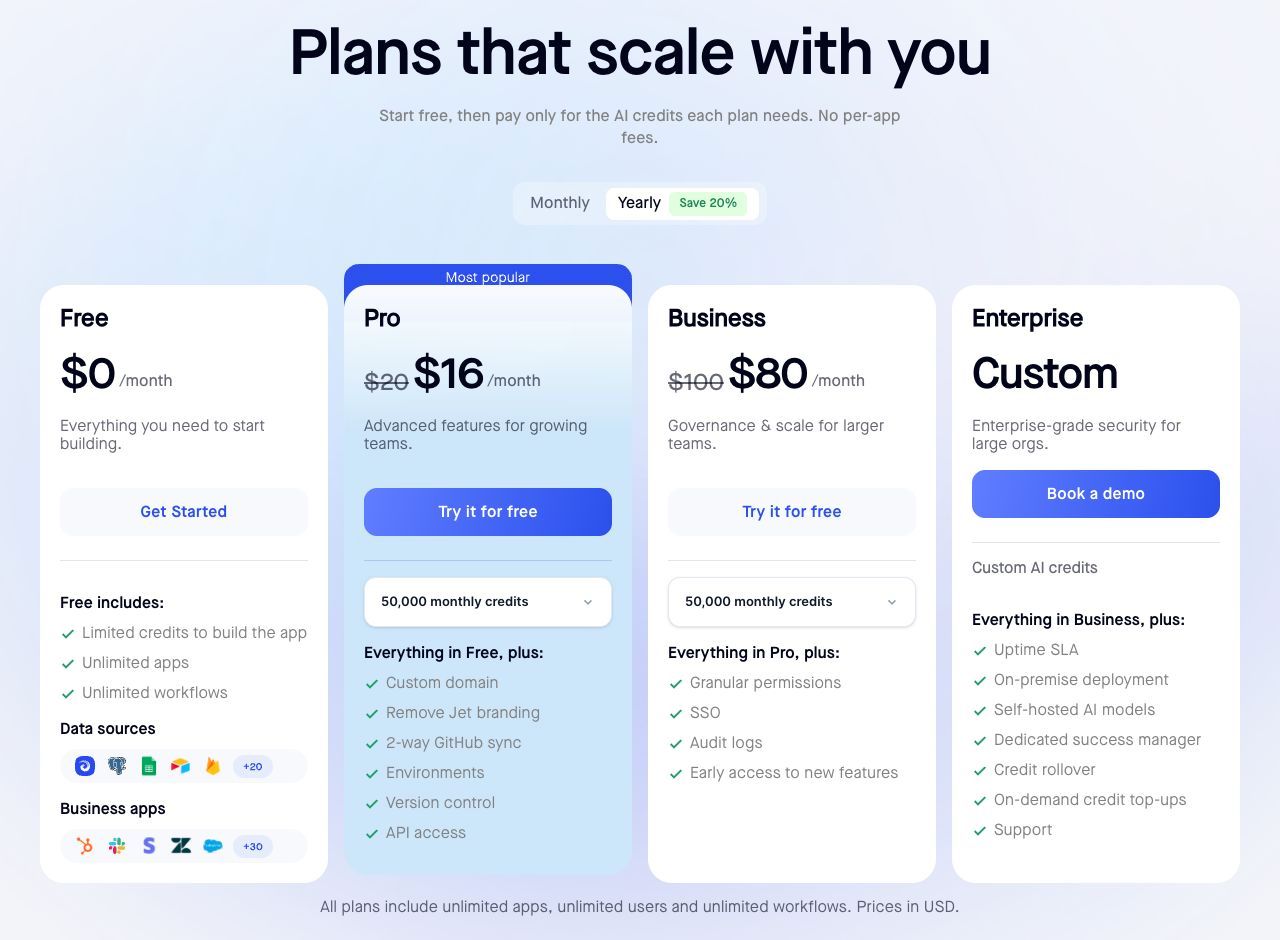
Jet Admin Business costs $100/month or $960/year and includes granular permissions, SSO, and audit logs. Adding it to monthly Suite gives a known subscription subtotal of $399/month, before integration work and other usage. Choose the additional app only if it solves a distinct operational need. Jet Admin pricing.
Which offer should you choose?
Choose Forms for a qualifying intake-only process. Evaluate Suite when documents, signatures, or its broader workflow scope are needed. Request Salesforce or Enterprise pricing for those specific requirements. Use retained submissions and document deliveries as separate sizing inputs.
Frequently asked questions
Does Formstack have a permanent free plan?
The current pricing page offers a 14-day Forms trial without a credit card, rather than advertising a permanent free Forms plan.
Are the listed submissions a monthly allowance?
The help center describes them as stored submissions per form. Document deliveries have a separate monthly allowance.
Should I add Forms pricing to Suite pricing?
Not for the Forms scope already included in Suite. Count the bundle once, then add only genuine extras.
What happens when stored submissions exceed the limit?
The help center says subsequent submissions are emailed instead of stored and integrations continue. Do not rely on that fallback as your normal retention strategy.
If your document workflow also needs a case-management interface, review Jet Admin’s app plans against that specific operational scope.