
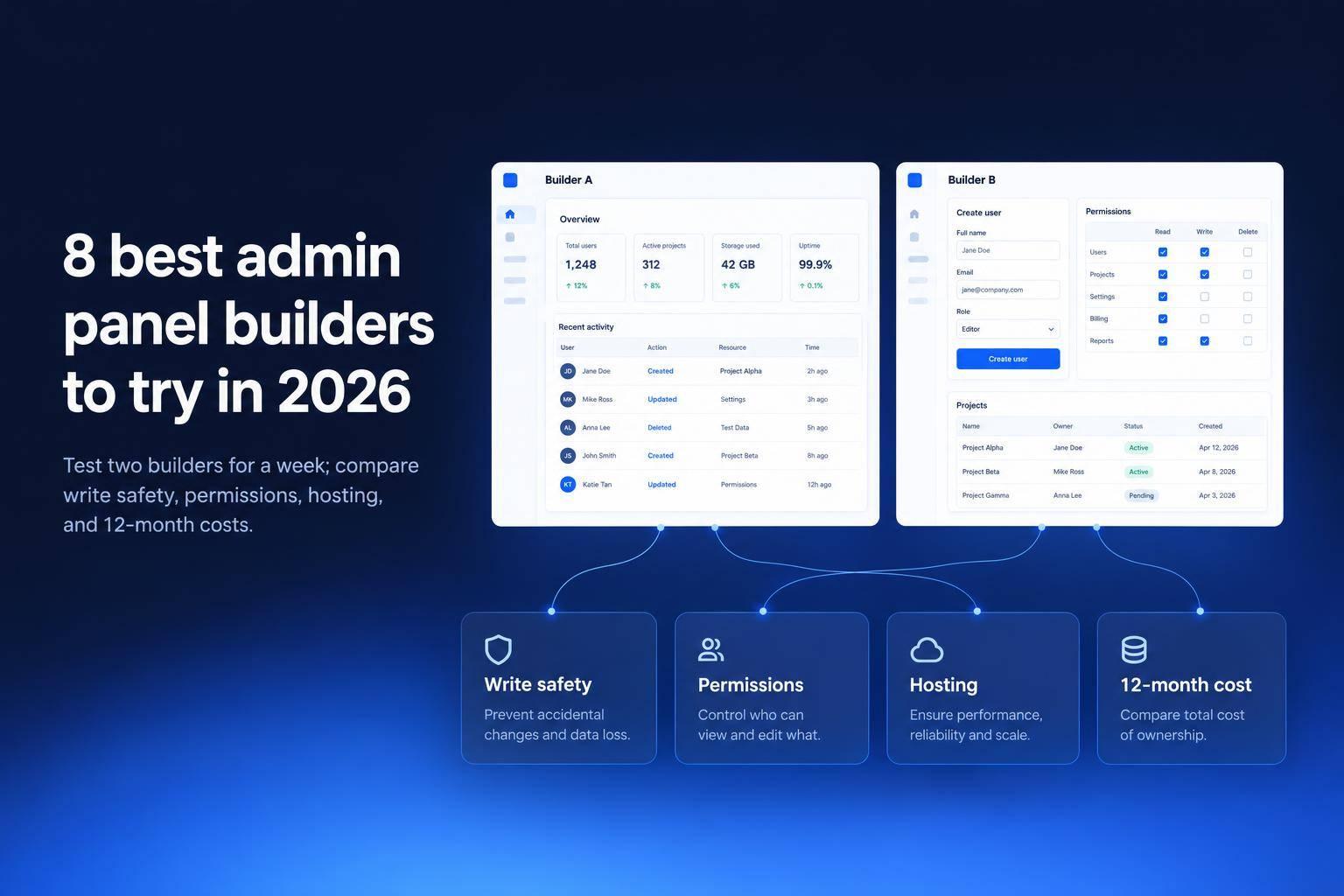
I’d choose an admin panel builder by testing one job first: can it safely update your data? Start with your database or API, check permissions, then compare the 12-month cost of licenses, hosting, and maintenance - not just the starting price.
I compare eight options below, from tools for simple CRUD screens to builders for custom interfaces and approval workflows.
Quick Comparison
| Builder | Best fit | Hosting | Main cost check |
|---|---|---|---|
| Jet Admin | Fast CRUD apps with access controls | Cloud, self-hosted, on-premises | Confirm features and licensing in your quote |
| Retool | Developer-led apps with custom logic | Cloud; Enterprise self-hosting | Count builder and end-user seats |
| Appsmith | Code-based customization with a free self-hosted edition | Cloud, self-hosted | Check edition limits and billing model |
| ToolJet | Open-source apps with code extensions | Cloud, self-hosted | Check paid features and maintenance costs |
| Budibase | CRUD screens and approval workflows | Cloud, self-hosted | Count creator and app-user seats |
| Forest Admin | Database-generated admin screens | Hosted UI with a customer-run agent | Include user fees and agent upkeep |
| Directus | SQL data management and APIs | Cloud, self-hosted | Check license eligibility and hosting costs |
| DronaHQ | Workflow-driven apps with mobile needs | Cloud, self-hosted, on-premises | Compare user-based and usage-based plans |
My next step: pilot two builders on your two most-used workflows for one week. Test writes, deletes, and restricted fields, then check <u>where permissions are enforced</u> and who handles backups and updates.
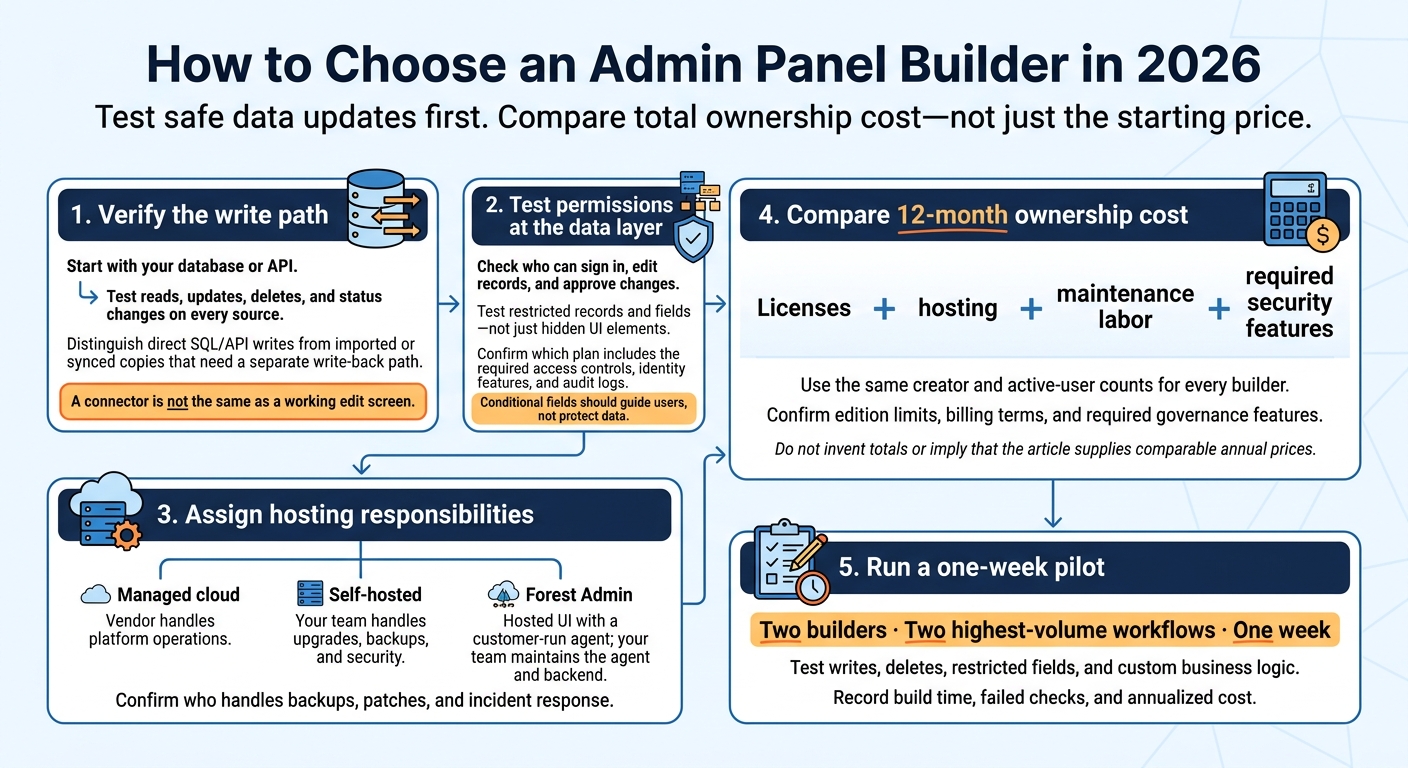
How to Choose an Admin Panel Builder in 2026
1. Jet Admin
Data integrations and interface control
Jet Admin suits teams that need broad database access and fast CRUD apps. Its AI-powered app builder includes CRM and inventory templates for managing customer records, inventory edits, and admin workflows.
Templates, inline spreadsheet-style editing, branded themes, and secure server-side functions help cut setup time. 200+ integrations connect it to PostgreSQL, MySQL, MongoDB, and other data sources, with read and write access, native SQL, and automatic backend generation.
Access controls and deployment
Jet Admin documents role-based access control, SSO/SAML, audit logs, and built-in authentication. Deployment options include managed cloud, self-hosting in AWS, Google Cloud, or Azure, and on-premises hosting with air-gapped support.
Before comparing quotes, confirm which controls your plan includes. Also check where app data and AI prompts are processed, plus who handles backups, patches, and incident response.
Pricing, licensing, and trade-offs
Contact sales for cloud, self-hosted, and on-premises pricing. Ask for a written quote that covers builder and user licensing, AI usage limits, integrations, support, and renewal terms. For self-managed deployments, budget separately for infrastructure and maintenance.
Before signing, test a working prototype against a nonproduction data source. Check permissions, write operations, and custom business logic.
sbb-itb-8346adb
2. Retool
Data integrations and interface control
Retool suits developer-led admin apps, with 100+ UI components such as tables, forms, and buttons. Complex queries and business logic require SQL and JavaScript.
Building a PHP admin panel or a large, CRUD-heavy app for customer records or inventory? Test query speed early. Debugging and memory use can become problems as the app grows. That flexibility also brings more governance and hosting requirements.
Access controls and deployment
Granular RBAC, SSO/SAML, and audit logs are available on Business and Enterprise tiers. With Cloud, Retool handles infrastructure and updates.
Self-hosting with Docker or Kubernetes typically requires an Enterprise contract. Your team then takes responsibility for host maintenance, secrets, updates, and network rules.
Pricing, licensing, and trade-offs
Deployment choices affect both cost and ownership. The subscription price matters less than the engineering time needed to keep custom apps maintainable.
The Free plan supports up to 5 users with limited features. Standard Users build and edit apps; End Users use them. Business pricing is approximately $50 per standard user and $15 per end user per month.
Budget for engineering ownership, too: custom SQL and JavaScript make handoffs harder, and self-hosting still depends on Retool’s runtime.
3. Appsmith
Data integrations and interface control
Appsmith helps teams build admin panels on existing databases and APIs, including CRUD dashboards for customer orders, inventory, and project tracking. It connects to PostgreSQL, MongoDB, DynamoDB, and REST/GraphQL APIs through a visual interface and a dedicated API connection toolkit.
More customization means more setup. Appsmith has a steeper learning curve and fewer pre-built templates, so budget time to get your production-ready business apps ready.
Access controls and deployment
Community Edition includes basic role-based access and Google/GitHub authentication. Business adds granular roles and Git versioning, while Enterprise adds SAML, SCIM, and audit logs. Check which edition meets your access requirements before you start building.
Appsmith supports cloud, self-hosted, and enterprise air-gapped deployments. Self-hosting runs on Docker or Kubernetes. Before going into production, assign responsibility for security updates, backups, and monitoring.
Pricing, licensing, and trade-offs
Appsmith offers a free self-hosted Community Edition. Business costs about $15/user/month, and Enterprise costs about $2,500/month for 100 users. A cloud plan starts at $40/month for 100 hours, plus $0.40 per additional hour.
Confirm the licensing model, then weigh subscription costs against the time needed for setup and maintenance.
The next builders offer a different balance of control, setup time, and maintenance.
4. ToolJet
Data integrations and interface control
ToolJet gives teams open-source flexibility and more room to extend apps with code than purely visual builders. It works well for admin panels that manage records, inventory, or operations data and need custom logic.
Its visual editor supports code extensions and 80+ data connections across SQL, NoSQL, REST, GraphQL, and SaaS apps. You also get 82+ UI components, including tables, Kanban boards, charts, and a QR scanner.
Access controls and deployment
ToolJet supports role-based access control. SSO, audit logs, and Git integration require Enterprise. Before choosing an edition, check which permission controls it includes.
The free/open-source edition supports self-hosting through Docker or Kubernetes. Enterprise offers cloud or self-hosted deployment. With self-hosting, your team handles infrastructure, updates, and security maintenance.
Pricing, licensing, and trade-offs
Available sources confirm a free/open-source edition, but they don’t verify 2026 paid pricing or full licensing terms. Request current pricing, and check user limits and feature restrictions.
Open-source control and custom logic come with responsibility for in-house infrastructure if you self-host. Next, compare how Budibase handles simpler CRUD apps with less setup.
5. Budibase
Data integrations and interface control
Budibase works well for CRUD apps and approval workflows. It connects to PostgreSQL, MySQL, SQL Server, MongoDB, CouchDB, Supabase, Firebase, Google Sheets, Airtable, and REST APIs. External connections can generate CRUD screens from existing schemas, while BudibaseDB provides built-in storage if you need it.
The editor includes 40+ components for forms, tables, and approval screens. You can extend standard behavior with if/then logic, custom JavaScript actions, and 20+ automation triggers and actions. More advanced changes can take extra work, so test validation rules and approval logic early.
Access controls and deployment
Budibase provides basic role-based access control. Paid tiers add SSO, user groups, and audit logs, while Enterprise adds Active Directory/SCIM.
Choose managed cloud hosting or self-host through Docker or Kubernetes. Self-hosting cuts license costs, but your team handles upgrades, backups, and security patches.
Pricing, licensing, and trade-offs
Budibase offers a free self-hosted edition under the GPLv3 license with unlimited users, though it leaves out some paid governance features. Paid cloud pricing is reported to start at around $60 per creator plus $6 per app user per month.
Treat that cloud price as an estimate. Before choosing a plan, calculate costs based on creator seats, end users, and workflow volume. Next, compare Budibase with a more database-first option.
6. Forest Admin
Data integrations and interface control
Forest Admin takes a more opinionated approach to building an admin layer from an existing database schema. It automatically generates CRUD screens, search, and dashboards, making it a fit for teams managing customer records, inventory, or other business data. You get a fast start, but your team still needs to maintain an agent.
Customization stays tied to the database schema, and lower tiers limit advanced actions. Test any specific relationships or actions your workflow needs before committing.
Access controls and deployment
Forest Admin pairs a hosted UI with a locally operated agent. Developers handle the initial setup and agent maintenance, while Forest Admin hosts the interface. Built-in RBAC, audit logs, and approval workflows help your team control access to sensitive data.
Pricing, licensing, and trade-offs
Reported pricing is around $60 per user per month, with 20% off annual billing. Forest Admin is fast to launch, though agent upkeep and schema limits remain part of the deal. It suits teams that prioritize fast database-backed admin screens over deep UI control.
7. Directus
Data integrations and interface control
Directus gives teams a database-first admin layer with REST/GraphQL APIs. It suits teams that prefer schema-driven structure over highly custom UI design.
It connects to existing SQL databases, including PostgreSQL, MySQL, and SQL Server, and uses their schemas to build an admin interface for managing relational customer or inventory data. When basic record editing isn't enough, you can add custom interfaces and extensions.
Access controls and deployment
Directus offers granular permissions. You can self-host it or use Directus Cloud.
Pricing, licensing, and trade-offs
Directus is source-available, with commercial license limits for larger organizations. It's best suited to SQL-backed administration and API management. Custom screens for day-to-day workflows take more development work.
The next builder moves beyond database-first admin work into more general enterprise app building.
8. DronaHQ
DronaHQ moves beyond database-first admin panels to business apps built around workflows.
Data integrations and interface control
Connect your existing data sources through PostgreSQL, MySQL, MongoDB, REST, GraphQL, and gRPC connectors. Build interfaces with 150+ drag-and-drop UI controls, then use visual workflows, spreadsheet formulas, or JavaScript to handle business rules.
It works well for inventory approvals and other process-driven admin tasks.
Access controls and deployment
Deploy in the cloud, self-host, or run on-premises - including behind a firewall. Role-based permissions manage access, while SSO, audit logs, and custom branding require Business or higher.
Pricing, licensing, and trade-offs
DronaHQ offers user-based, usage-based, and developer-only pricing. Cloud user-based plans start at $12 per user per month. Developer-only pricing supports unlimited end users.
There’s no permanent free tier. A 30-day Business trial lets you test advanced logic and branding.
The next sections compare data sources, permissions, hosting, and total cost.
Data Connections and Interface Customization
A connector is not the same as a working edit screen. What matters is whether the tool can safely write changes back - not just read data.
Separate direct writes from synced copies. Direct queries or API writes update the source system. Imported data needs a separate write-back or sync path. Budibase offers a built-in database and external connections, so check where each screen saves its changes. For spreadsheets and SaaS sources, test reads, updates, and deletes.
The write path matters more than the connector count. These four builders take different approaches to reading, editing, and syncing admin app data.
| Builder | Write pattern and trade-off |
|---|---|
| Retool | Direct SQL/API access supports complex validation and approvals, but that logic adds maintenance. |
| Appsmith | Database/API access uses server-side query execution; custom logic becomes harder to maintain. |
| Budibase | Uses built-in storage or external sources; check write support before building edit screens. |
| DronaHQ | Direct/API-first access; advanced features need more configuration. |
Test writes, deletes, and status changes on every source. Conditional fields should guide users, not protect data.
Next, compare access controls, hosting, and maintenance responsibilities.
Permissions, Hosting, and Maintenance
Once you’ve confirmed write access, check who can sign in, edit records, and approve changes. SSO centralizes login, while SCIM automates provisioning. Neither guarantees record- or field-level restrictions. Check that restrictions apply to the data - not just the UI, especially for sensitive customer fields and inventory edits.
| Builder | Access controls | Enterprise identity | Audit logs | Confirmed deployment options | Limits and maintenance burden |
|---|---|---|---|---|---|
| Jet Admin | Row- and field-level controls | SSO/SAML: Business+; SCIM: Enterprise | Business+ | Cloud, private cloud, on-premises, air-gapped | Vendor manages cloud hosting; your team manages self-hosting. Confirm licensing. |
| Retool | Advanced RBAC | SSO/SAML/SCIM: Enterprise | Enterprise | Cloud; self-hosted on Enterprise | Listed governance features and self-hosting require Enterprise. |
| Appsmith | RBAC | SAML/SCIM: Enterprise | Business+ | Cloud; self-hosted with Docker | Governance features require a paid plan; your team manages self-hosting. |
| ToolJet | RBAC | SSO/SAML | Available | Cloud, self-hosted | Confirm tiers and licensing; your team manages self-hosting. |
| Budibase | App- and page-level controls | SSO: Business+; SCIM: Enterprise | Business+ | Cloud; self-hosted with Docker or Kubernetes | Governance features require a paid plan; your team manages self-hosting. |
| Forest Admin | Record-level controls | SSO/SAML | Available | Hosted UI with a customer-run backend agent | Your team manages the agent and backend. |
| Directus | Row- and field-level controls | SSO/SAML | Available | Cloud, self-hosted | Confirm license eligibility and tiers; your team manages self-hosting. |
| DronaHQ | Granular RBAC | SSO/SAML | Available | Cloud, self-hosted | Confirm tiers and licensing; your team manages self-hosting. |
Cloud hosting puts the vendor in charge of platform operations. With self-hosting, your team handles upgrades, backups, and security. Those governance and hosting choices affect total cost, which the next section breaks down.
Pricing, Trade-offs, and How to Choose
Once you’ve compared features, permissions, and hosting, total cost is the final filter.
| Builder | USD price reference | Trade-off |
|---|---|---|
| Jet Admin | Contact sales for all deployments. | Confirm that the quote includes your required governance features. |
| Retool | References list builder seats at $10–$12/month and end-user seats at $5–$6/month. | Your seat mix affects the total cost. |
| Appsmith | One reference lists $0.40/hour after 100 free hours. | Check edition eligibility and how hours are counted. |
| ToolJet | Free self-hosted edition. | Budget for maintenance and check edition limits. |
| Budibase | About $50–$60 per creator/month plus $5–$6 per app user/month. | Both seat types affect paid-plan costs. |
| Forest Admin | Quote required. | Include agent maintenance in your budget. |
| Directus | Quote required. | Check license eligibility and hosting costs. |
| DronaHQ | References start at $10–$12 per user/month. | Check usage caps and billing terms. |
Compare 12-month ownership cost, not just subscription prices. Include licenses, hosting, maintenance labor, and required security features. Use the same creator and active-user counts for each builder.
Match your budget to your buying priority:
| Priority | Pilot shortlist | Main check |
|---|---|---|
| Fast CRUD | Budibase, Jet Admin | Reliable write access with minimal setup |
| Interface customization | Retool, Appsmith | SQL/JavaScript effort and maintenance over time |
| Access governance | Jet Admin | Required controls included in the quoted plan |
| Free self-hosting | Appsmith, ToolJet, Budibase | Edition limits and deployment burden |
| SQL data administration | Directus | Schema fit, write access, and license eligibility |
Run a one-week pilot on your two highest-volume workflows. Record build time, failed checks, and annualized cost.
FAQs
How can I prevent accidental data loss?
Use the platform’s governance and security controls to set role-based permissions at the row, column, and action levels. This limits users to the data and actions their roles allow. Track changes with audit trails and activity logs, and enable version rollback or backups to recover from errors.
Choose a deployment model - cloud, self-hosted, or air-gapped - that meets your internal security and data residency requirements.
How should I handle simultaneous record edits?
Use role-based access control to set who can view or change specific data. The platform’s audit logs let you track changes and see who edited each record. Set up approval workflows so designated managers review and validate edits before those changes reach your database, helping protect data integrity when multiple users work with the same datasets.
Can I migrate my admin panel later?
Yes, but plan to rebuild your applications - not just export and import them. Your underlying data model stays consistent, but you’ll typically need to recreate dashboards, custom UI components, workflows, permissions, and business logic.
Before you move, inventory your existing apps and data sources, test migrations for complex features, and plan a phased transition with both platforms running in parallel.