
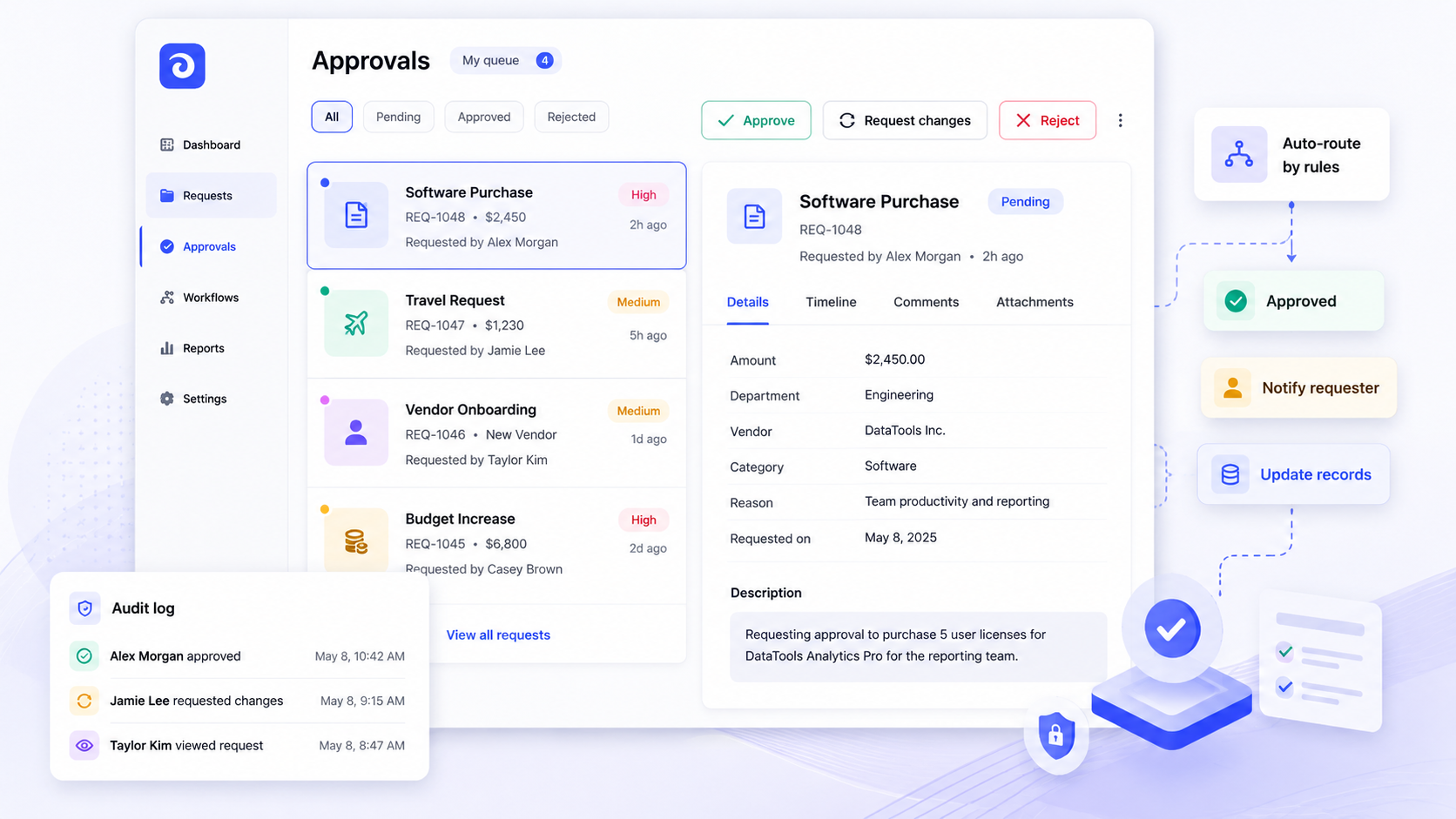
Approval workflow software replaces manual approval methods with structured, automated processes that route requests, enforce rules, and log every decision. If your team still runs approvals through email threads, chat messages, or shared spreadsheets, this page will help you evaluate whether a purpose-built approval workflow solution fits your stack and your operations.
Key Takeaways
- Modern approval workflow software automates request intake, conditional routing, notifications, and audit trails while running directly on existing data sources-databases, APIs, and SaaS tools-without forcing a data migration.
- Jet Admin lets teams build secure, custom approval workflows on top of their current stack, combining workflow automation, role-based permissions, and connected data in a single interface.
- Measurable outcomes from end-to-end approval workflows include reduced cycle time, improved SLA adherence, fewer errors from minimizing human mistakes, and stronger compliance reporting.
- Approval workflow software reduces approval turnaround time significantly and generates detailed audit trails for every decision, so leaders always know where a request stands.
What is approval workflow software?
Approval workflow software is a category of tools designed to orchestrate how requests, documents, transactions, or changes get formally reviewed and authorized before moving forward. Common use cases include invoice approvals, purchase orders, and employee onboarding, but the pattern extends to refund approvals, data-access requests, contract sign-offs, and more.
At its core, the software replaces a manual process-someone emailing a PDF, pinging a manager in Slack, or updating a shared spreadsheet-with a structured approval process. Each approval request has a clear status (pending, approved, rejected), assigned approvers, and rules that determine routing. The software automatically sends alerts when action is needed, and it enables managers to view where requests are in the approval process at any moment.
It is worth distinguishing approval workflow tools from generic workflow management or project management platforms. While task trackers handle timelines and collaboration, specialized approval software focuses on document approval workflows, role-based decisioning, audit trails, and rejection or rework loops. Core concepts you will see throughout this page include: the approval request (the submitted item), approver (the decision-maker), approval steps (the sequence), conditions (logic that determines paths), escalation (fallback when deadlines pass), the audit trail (timestamped log of all actions), and the approved asset (the final locked state after sign-off).
Approval workflows appear across finance, HR, IT, legal, and operations. The principles are industry-agnostic: any process where someone must formally approve requests before work proceeds benefits from structured approval management.
The operational problem: manual approvals and siloed data
Picture a mid-size company in 2026. Invoices arrive and a finance analyst emails the PDF to a manager. Meanwhile, vacation requests live in a Google Sheet, and product change requests float through Slack threads. Each request lacks context-the invoice does not show the linked purchase order, the leave form is missing the manager's notes, and nobody knows who is responsible at each step.
This is the norm for teams still running a manual approval process, and the costs are real. Manual approval processes often lead to lost or forgotten requests. Approval workflows can stall due to slow stakeholder responses. Version confusion increases the risk of human error in approvals, and scattered feedback across tools creates unnecessary manual work and rework.
The business risks compound: late payments that forfeit vendor discounts, policy violations when spend exceeds authority, incorrect discounts or refunds slipping through, and unauthorized data access that creates compliance exposure. Without a single audit trail, reconstructing who approved what and when becomes a forensic exercise.
Data fragmentation sits at the center of the problem. The information an approver needs-budget balances, customer history, vendor terms, prior decisions-lives in CRM, ERP, help-desk software, file storage, or data warehouses. Approvers toggle between apps, copy-paste data, and make decisions on incomplete information.
The measurable impact: long cycle times, missed SLAs, low first-pass approval rates, high rework rates, and frustrated requesters. Over 60% of professionals report increased productivity with digital workflows, and 51% of professionals feel more productive with digital approval workflows-yet many organizations still rely on email and spreadsheets for critical decisions.
Who approval workflow software is for
Operations leaders care about consistency, SLA adherence, and throughput. They view approval process software as a lever to standardize how the organization handles procurement, refunds, vendor onboarding, and operational approvals. Their goal is to remove bottlenecks so internal teams can focus on work that moves the business forward, rather than chasing signatures.
Product and growth teams deal with project approvals, experiment sign-offs, marketing spend, and creative asset reviews. Marketing teams need fast turnaround on campaign budgets and design proofs. These groups act as both requesters and approvers, and they want speed and clarity without sacrificing control.
IT and data teams own access and change approvals, data security policies, and compliance enforcement. They need audit trails, granular permissions, and secure interfaces. They are also the ones integrating business systems and worrying about data integrity.
Developers and internal tool builders configure the workflows themselves-authoring approval forms, designing roles and permissions, connecting data sources, and building automations. Approval workflow software enables teams to focus on strategic initiatives rather than administrative tasks, freeing engineering time for higher-value work.
Cross-functional approvals span multiple groups. New vendor onboarding, for example, requires legal review, finance sign-off, and operations coordination. The software must support these multi-department processes with multiple stakeholders interacting as requesters, approvers, or administrators depending on context.
Core capabilities of approval workflow software
Any robust approval workflow tool should directly address the problems described above: delays, missing context, inconsistent processes, no audit trail, and poor visibility. Approval workflow software improves efficiency, consistency, and visibility across business functions, and it improves accountability with clear ownership of tasks at every step.
Request intake forms let requesters submit structured information and attach related records-vendors, invoices, budget lines, tickets. Good forms validate inputs, enforce required fields, and pull context from upstream systems so nobody has to re-enter data. Centralized access to documents is essential for approval workflows, ensuring approvers have everything they need.
Conditional routing uses a rules engine where rules determine which approver or group handles a request based on department, amount thresholds, requester role, or data sensitivity. Conditional approvals route low-risk items to a single approver while high-value business requests go through multiple levels.
Multi-level approval hierarchies support both serial and parallel approval paths. Serial approvals move sequentially; parallel approvals go to multiple stakeholders simultaneously. Customizable approval flows enhance workflow efficiency by matching the actual decision structure of the organization.
Notifications and reminders keep things moving. The software should include automated notifications for new assignments, pending approvals, and SLA breaches. Automated status changes streamline the approval process without manual intervention.
Audit trails are crucial for tracking approval decisions. Every submission, approval, rejection, comment, and field change gets logged with timestamps and user identity.
Reporting and dashboards surface key performance indicators like cycle time, SLA compliance, and bottleneck identification. Standardized workflows reduce incomplete submissions and inconsistent decision-making, and the data proves it.
Permissions and security enforce role-based access, segregation of duties, and data visibility controls. The software allows organizations to define approval rules uniformly across departments.
Modern approval management software automates routing and review processes, supports document approvals with version tracking and a final approved asset state, and handles exception paths like auto-approval under certain thresholds.
Jet Admin as your approval workflow software layer
Jet Admin is a platform for building secure business apps and approval workflows directly on top of existing databases, APIs, spreadsheets, and SaaS tools. Instead of migrating data into yet another system, Jet Admin connects to your current sources-SQL databases, CRMs, support platforms, warehouses, storage services-so approvals happen where the data already lives.
With Jet Admin, teams can generate user interfaces for approval apps: dashboards that surface pending approvals, request forms that pull context from connected data, and detail views that show related records. The platform handles application logic, so you are not hand-coding every screen, permission check, or notification.
Approvals built in Jet Admin combine workflow automation with connected data, role-based permissions, and notifications. A finance team might build an invoice approval workflow that routes based on amount and department. An operations team might build a vendor onboarding flow that touches legal, procurement, and finance. A support team might build a refund approval tool that surfaces customer history from the CRM in real time.
Jet Admin can integrate with various business systems to streamline operations, and it provides a centralized view of all requests. It tracks the status of requests to identify bottlenecks, giving leaders the visibility they need to manage business operations effectively. The platform is designed for internal workflows and operational approvals-not as a generic SaaS comparison tool, but as the approval workflow software layer your team actually builds on.
Data model: approvals on top of your existing systems
The data model matters because every approval process needs structured data-request records, related business objects, decisions, timestamps-tied back to source systems. Without this structure, you end up with the same fragmented mess that manual processes create.
A typical approval data model includes these entities: the approval request record (the primary object), the requester (user or system that submitted), the approver or approvers (people or roles responsible for decisions), the related business object (invoice, order, ticket, dataset, or document), approval steps (the sequence with assigned roles and thresholds), decisions (approved, rejected, in rework), comments and justification, and audit log entries recording every action and field-level change.
Jet Admin can map these entities onto existing tables and APIs rather than imposing a separate schema. For example, an approval request table can link to rows in a PostgreSQL invoice table via foreign key, or reference a CRM deal object by its source system ID. This means the document workflow stays connected to the system of record.
If needed, Jet Admin-specific tables can store workflow metadata-status, assigned approver, SLA deadlines, escalation history-while still referencing IDs from upstream systems. This keeps the approval management system lightweight and avoids duplicating business data.
The payoff: approvers see up-to-date information pulled live from source systems. When an approval happens, Jet Admin can write back to those systems or trigger external API calls-marking an invoice as approved for payment in the ERP, updating a CRM record, or notifying a downstream team. Business users interact with the same document or record they already trust, and the approval layer adds structure without replacing their existing systems.
Screens and roles in a typical approval workflow app
Clear screens and well-defined roles are critical for adoption. Requesters need simple approval forms. Approvers need focused dashboards. Admins need configuration views. If any of these experiences is clunky, people revert to email.
Key screen types in an approval workflow app include: submission forms where requesters enter details and attach related data; inbox or queue views where approvers see their pending approvals filtered by status, SLA, and department; detailed request views showing the business object, history, related records, and a decision panel; history and audit views for compliance officers and leadership; and admin configuration screens where workflow rules, approval steps, and permissions are managed.
Core roles map to how people interact with the system. The requester creates an approval request-an employee submitting an expense, a vendor submitting an invoice, a developer requesting access. The approver reviews and makes a decision: approve, reject, or send back for changes. The admin configures workflows, routing rules, and permissions. Observer or reporting roles give operations leads, compliance officers, or leadership read-only access to dashboards and audit trails.
Jet Admin can provide different views per role. A finance approver dashboard might show only invoices above a certain threshold, with columns for vendor, amount, PO number, and due date. An operations admin screen might surface routing rules that can be modified without touching the underlying automation. A read-only audit screen might display the complete decision history for auditors reviewing financial documents.

Recommended screenshot: An approver queue view filtered by status, SLA, and department, with alt text "Approval queue dashboard showing pending requests by department and SLA status."
Designing approval workflows and automations
Approval workflows in Jet Admin are modeled using automations driven by triggers, conditions, and actions. This approach lets teams design automated workflows that match their actual business processes rather than conforming to a rigid template.
Triggers relevant to approvals include: a new record created or updated in a connected data source (such as a new invoice row in PostgreSQL), a webhook event from an external system, or scheduled jobs that run every minute, hour, or day to check for pending approvals or SLA breaches. These triggers initiate the workflow approval process automatically.
Conditions determine routing. Amount thresholds, department, requester role, data sensitivity, document type, or custom fields can all branch the workflow. For example, purchase approvals under a set dollar amount might route to a single manager, while those above the threshold require a second approver from finance. These condition-based paths make the approval process software flexible enough to handle everything from employee requests to purchase orders.
Actions execute the workflow: assigning the approval to a specific user or role, updating the request status, sending email or in-app notifications, calling external APIs to update an ERP or CRM, and writing audit-log entries. Automated reminders in approval workflow software help to prevent bottlenecks by nudging approvers when deadlines approach. Automated workflows eliminate email-based approval bottlenecks entirely.
Multi-step approval processes can be serial (one approver after another), parallel (simultaneous review), or a mix. Rework cycles send rejected requests back to the requester with comments. Escalation rules trigger when deadlines pass-reassigning to a backup approver or notifying a manager. This kind of process automation handles repetitive tasks at scale while keeping the right people in the loop.
End-to-end example: invoice approval workflow on Jet Admin
Consider a company with 200 employees that processes several hundred vendor invoices per month. Before automation, the finance team received invoices via email, manually checked them against purchase orders in their ERP, then forwarded them to the appropriate manager for sign-off. The whole cycle took three to five days on average, and late payments were common.
With Jet Admin, the invoice approval workflow starts when a new invoice record appears in the company's PostgreSQL database-either entered through an internal form or synced from a vendor portal. A Jet Admin automation detects the new record, creates an approval request, and auto-assigns it based on department and amount. Invoices under $5,000 go to the department manager. Those above $5,000 add a finance director as a second approver-a parallel approval path that runs simultaneously with the manager review.
The approver opens their dashboard and sees the invoice alongside key fields pulled live from the database: vendor name, amount, PO reference, due date, and any policy flags. Related data from the CRM or ERP-vendor payment history, outstanding balance, contract terms-is surfaced in the same view. No app-switching, no copy-paste.
The approver can approve, reject with comments, or request changes. If a request sits pending for more than 48 hours, an automated reminder fires. After 72 hours, the workflow escalates to the finance director regardless of amount. Approval software centralizes requests and tracks decisions in real-time, so leadership always knows the status of every invoice.
When the final approval lands, the automation writes back to the source database, marking the invoice as approved for payment. The complete audit trail-who submitted, who approved, timestamps, comments, any rework-is logged and available for reporting. Dashboards show cycle time, SLA compliance, and volume trends. The approval workflow reduces errors by minimizing human mistakes that plagued the old email-based process, and the finance team now closes the same document approval in under 24 hours on average.

Security, permissions, and audit trails
Security matters most when approval workflows handle spend, customer data, HR records, or access rights. For operations, IT, and organizations facing regulatory requirements, weak controls are not an option.
Role-based permissions control who can create, view, edit, approve, or administer workflows. An approval workflow tool should ensure approvers only see the data they need-a manager reviewing team approvals should not see salary data for other departments. Jet Admin can leverage access controls tied to both data sources and app-level permissions, restricting sensitive information like salaries, discount rates, or PII to appropriate roles. Jet Admin supports external authentication providers including Auth0, Google OAuth, and OIDC, so identity management stays centralized.
A strong audit trail captures who submitted, who approved each step, timestamps of every action, decisions and rejections, comments, field changes, and integration calls. This is not just a compliance checkbox-it is the foundation for incident reviews, process improvement, and data security audits. Approval workflow software maintains compliance through consistent documentation processes. Specialized software improves compliance and audit readiness by making every decision traceable.
Segregation of duties is critical for high-value approvals. The same person should not create and approve their own invoice or expense. Approval tools can enforce this technically-blocking self-approval, requiring a different role for the second step, or flagging violations. Centralized approval processes reduce misunderstandings and lost feedback because every decision, comment, and revision lives in one system with clear ownership.
Integrations: running approvals on your existing stack
Integrations are the foundation of effective workflow approval software. Without them, approval tools become isolated silos that duplicate data and create more problems than they solve.
Jet Admin connects to common categories of tools: relational databases (PostgreSQL, MySQL), data warehouses (BigQuery, Snowflake), file and object storage (Amazon S3, Google Cloud Storage), CRMs (HubSpot, Salesforce), support systems (Zendesk), communication tools (Slack, Gmail, SendGrid), and authentication providers (Auth0, Google OAuth). The full catalog is available on the Jet Admin integrations page.
These integrations allow Jet Admin to read and write records, call external APIs, and embed actions directly in approval workflows. When a discount is approved, the CRM record updates automatically. When a refund request completes, a notification posts to a Slack channel. When an access request is granted, the system triggers a provisioning API. Data integration means approvals run on live business data, not stale exports.
Because Jet Admin runs on top of existing data, teams avoid large data migrations and keep their existing workflows and systems of record intact. IT and developers can standardize APIs and data models behind Jet Admin so new approval processes reuse existing integration work. This is especially valuable for organizations scaling from one approval workflow to many.
Automated workflows allow quick remote approvals via mobile devices, and the software offers mobile access for approvals away from desks-meaning approvers are not blocked just because they are traveling or working remotely.
Build vs. buy: packaged tools vs. Jet Admin
The "build vs. buy" decision is one of the first questions teams face when evaluating the best approval workflow software. The options are: buy a packaged approval tool, build a fully custom internal app, or use a platform like Jet Admin that sits between the two.
Packaged approval tools offer faster initial setup for narrow use cases. Many approval tools in the market serve specific niches well-Wrike is used by 20,000 organizations worldwide for project and workflow management; Filestage simplifies content review for agencies and marketing teams; DocuWare automates document approvals with a clear audit trail; Moxo is designed for external approval workflows across teams. However, these point solutions often force data migration, limit UI customization, and struggle when your internal workflows diverge from their templates. Tools like Microsoft Power Automate or Power Automate-based solutions can handle some approval scenarios, but may require significant configuration for complex multi-system flows. Approval Studio is another option focused on creative review. The tradeoff: faster start, less flexibility over time.
Fully custom development gives maximum control-direct database access, tailored UI, exact business logic. But the cost is high: longer build cycles, dedicated engineering resources, technical debt, and ongoing maintenance for auth, UI scaffolding, data connectors, and audit logging.
Jet Admin represents a middle path. Teams "buy" the platform-getting pre-built connectors, UI generation, a drag and drop interface, automations, and permissions-but "build" tailored approval workflow solutions and interfaces that match their exact processes. You do not recreate basic plumbing from scratch, and you do not compromise on flexibility.
When evaluating, consider: how many workflows do you need? How complex are the data integrations? What are your compliance and data security requirements? How fast do you need to iterate? What internal engineering capacity do you have? If the answers point toward multiple workflows, deep integration needs, and limited engineering bandwidth, a platform approach makes strong economic sense.
Implementation path: from first workflow to organization-wide approvals
Teams adopting Jet Admin for approval workflows typically follow a phased approach, starting small and expanding as confidence and reuse grow.
In the first phase, identify one or two high-friction processes-invoice approvals or refund approvals are common starting points. Map the current steps: who approves what, what data is involved, what SLAs exist, and where the biggest delays occur. Then build a minimum viable approval app in Jet Admin by connecting the relevant data sources, creating intake forms, setting up routing rules, and deploying to a small group. Even a simple workflow at this stage demonstrates value and surfaces real feedback.
The second phase incorporates that feedback. Refine request forms based on what approvers actually need to see. Adjust routing thresholds-maybe the initial cutoff was too low, or too many requests hit the escalation path. Introduce basic reporting dashboards to monitor cycle times, bottlenecks, and SLA miss rates. This is where existing workflows start to feel materially better.
In the third phase, expand to adjacent workflows: purchase approvals, access requests, expense approvals, document creation sign-offs, or vendor onboarding. Standardize roles and permissions across workflows, and reuse components-shared lookup tables, common notification templates, and integration connectors already configured. Automated approval workflows save teams hundreds of hours annually as the number of automated processes grows.
The fourth phase is governance. Document workflows. Train admins on rule changes. Establish change management practices-test rule updates in a non-production environment before deploying. Set up periodic reviews of metrics to continuously improve standardized approval processes. Approval workflow systems can scale with an organization's growth without compromising efficiency, but only if governance keeps pace with adoption.
Reporting and continuous improvement of approval processes
Reporting is not a nice-to-have. Leaders and operations teams need to see how approval processes perform and where to optimize, not just that the workflows exist. Without measurement, you cannot justify continued investment or identify where business processes are breaking down.
Key metrics to track and visualize include: cycle time from submission to final approval, on-time SLA rate, first-pass approval rate (how often requests are approved without rework), rework or rejection rate, volume by department or approver, and queue length or backlog. Approval workflow software reduces approval turnaround time significantly when teams actively monitor and act on these numbers.
An approval workflow tool like Jet Admin can use connected data to build dashboards that combine approval metrics with business outcomes. For example: total spend by approved invoices, refund amounts correlated with churn risk, or access requests mapped against security incidents. This turns the approval tracking system into a decision-support tool for leadership.
Teams should use this data to refine rules over time: adjusting thresholds, adding or removing approval steps, rebalancing workloads across approvers, and automating more low-risk decisions. If the data shows that 95% of requests under a certain amount are approved without changes, that is a candidate for automated approval. If one approver consistently has a backlog, redistribute or escalate earlier.
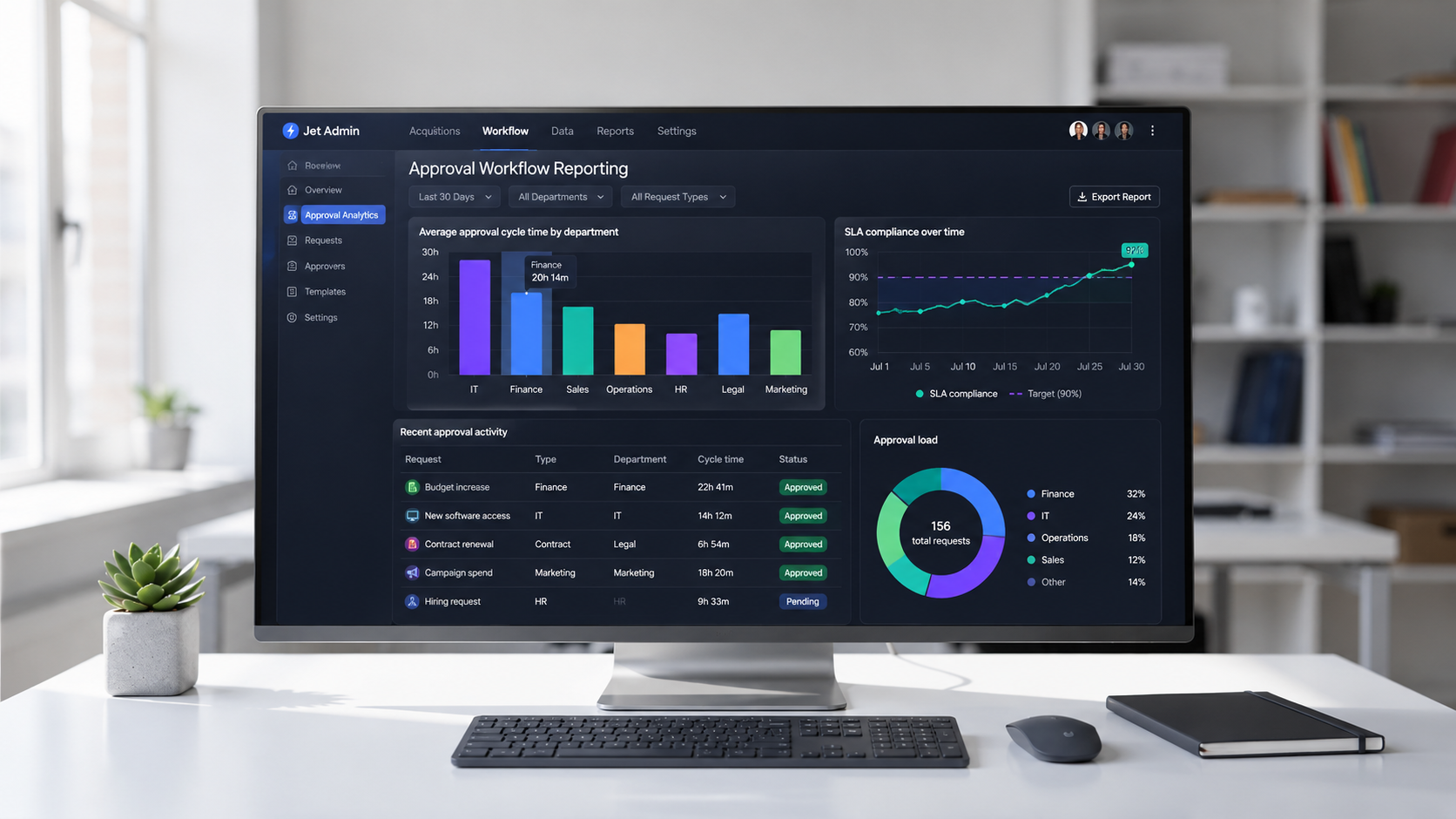
Recommended dashboard screenshot: Bar chart of average approval time by department alongside a line graph of SLA compliance over time, with alt text "Approval workflow reporting dashboard showing cycle time and SLA trends."
FAQ: evaluating and running approval workflow software
This section answers common questions operations, IT, and product teams have about approval workflow tools and Jet Admin specifically. Each answer adds detail not fully covered above.
How is approval workflow software different from generic project management tools?
Approval software focuses on structured approval processes with clear states (pending, approved, rejected), conditional routing based on rules, formal audit trails, and rejection or rework loops. Project management tools primarily track tasks, timelines, and collaboration. Many teams pair both: project management for planning and execution, approval management software for formal sign-offs that gate critical actions like finance approvals, team approvals, or document approval processes. The key difference is that approval tools enforce decisions and accountability, not just progress.
Can we start with one approval process and expand later?
Yes, and this is the most common pattern. Teams typically pilot with a single workflow-such as an invoice approval workflow or access request approvals-validate the data model, roles, and routing logic, and then reuse those patterns to add more business requests over time. Because integrations and permissions are configured once and reused, each subsequent workflow builds faster. You do not need to re-implement data connectors or authentication for every new process.
How does Jet Admin handle changes to approval rules over time?
Admins can adjust routing rules, conditions, thresholds, and automations without rewriting the entire app. For example, if a new spending policy changes the threshold for second-level approval, an admin updates the condition in the workflow builder. Using versioning practices and testing in a non-production environment helps avoid disruption. This flexibility matters because approval rules change as organizations grow and policies evolve.
What happens if one of our integrated systems is temporarily unavailable?
Robust approval workflow tools should surface error states clearly in the UI rather than silently failing. Strategies include queueing actions to retry when the system recovers, designing workflows that degrade gracefully (for example, allowing the approval to proceed while flagging the failed write-back), and coordinating with IT/DevOps on monitoring and incident response. No system is immune to outages, but a well-designed workflow minimizes the blast radius.
How long does it typically take to implement a basic approval workflow in Jet Admin?
For a well-scoped workflow with existing integrations and clear business rules, teams typically go from design to deployment in days to a couple of weeks. More complex workflows-those involving multiple source systems, intricate branching logic, or strict compliance requirements-may take several weeks. Actual timelines depend on data readiness, stakeholder availability, and whether document creation and routing rules are already well understood. Starting with a focused pilot is the best way to establish a realistic baseline.
If your team is ready to move beyond email-based approvals, explore how Jet Admin's automations and integrations can help you build secure approval workflows on your existing data-without a forced migration or months of custom engineering.