Checked September 26, 2026. USD, excluding tax. This comparison is based on official pricing and documentation, not a hands-on build. Jet Admin publishes it and competes with both products; each one's strengths are stated as found.
The most useful thing to know before comparing these two is that they are no longer the same kind of product. Softr is a seat-priced app builder: you pay for builders and for the people who log in. Stacker has moved to stacker.ai and now sells credit-priced AI agents, with unlimited customer portals bundled in and — in its own words — "no per-seat charges."
That single difference decides most evaluations. If your cost problem is the number of people who need access, Stacker's model removes it. If your cost problem is unpredictable usage, Softr's limits are the thing you can forecast.
This comparison covers what each product is today, how each one bills, what two realistic deployments actually cost, and which to choose.
Softr vs Stacker at a glance
| Softr | Stacker | |
|---|---|---|
| What it is today | "The AI app builder for business operations" — internal tools and portals | An AI agent platform that also ships unlimited customer portals |
| Billing unit | Five dials: builders, app users, database records, workflow actions and AI credits | One dial: credits consumed by agent actions. No per-seat charges |
| Entry paid price | Basic $19/month billed annually ($25 monthly) | Standard $50/month for 250 credits |
| Free option | Free plan: up to 3 builders, 5 app users | Trial: $100 in credits, no card, credits never expire |
| Cost of more users | Rises directly; extra app users from $1–$2/month each | No per-user charge |
| Cost of more activity | Metered as workflow actions and AI credits | Rises directly with agent actions |
| Ceiling | Business caps at 100 team / 500 client users and 1M records | Credit tiers to 10,000/month ($2,000); Enterprise custom |
| Best suited to | Portals and internal tools with a knowable audience | Agent-driven work, or a large portal audience |
Sources: Softr pricing, Softr pricing documentation and Stacker pricing, all checked September 26, 2026.
What Softr is in 2026
Softr describes itself as "the AI app builder for business operations," used to "build secure internal tools and portals with databases, workflow automation, and integrations included." In practice it is the mature option here for client portals, team intranets, inventory tools and CRMs built on connected data.
Its model is explicit about roles. Softr's documentation defines them clearly: "A builder is a workspace member or guest who can access Softr Studio to build applications, databases, and workflows. An app user is someone who can log in to a Softr app you've built." App users split into team users (internal) and client users (external), and the split matters because they are priced differently.
What Stacker is in 2026 — and why older comparisons mislead
Stacker used to be a no-code portal builder on top of Airtable, and most comparison articles still describe it that way. Its old domain now returns a permanent redirect to stacker.ai, and the product there is an agent platform.
Stacker's pricing page lists "unlimited agents," "all 2,000+ integrations," "unlimited customer portals," white-label portals, custom domains, communication channels, automations, computer use, a knowledge base and custom skills — on every plan. The metered resource is credits, and "each agent action uses credits based complexity."
Treat any Softr-versus-Stacker comparison written before this shift with caution, including claims about which one has deeper permissions. Those were fair observations about a portal builder that has since become something else. We could not verify Stacker's current permission granularity from its public pages, and we are not going to repeat a stale claim as if we had.
How each one charges — the difference that decides it
Softr: five dials, not one
Softr's pricing page leads with AI credits, but the usage-limits panel underneath shows four more metered resources. All five can force an upgrade independently, which is the thing to understand before comparing headline prices.
| Plan | Annual monthly equivalent | Monthly | Builders | App users (team + client) | Database records | Workflow actions/mo | AI credits/mo |
|---|---|---|---|---|---|---|---|
| Free | $0 | $0 | Up to 3 | 5 combined | 5K | 500 | 5 |
| Basic | $19 | $25 | 1 | 5 + 5 | 50K | 2.5K | 10 |
| Pro | $99 | $119 | 2 | 10 + 50 | 500K | 10K | 50 |
| Business | $329 | $395 | 3 | 30 + 100 | 1M | 25K | 100 |
| Enterprise | Custom | Custom | Custom | Custom | Custom | Custom | |
Extra builders cost $5, $10 and $20 a month on Basic, Pro and Business respectively. Extra app users start at $1 a month on Pro and $2 on Business, with Pro extending to 50 team and 250 client users and Business to 100 and 500. Free and Basic have no add-on — you are capped at the included allowance. Additional custom domains are $13 a year.
Note what this means in practice. A portal with a modest audience but a large Airtable base can hit the record ceiling long before the user ceiling, and an app that runs automations on every submission can exhaust workflow actions while every other dial sits idle. Check all five against your workload, not just seats.
Stacker: credits, priced by tier
| Monthly credits | Price |
|---|---|
| 250 | $50 |
| 500 | $100 |
| 1,000 | $200 |
| 2,500 | $500 |
| 5,000 | $1,000 |
| 10,000 | $2,000 |
| Enterprise | Custom — "tailored to your usage" |
Credits run at a flat $0.20 each across every published tier, so there is no volume discount to chase — you simply buy the bracket that fits. Stacker's published consumption bands are 1–3 credits for quick tasks such as summaries, CRM updates and lookups; 5–15 for multi-step workflows, outbound emails and reports; and 20–50 for projects such as research, competitive analysis and media generation. Monthly credits reset; trial credits do not expire.
What each one costs for a real deployment
These are illustrative calculations from published rates, not quotes. Annual figures are monthly equivalents.
Scenario 1: a client portal with 200 external users
A portal where 200 customers log in to see their records, with two people maintaining it.
| Option | Calculation | Monthly |
|---|---|---|
| Softr Pro | $99 + (200 − 50 included) × $1 | $249 |
| Softr Business | $329 + (200 − 100 included) × $2 | $529 |
| Stacker | No per-user charge; tier chosen by agent activity | From $50 |
Two things stand out. First, Softr Pro with add-on users is less than half the cost of Business at this size — Business only wins once you need its record ceiling, its user groups, or more than 250 client users. That is worth checking before anyone upgrades on instinct.
Second, Stacker's portal cost here is genuinely zero per user. Its bill depends entirely on whether agents do work for those customers. If the portal is read-and-self-serve, Standard covers it. If an agent handles even one 10-credit workflow per customer per month, that is 2,000 credits — the $500 tier — and Stacker becomes the more expensive option.
Scenario 2: an internal tool for 30 team members
| Option | Calculation | Monthly |
|---|---|---|
| Softr Pro | $99 + (30 − 10 included) × $3 | $159 |
| Softr Business | 30 team users included | $329 |
| Stacker | No per-user charge; 250 credits | $50 |
Again Pro with add-ons beats Business, and again Stacker's headline number is lowest — provided your 30 colleagues are not each triggering agent actions. Thirty people each running two 10-credit workflows on 20 working days would consume 12,000 credits a month — past the top published tier, and into an Enterprise conversation.
The pattern is consistent: Softr's cost is a function of what you accumulate — people, records, actions — and is forecastable once you know those numbers. Stacker's is a function of what your agents do, and is not forecastable until you measure it.
Permissions, data and what else differs
Access control
Softr's documented granularity is its custom user groups — three on Pro, ten on Business — layered on the team/client distinction. That is a concrete, checkable limit: if you need more than ten audience segments with different visibility, you are looking at Enterprise. SSO, SCIM and audit logs also sit on Enterprise.
Stacker publishes white-label portals and custom domains on all plans but does not set out an equivalent permission-tier structure publicly. If granular access control decides your purchase, ask Stacker directly and get the answer against your actual roles rather than relying on a feature list.
Data sources
Softr includes databases, workflow automation and integrations, and is long established on Airtable and similar sources. Stacker advertises "all 2,000+ integrations" on every plan plus a knowledge base and "computer use," which is an agent capability rather than a data connector.
The question to ask is not how many integrations each claims, but whether your specific system of record is a first-class source — and, if your data must stay where it is, whether either product reads it live or copies it. Softr's record ceilings apply to data held in its own database, so where your records live changes which limit you hit.
Which should you choose?
Choose Softr when the deliverable is a portal or internal tool with a knowable audience, when you want a forecastable monthly bill, and when you need documented user groups for access control. Its Free plan is also a genuine way to test the build experience before paying.
Choose Stacker when your audience is large or unpredictable and per-user pricing is what blocks the project, or when the actual work is agent-driven — triage, research, outbound, multi-step automation — rather than people reading screens. The $100 trial credit with no card and no expiry is an unusually low-friction way to measure consumption first.
Do not choose on headline price. Stacker starts lower and Softr Basic starts lower still, but both invert at scale depending on which axis you grow along. Run your own numbers on the scenario tables above.
Where Jet Admin fits
All three build business software without a development team, so the honest comparison is on the axis each one meters.
| Priority | What to evaluate |
|---|---|
| Many people need access | Jet Admin includes unlimited users on every plan; Softr charges per app user above its allowance; Stacker charges none but meters agent activity |
| Forecastable monthly cost | Jet Admin and Softr are both forecastable once you know your numbers; Stacker requires measuring credit consumption first |
| Data stays in your own database | Jet Admin builds over your existing Postgres, MySQL or API, so record ceilings in a vendor database do not apply. Confirm with each of the others whether your source is read live or copied |
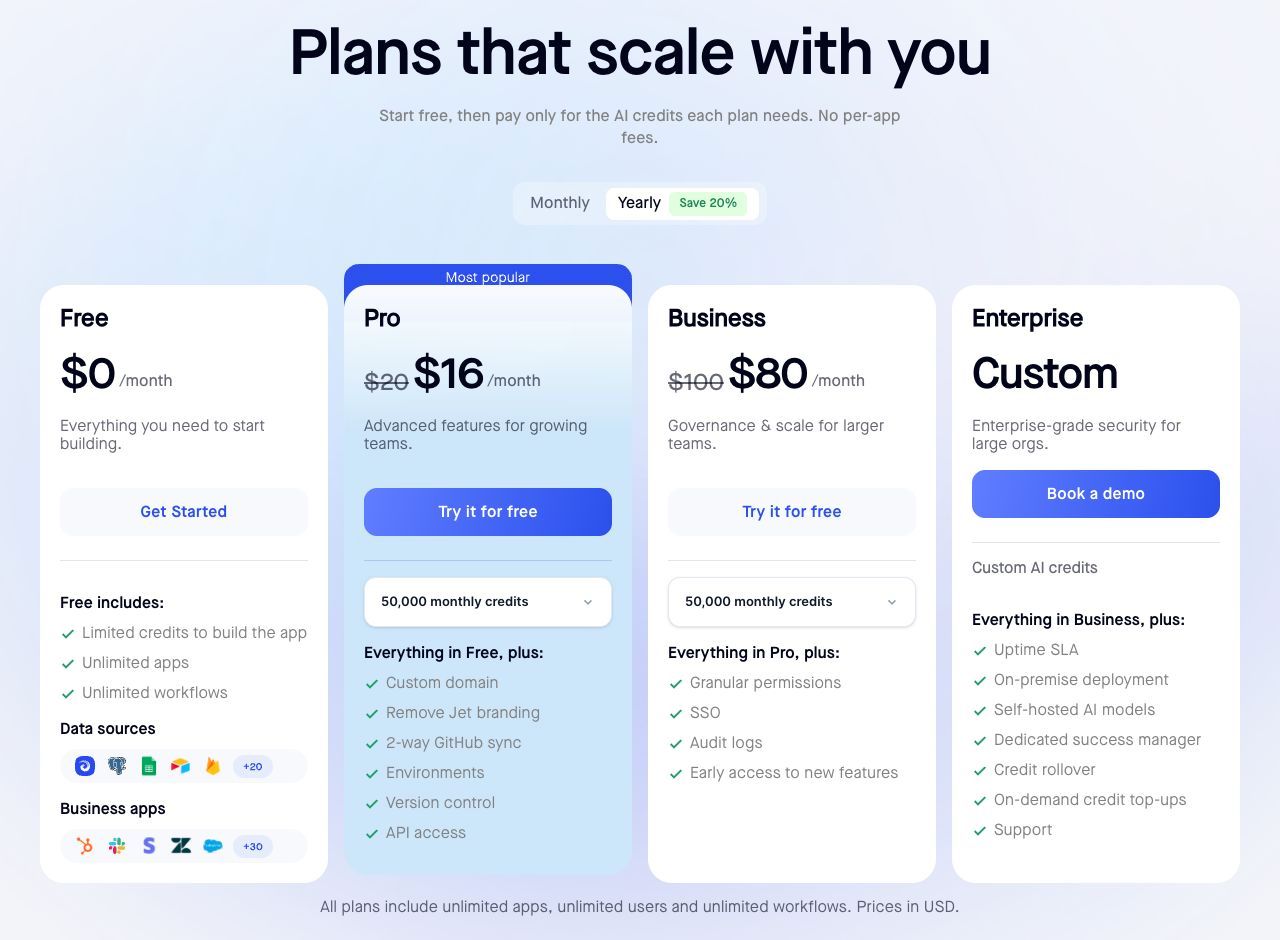
| Entry paid plan | Jet Admin Pro $20/month, or $16 annually; Softr Basic $19 annually; Stacker Standard $50 |
| Permissions, SSO and audit logs | Jet Admin lists these on Business ($100/month, $80 annually); Softr puts SSO, SCIM and audit logs on Enterprise; ask Stacker for its current model |
| Agent-driven work | Stacker is purpose-built for it. Do not expect an application platform to substitute |
Sources: Jet Admin pricing, Softr pricing, Stacker pricing. Matching prices do not imply matching capabilities.
The case for looking at Jet Admin is narrow and specific: a shared operational app on data you already own, used by enough colleagues that per-seat pricing constrains who gets access. For a customer-facing marketing portal, or for genuinely agentic work, the other two are doing something different. See Jet Admin vs Softr for the direct comparison, or Softr alternatives for the wider field.
Frequently asked questions
Is Softr or Stacker cheaper?
It depends which way you grow. For a 200-user client portal, Softr Pro works out at about $249 a month while Stacker charges nothing per user and starts at $50. For heavy agent activity, Stacker's credits can exceed Softr's seats quickly. Price the axis you will actually scale along.
Is Stacker still a portal builder?
It still offers unlimited customer portals, but the product has repositioned around AI agents and now lives at stacker.ai. Comparisons written before that change describe a different product.
What is a Stacker credit?
The unit consumed by an agent action, priced at $0.20 across all published tiers. Stacker's bands are 1–3 credits for quick tasks, 5–15 for multi-step workflows and 20–50 for larger projects, with repeated tasks costing less over time.
What does Softr actually meter?
Five things: builders, app users, database records, workflow actions and AI credits. Any one of them can force an upgrade, so check your workload against all five rather than counting seats alone.
Does either have a free plan?
Softr has a permanent free plan with up to 3 builders, 5 app users, 5,000 records and 500 workflow actions a month. Stacker offers $100 in trial credits with no card required, and those credits do not expire — a trial rather than a free tier.
Which has better permissions?
Softr documents custom user groups — 3 on Pro, 10 on Business — so its granularity is checkable against your roles, with SSO and audit logs on Enterprise. Stacker does not publish an equivalent structure, and older articles describing its permission depth refer to the pre-repositioning product. Ask directly if this decides your purchase.
Measure the axis you will grow along
Before choosing, write down three numbers: how many people will log in within a year, how many records your app will hold, and how many agent actions your process would need per month. The first two price Softr. The third prices Stacker. Whichever you cannot confidently estimate is the one to test first — Softr's free plan and Stacker's non-expiring trial credits both make that cheap to do.
If the answer to the first number is "most of the company," build the same app in Jet Admin where users are not the billing unit, and compare all three against the same workflow.