Shipping secure business software used to mean months of custom development, dedicated engineering teams, and spiraling costs. A low code app builder changes that equation by letting operations leaders, product teams, and developers create apps using visual design, reusable components, and selective custom code, without sacrificing the architecture that production systems demand.
This guide walks you through every layer of the decision: from evaluating platforms and choosing a data strategy, to configuring granular permissions, integrating external systems, deploying safely, and planning for long-term maintenance.
Key Takeaways
A low code app builder is a platform that lets teams ship secure business apps faster by combining a visual interface, pre built components, and optional custom code. Unlike traditional coding, where everything is hand-written, low code abstracts away boilerplate while still supporting the full lifecycle: data connections, integrations, authentication, deployment, and ongoing maintenance. Low-code platforms reduce development time by 10X compared to conventional approaches, and 62% of tech leaders report cost reductions after adopting low code tools.
Modern low code platforms now span multiple app building modes. Teams can use natural language prompts to scaffold an initial app, connect an existing backend, import React components for high-fidelity UI, or leverage coding-agent and MCP workflows to accelerate repetitive tasks. This article covers when to use each mode and how they fit together.
Success with any code app builder depends less on drag and drop and more on architecture. How you model data sources, configure business logic, enforce role based access controls, and set up testing and governance from day one determines whether your app scales or stalls. Low code democratizes the development process by enabling non-technical employees to build applications, but it also minimizes the need for large teams of specialized software developers. With 43% of companies already implementing low code tools, this approach is quickly becoming standard practice.
Jet Admin is a concrete example of a low code app builder focused on secure internal and customer-facing business apps built on top of existing data sources, including databases, APIs, SaaS tools, and spreadsheets. The rest of this article is a practical guide to evaluating low code platforms, selecting a data strategy, and rolling out your first app with confidence.

What is a low code app builder (and how is it different from no code)?
A low code app builder is a low code development platform that combines visual app building with configurable logic and optional custom code. You design screens, wire up data, and define workflows using a drag and drop interface. When you need something the visual tools don't cover, like a complex validation rule or a niche API integration, you write code in JavaScript, Python, or SQL to fill the gap.
No code app builders sit at the other end of the spectrum. No-code platforms require no coding skills at all and are designed for complete beginners, often called citizen developers. No code tools work well for simple apps like form workflows and lightweight automations, but no-code development is generally slower than low-code development when requirements grow. Low-code platforms allow some coding for customization and cater to both novice and experienced developers. Traditional code platforms, by contrast, require full custom development for every layer. Low-code and no-code platforms enable users to build applications using visual interfaces, but low code gives professional developers the escape hatches they need.
Typical use cases for low code development in 2024–2026 include internal tools, admin dashboards, approval workflows, customer portals, and light external apps where speed and governance matter more than pixel-perfect frontends. Many vendors now blend no code and low code, offering both configuration-only builders and hooks for deeper code development. The terminology is fuzzy: "low code platform," "no code development," "code app builder," and "code platform" all overlap. What matters is whether the platform can handle your real-world complexity.
Many low-code platforms now incorporate AI for application generation and workflow design, introducing "prompt-to-app" capabilities where generative AI produces an initial data model, UI, and workflows that you then refine. Bubble is known for its visual programming language and flexibility, while other platforms like Jet Admin go further by supporting prompt-based building, visual app builders, and deeper code extensibility, all while connecting to existing data and backends. Low-code tools democratize app development for non-technical users and help overcome the tech talent shortage.
The modern low code app builder stack: core building blocks
A serious low code app is more than a visual UI designer. It is a layered architecture spanning data, logic, interface, security, and operations. Evaluating any low code development platform means evaluating all of these layers together.
- Data and backend. This is the foundation. Low code platforms often include connectors for databases and cloud services. You connect to operational databases (PostgreSQL, MySQL, SQL Server), SaaS apps (Stripe, HubSpot, Salesforce), spreadsheets like Google Sheets, or data warehouses. The platform reads and writes against those sources so your app stays in sync with live data.
- Business logic. Visual workflows, expressions, event-based triggers, and serverless functions handle everything from "on submit, update this record" to complex branching approval chains. Some platforms also support custom code modules in JavaScript or Python for edge cases.
- UI layer. Drag and drop layouts with form components, tables, charts, filters, and detail views let teams assemble screens quickly. Pre built components for CRUD tables, Kanban boards, and approval modals accelerate app creation.
- Security. Authentication methods (built-in user management, SSO, SAML, OIDC), role-based access, and audit logs protect data and satisfy compliance requirements. Many low-code platforms include built-in security features for data protection.
- Operations. Versioning, separate environments (dev/staging/production), one-click deployments, and monitoring keep apps stable and auditable.
Jet Admin exemplifies this stack by connecting to databases and APIs, defining logic inside the platform, and exposing it through generated UIs, with governance controls layered on top. Each layer allows overrides: custom SQL, JavaScript, or imported React components where the visual tooling falls short.
Data and backend options: building on what you already have
For most operations, product, and IT teams, a new app should sit on top of existing data rather than duplicating it. Your PostgreSQL database, your CRM, your spreadsheets: these are your systems of record. A low code app builder should be the system of engagement that presents and acts on that data.
Common data strategies in low code platforms include:
- Direct database connection. The fastest option. You connect to PostgreSQL, MySQL, or another operational database, write SQL queries, and get live reads and writes. The tradeoff: you need careful permission scoping and performance planning, especially with large tables.
- Built-in backend. Some platforms offer a managed database. This is simpler but can raise vendor lock-in questions since your data lives inside the platform. Backendless, for example, provides high control over app data and infrastructure through its own backend layer.
- API and SaaS-centric approach. Great for unifying multiple systems, like pulling customer records from Salesforce and billing data from Stripe into one view. Latency and rate limits matter here.
Jet Admin's integrations catalog supports direct connections to PostgreSQL, MySQL, Microsoft SQL, MongoDB, Snowflake, BigQuery, Firestore, Airtable, Google Sheets, and dozens more. It also connects to REST APIs, GraphQL endpoints, and SaaS tools like Stripe, HubSpot, Zendesk, and Salesforce. You can generate backend logic on top of those connections, making it a low code platform for application development on existing data.
Before selecting a platform, document your current data map. Identify which systems are sources of truth, what your app needs to read and write, and whether the low code app builder will act as an engagement layer or become a new data silo.
App-building modes: prompt-based, visual, existing React, and coding agents
Modern low code platforms no longer have a single way to build apps. They blend natural language prompts, visual builders, and traditional code workflows. Choosing the right mode for each phase of development matters more than defaulting to one approach.
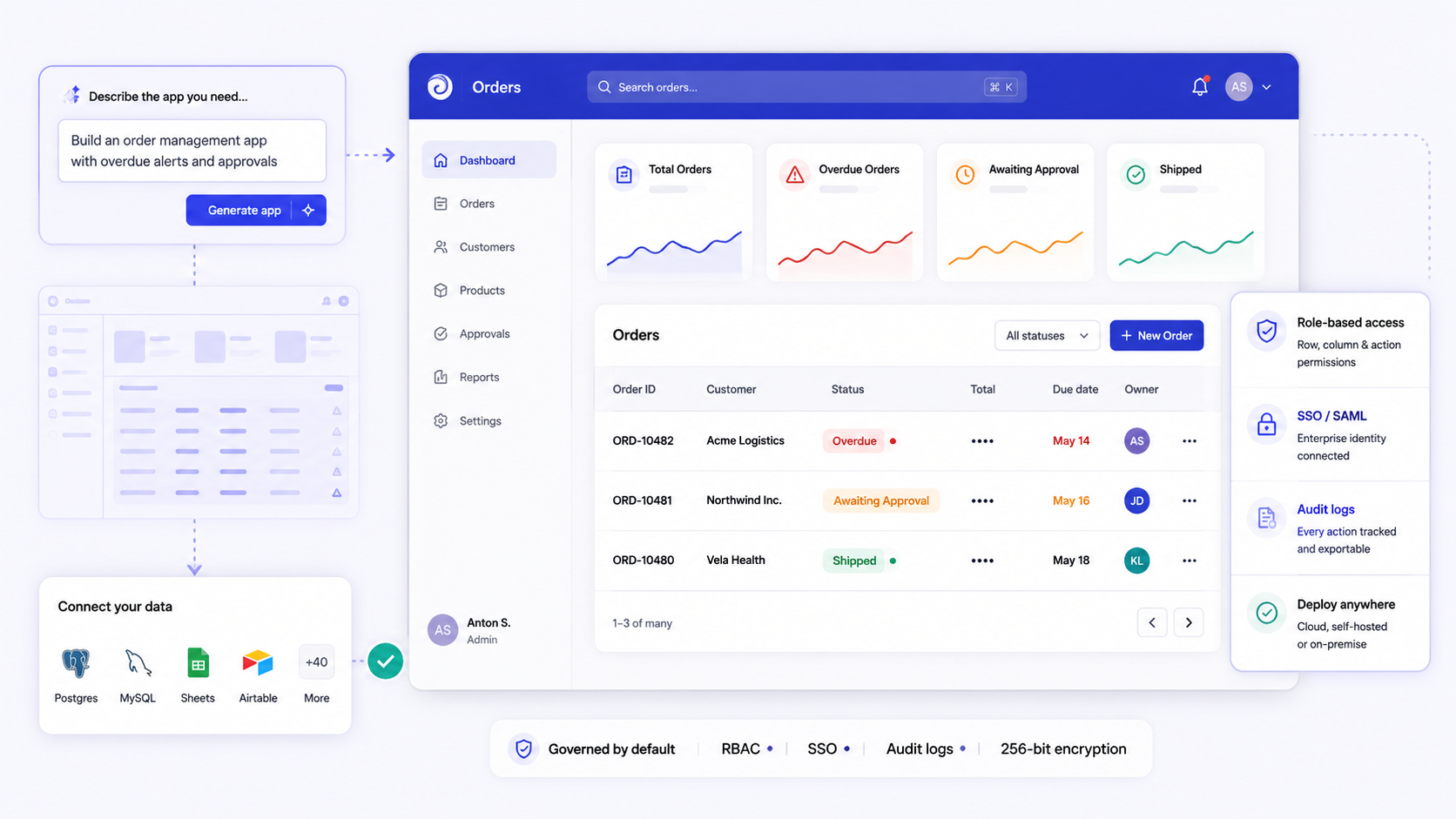
Prompt-based building lets users describe an app in text, like "Build an approvals dashboard for invoices in our PostgreSQL DB," and the platform scaffolds data bindings, UI, and logic. This is powerful for prototyping. However, research shows that prompt-to-app tools often struggle with backend correctness, auth logic, and deep workflows. Treat prompt output as a starting point, not a finished product. OutSystems offers AI-assisted app creation and performance optimization in a similar vein, and Momen integrates an AI agent builder for faster app development using ai capabilities.
Visual low code builders remain the core of most platforms. WYSIWYG UI design, drag and drop tables and forms, and workflow editors for actions like "on submit, update record and send Slack message" handle the bulk of internal tools and admin panels. Bubble offers a visual programming language for app creation that gives teams flexibility without writing code.
Importing existing React code is essential when teams have established design systems or need high-fidelity UIs. You use your own React, Angular, or Vue components inside the low code app while leveraging the platform for data, permissions, and deployment.
Connecting an existing backend means plugging into internal APIs or microservices. The low code app acts as a front-end and orchestration layer over your tech stack.
Coding-agent and MCP-style workflows let an AI agent generate or refactor logic snippets, queries, or integrations in a controlled environment. Developers review and approve before shipping. These ai features speed up repetitive coding tasks but require human oversight, especially for security and auth.
Jet Admin supports prompt-based app building, connecting existing backends and data, and integrating custom React components. Use prompts for rapid prototyping, visual builders for internal tools, imported React for high-fidelity UIs, and coding agents for speeding up repetitive work. Vibe coding and ai powered apps are useful accelerators, but they are not substitutes for architectural planning.

Designing UI and workflows in a low code platform
Operations and product teams care about how quickly they can translate real-world business processes into usable screens and flows. The right low code platform should collapse development time from weeks to days.
Typical UI capabilities include:
- Drag and drop pages with forms, tables, charts, filters, and detail views.
- Responsive layouts for desktop and tablet. Mobile app and mobile applications may need extra attention. FlutterFlow supports building apps for Android, iOS, and web. Glide allows installation as a Progressive Web App on devices, making it easy to deploy a no code app to phones.
- Component templates like CRUD tables, Kanban boards, and approval modals accelerate app building.
Workflow and logic tools handle digital process automation:
- Event-based actions (on click, on row select, on submit).
- Visual flow diagrams or rule builders for conditional logic.
- Conditional visibility and branching based on user roles or data values, supporting complex processes in business process management applications.
Appian allows building web apps and mobile apps in a single environment, which simplifies deployment options for teams managing both. Jet Admin auto-generates CRUD interfaces on top of a connected data source, then lets teams refine layouts, add validation, and define multi-step logic without writing a full front-end from scratch.
When building any app, configure UX patterns early: inline validation, bulk actions, undo and rollback behavior, and clear error messages. These details matter for both internal tools and customer-facing portals and are easy to overlook in the rush of app creation.
Security, authentication, and granular role based access controls
For any enterprise app, the real test of a low code platform is not the drag and drop UI but the security architecture: identity, access, and audit. Organizations can respond quickly to changing needs by modifying applications in low-code platforms, but only if security is foundational.
Baseline authentication options teams should require:
- Built-in user management for small teams and pilots.
- Enterprise SSO (SAML, OAuth, OpenID Connect) and SCIM for automated user provisioning.
- Support for multiple identity providers when apps span subsidiaries or partners.
Granular role based access controls should restrict views and actions at every level:
- App-level: Who can see which application.
- Page and component-level: Who sees which dashboards, forms, and buttons.
- Data-level: Row- and column-level security enforcing least-privilege policies.
- Action-level: Who can run risky operations like refunds, exports, or approvals.
Jet Admin's enterprise capabilities include SSO/SAML (Business and above), SCIM (Enterprise), detailed RBAC down to rows, columns, and actions, and audit logs (Business and above) for compliance. This makes it suitable for internal tools in regulated environments where every data access event must be traceable. Assess security and compliance requirements early when selecting a platform.
Involve your security and compliance teams during evaluation, not after go-live. Map internal policies (SOC 2, HIPAA, GDPR) to platform features and test real-world permission scenarios with role-based test accounts before onboarding end users.
Integrations: connecting SaaS, APIs, and internal systems
Most business apps need to read and write data across CRMs, ticketing systems, billing platforms, and internal APIs. Integrations are central to low code application development because no useful app operates in isolation.
Integration categories to evaluate:
- Native connectors to popular SaaS tools like Stripe, HubSpot, Salesforce, Zendesk, Slack, and SendGrid.
- Generic HTTP/REST and GraphQL connectors for custom APIs.
- Database connectors for PostgreSQL, MySQL, SQL Server, MongoDB, Snowflake, and others.
- File and spreadsheet sources like CSV, Google Sheets, and Airtable. Softr connects to over 16 data sources including Google Sheets, illustrating the breadth that even simpler platforms now offer.
Jet Admin's integrations page lists connectors across databases, AI services (OpenAI, Anthropic, Google Gemini), SaaS tools, storage (Amazon S3, Azure Blob, Google Cloud Storage), and authentication providers. This lets the app builder act as a unified platform and single interface over many systems. Consider integration needs when choosing a low-code platform, and always prototype your two or three most critical integrations during evaluation rather than just reading documentation.
Best practices for integrations:
- Centralize secrets and API keys in the platform's secure storage.
- Reuse shared connections across apps to simplify governance.
- Rate-limit and error-handle external calls to keep UIs responsive.
Testing, environments, and deployment in low code platforms
Even if low code reduces manual work in coding, it does not remove the need for systematic testing and staged deployments. This is especially true for financial, operations, or healthcare apps where errors have real consequences.
Typical environment patterns in mature platforms:
- Separate development, staging, and production workspaces.
- Ability to clone apps and data schemas between environments.
- Feature flags or per-user rollouts for sensitive changes.
Mendix supports multi-cloud deployment and AI-assisted development, giving teams flexibility in where and how they deploy apps. Testing approaches tailored to low code include:
- Manual QA flows with role-based test accounts.
- Automated tests at the API or database level, even when the UI is low code.
- Snapshot or regression testing on critical workflows (approvals, billing, operations automations).
Deployment features a mature platform should provide:
- One-click or automated deployments to deploy apps safely.
- Version history with rollback.
- Change logs that can be audited for real time monitoring of who changed what and when.
Jet Admin supports structured app deployment and governance, including version control, environments, and activity logs. Teams should align platform capabilities with their existing CI/CD or change management processes before onboarding users.
Governance, collaboration, and enterprise controls
Platform governance goes beyond app-level permissions. It is about controlling how teams build, review, and ship apps on a low code platform across the organization.
Collaboration needs include:
- Multi-user editing with conflict handling or locking.
- Review and approval workflows for app changes.
- Commenting and documentation features inside the builder.
Quickbase focuses on cross-departmental collaboration in app development, demonstrating that governance and collaboration are not afterthoughts but core features. The visual nature of low-code applications improves collaboration between IT and business teams because both can see and discuss the same screens, logic, and data flows.
Governance controls expected by IT and security:
- Organization-level workspaces and projects.
- Centralized control over integrations, environments, and templates.
- Audit logs of configuration and data-access events.
Jet Admin provides audit trails and SSO/SAML (Business and above), SCIM provisioning (Enterprise), and deployment options including cloud, plus self-hosted/on-premise configurations on Enterprise, that matter to large organizations. Treat the low code platform as a strategic shared service: define owners, usage guidelines, and guardrails up front so that app builders, whether business leaders or developers, can move fast without creating compliance risk.

Vendor lock-in, extensibility, and long-term maintenance
A common concern: will choosing a low code app builder today make it hard to maintain or migrate apps in three to five years? The answer depends on how the platform handles data, logic, and UI ownership.
Concrete dimensions of vendor lock-in:
- Data: Can you keep data in your own databases? Is there an export path? Platforms that connect to external databases (rather than storing everything internally) reduce this risk.
- Code and logic: Are business rules stored in an open format? Can custom code be reused outside the platform?
- UI: Can you import existing React or export generated code, or is the UI locked to the vendor?
Extensibility options to look for:
- Custom code blocks (JavaScript, TypeScript, Python, serverless functions).
- Ability to call arbitrary APIs or host custom microservices, including using external libraries.
- Support for importing existing React components or design systems.
Customization and extensibility are key factors in platform selection. Total cost of ownership should include not just licensing but also future migration costs. Jet Admin mitigates lock-in by building directly on existing databases and APIs, letting you preserve your system-of-record data and logic. It allows code extensibility and React imports where needed, keeping your investment portable.
For long-term maintenance: low-code platforms simplify the maintenance and updating of applications, but you should still document critical flows, avoid overloading a single "super app" with unrelated features, and periodically review apps for security, performance, and ownership. Low code app development stays healthy when you treat each app as a manageable, well-scoped product.
A practical checklist for choosing and implementing a low code app builder
Use this checklist as a starting point for your evaluation. Copy it into your planning docs and fill in the specifics.
Evaluation steps:
- Define two or three high-impact use cases (e.g., finance approvals, customer support dashboards) with clear metrics like development time saved or error reduction.
- Inventory your existing data sources and systems (databases, APIs, SaaS) and note specific integration requirements. Evaluate team profiles to match platform capabilities: how many citizen developers versus experienced developers will use the tool?
- Shortlist low code platforms that support your integrations, RBAC depth, and deployment models (cloud versus self-hosted) matching your IT policies.
- Assess total cost of ownership, not just license price. Factor in onboarding, training, and future scaling costs. Jet Admin's pricing tiers (Free, Pro $20/month, Business $100/month, with no per-seat charges) offer predictable costs, especially for customer portals with external users.
Build and rollout steps:
- Run a time-boxed pilot (four to six weeks) using prompt-based building to scaffold, then refine with visual and code tools.
- Involve security early to configure authentication, role based access controls, and audit logging. Don't leave this for the end.
- Set up dev/staging/production spaces and simple release workflows before onboarding end users.
- Use Jet Admin's prompt-based app builder to create an initial interface on top of a live database, then harden permissions and workflows using its governance features.
Scale and standardize:
Treat the first app as a template. Codify patterns, such as auth flows, layout conventions, logging configurations, and permission structures, that can be cloned for future low code projects. This reduces the marginal cost of each new app and improve developer productivity across the organization. Low-code platforms allow organizations to quickly respond to changing market demands by spinning up new custom apps from proven patterns instead of starting from scratch every time.
Conclusion: when a low code app builder is the right choice
Low code is especially valuable for internal tools, operations workflows, and business apps where requirements change frequently and speed plus governance beat ground-up custom code. If your team spends weeks building simple apps that could be assembled in days, or if your developers are buried in CRUD boilerplate instead of solving unique problems, a low code app builder can unlock significant developer productivity. Low-code platforms help overcome the tech talent shortage by letting smaller teams build and ship more.
The core evaluation themes remain consistent regardless of which platform you choose: architecture (data and backend approach), security and granular permissions, integration depth, testing and deployment rigor, governance maturity, and extensibility and vendor lock-in profile. Digital transformation in app development does not require abandoning code entirely; it means applying code where it creates unique value and using low code everywhere else.
Jet Admin is a strong candidate for organizations that want to build secure apps on existing data, with prompt-based building, a robust low code platform, and enterprise-grade governance. Review its integrations catalog and pricing to see how it maps to your stack.
Start with a single, well-scoped app, such as a finance approvals dashboard or an operations portal, validate security and usability with a small group, and then decide whether to standardize on the platform for broader application development.
FAQ: low code app builders for secure business software
This FAQ addresses practical questions that often arise after teams shortlist a low code platform but before they commit to a rollout. All answers are written for operations leaders, product teams, IT, and developers evaluating secure low code app builders in 2024–2026.
Can a low code app builder coexist with our existing React front-end and microservices?
Yes. Many teams use low code platforms alongside existing apps in their tech stack. A common pattern is low code for internal tools and admin UIs, custom React for public-facing products, with both talking to the same microservices and databases.
Platforms like Jet Admin can connect to existing APIs and databases and import custom React components where needed. This lets you share backend logic while keeping front-end freedom for customer-facing code app development. You avoid duplicating data or building redundant APIs.
The key is agreeing on API contracts and auth patterns so both the custom code app and the low code app share consistent authorization rules and audit trails. If your engineering team already uses OpenID Connect or SAML for authentication, make sure the low code platform can plug into the same identity provider. This keeps your security posture consistent across both existing apps and new low code builds.
How do low code platforms handle performance and scaling for hundreds or thousands of users?
Performance depends on two things: the platform's own infrastructure (auto-scaling, query optimization, caching) and how your app is modeled (query complexity, filter design, data volume).
To validate scalability:
- Test against production-like data volumes and concurrent users during evaluation.
- Review how the platform handles pagination, caching, and long-running queries.
- Confirm rate limits and SLAs with the vendor for mission-critical apps.
Enterprise-focused platforms like Jet Admin are designed for multi-user, data-heavy internal tools. They can be deployed in cloud or, on the Enterprise plan, self-hosted configurations, letting IT tune performance for their specific workloads. For complex apps with hundreds of thousands of records, optimize your queries and use server-side pagination rather than loading everything into the UI.
Is a low code or no code app builder suitable for regulated industries (finance, healthcare, public sector)?
Suitability depends on security certifications, deployment options, and governance features rather than whether the label says "low code" or "no code."
Concrete criteria to evaluate:
- Support for SSO/SAML, SCIM, and granular role based access controls at the data and action level.
- Audit logs covering both configuration changes and data access events.
- Data residency options and on-premise or self-hosted capabilities where regulations require it.
- Certifications like SOC 2, HIPAA, or ISO 27001.
Jet Admin provides enterprise security and governance features including SSO/SAML and audit logs (Business and above), SCIM (Enterprise), and detailed RBAC. Organizations should map those capabilities to their specific regulatory frameworks with their security team. No code platforms can work for lighter internal use cases in regulated industries, but for sensitive data workflows, look for the depth of controls that a low code development platform provides.
How much custom code will we still need with a low code platform?
Many CRUD-style internal tools and simple apps can be 80–90% visual configuration: data binding, UI layout, and workflow rules, with only small amounts of custom code for edge cases like complex validation, niche integrations, or performance optimizations.
Low code is not about eliminating code but moving it to where it adds unique value. Non-technical builders assemble most of the app while developers focus on custom modules, reusable components, and writing a single line of JavaScript for a tricky calculation rather than building entire screens from scratch.
In early pilots, track how often you drop into code blocks. If every step requires code, a more traditional code platform may be a better fit. But if most work stays visual, low code will deliver significant speed and cost benefits and improve developer productivity across your team. The goal is to build apps faster, not to write code for its own sake.