
I’d choose a partner portal by testing one complete workflow: onboarding, finding resources, submitting a deal, and checking who can see the data. This guide compares 8 options for 2026, from custom portals to ready-made partner relationship management (PRM) tools and referral platforms.
My shortlist depends on what your program needs: custom workflows, close CRM links, enterprise channel tools, or affiliate payouts. I compare access controls, CRM connections, setup work, and total cost in U.S. dollars - not just subscription fees.
Quick Comparison
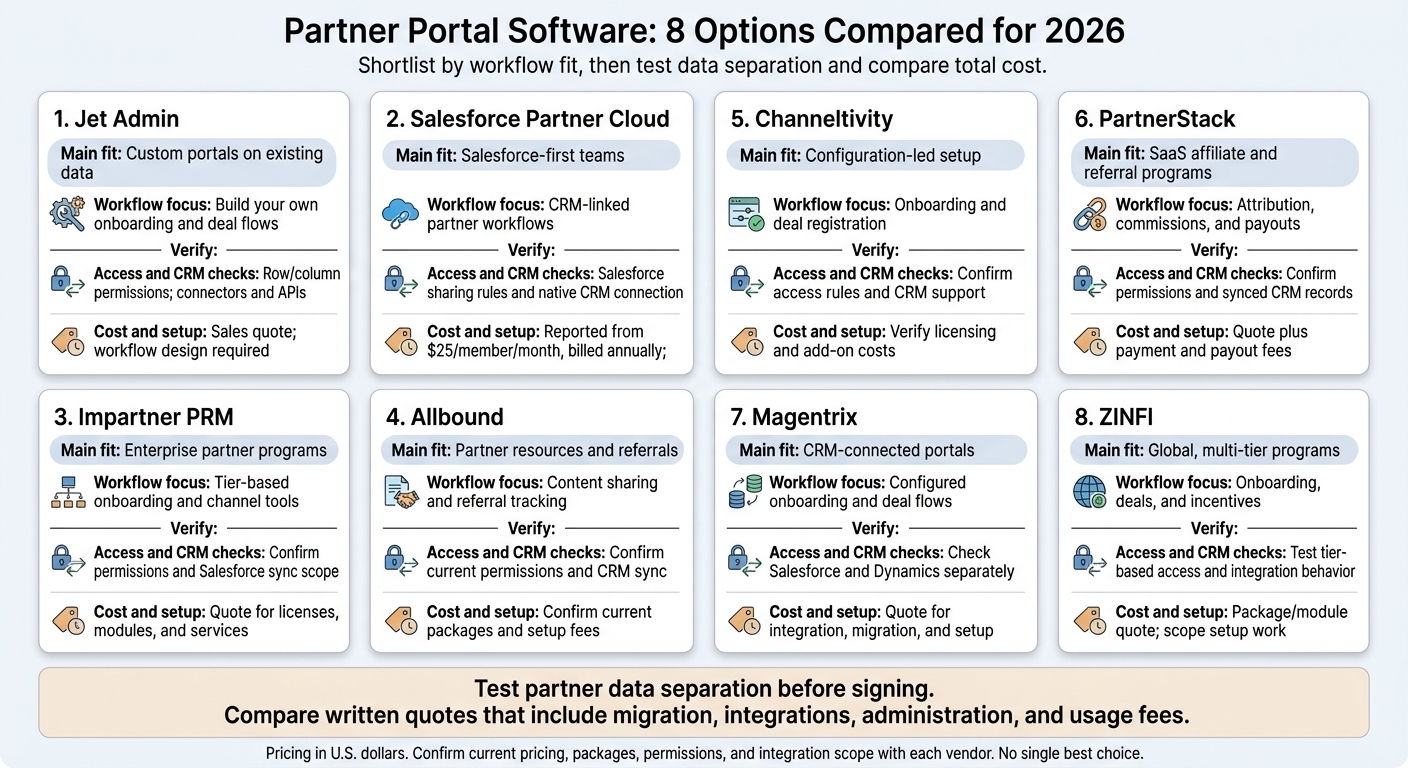
| Platform | Main fit | Workflow focus | Access and CRM checks | Cost and setup |
|---|---|---|---|---|
| Jet Admin | Custom portals on existing data | Build your own onboarding and deal flows | Row/column permissions; connectors and APIs | Sales quote; workflow design required |
| Salesforce Partner Cloud | Salesforce-first teams | CRM-linked partner workflows | Salesforce sharing rules and native CRM connection | Reported from $25/member/month, billed annually; admin support needed |
| Impartner PRM | Enterprise partner programs | Tier-based onboarding and channel tools | Confirm permissions and Salesforce sync scope | Quote for licenses, modules, and services |
| Allbound | Partner resources and referrals | Content sharing and referral tracking | Confirm current permissions and CRM sync | Confirm current packages and setup fees |
| Channeltivity | Configuration-led setup | Onboarding and deal registration | Confirm access rules and CRM support | Verify licensing and add-on costs |
| PartnerStack | SaaS affiliate and referral programs | Attribution, commissions, and payouts | Confirm permissions and synced CRM records | Quote plus payment and payout fees |
| Magentrix | CRM-connected portals | Configured onboarding and deal flows | Check Salesforce and Dynamics separately | Quote for integration, migration, and setup |
| ZINFI | Global, multi-tier programs | Onboarding, deals, and incentives | Test tier-based access and integration behavior | Package/module quote; scope setup work |
My buying rule: <u>test partner data separation before signing</u>. Then compare written quotes that include migration, integrations, administration, and usage fees.
Partner Portal Software: 8 Options Compared for 2026
Best Partnership Management Software
sbb-itb-8346adb
1. Jet Admin
Best fit: partner-program teams that need a custom partner portal and workflows. Jet Admin’s AI turns plain-language prompts into a starting portal you can edit visually. Connect it to PostgreSQL, MySQL, MongoDB, REST APIs, Google Sheets, Airtable, and Jet Tables.
Onboarding and resources
Track registration, documents, and training with onboarding checklists. Build a library of sales and marketing materials, and limit access by partner tier or certification.
Deal registration and collaboration
Partners submit opportunities through branded forms linked to your data sources. Set up approval workflows with pending, approved, and rejected statuses, plus dashboards that track revenue, leads, and commissions. Email or Slack alerts can notify teams about new registrations, approvals, and overdue onboarding tasks.
Access controls and CRM integrations
Manage access with built-in authentication, SSO, role-based permissions, and audit logs. Salesforce and HubSpot integrations connect CRM data to the portal.
Use row-level filtering and column-level permissions so partners see only their own records. Test access with partner accounts before launch.
Implementation and total cost
Budget for setup and maintenance - not just licensing. Your team will need time for internal design, configuration, and permission testing. AI can speed up the first build, but your team still handles workflow setup. Self-hosted and on-premises deployments give you infrastructure control while adding setup and maintenance work.
| Plan | Price | Deployment and responsibility |
|---|---|---|
| Cloud | Contact sales | Jet-managed hosting; lowest infrastructure workload |
| Self-hosted | Contact sales | Your AWS, Google Cloud, or Azure environment; your team manages the cloud environment |
| On-premises | Contact sales | Internal servers, including air-gapped setups; your team handles infrastructure and maintenance |
2. Salesforce Partner Cloud
Best fit: Salesforce-first businesses with admin support and budget for configuration. Teams built around Salesforce get close CRM alignment, but that comes with more admin work. It’s a poor fit if you need a fast launch with little setup.
Onboarding and resources
Start with the included enablement tools to guide onboarding. Partners can then find knowledge articles and manage support cases themselves, while your team keeps track of support requests without back-and-forth email.
Deal registration and collaboration
The CRM connection keeps partner activity in one system, from onboarding to deal submission. Manage registrations, approvals, and status updates in Salesforce to reduce manual entry. Each activity stays tied to partner records, giving account managers one place to track progress.
Access controls and CRM integrations
Use Salesforce SSO and sharing rules to block access to records across organizations. Test those rules in a sandbox before putting them into use.
Implementation and total cost
Administration is the main constraint - not features. Reported pricing starts at $25 per partner member per month for Partner Relationship Management and $50 for Partner Ecosystem Management, billed annually. Setup often requires a dedicated Salesforce admin or Salesforce developer.
3. Impartner PRM
Impartner PRM suits enterprise, global, and multi-tier partner programs that need segmented onboarding, certifications, targeted resources, role-based permissions, and performance analytics.
Onboarding and resources
Tailor onboarding to each partner’s type, tier, and region. Certification requirements and resources should match those needs.
Deal registration and collaboration
Check how Impartner handles deal registration, co-selling handoffs, marketing development fund (MDF) requests, and incentive tracking. Confirm what’s included and what costs extra.
Access controls and CRM integrations
Review role-based access for both partner and internal users. Check the scope of Salesforce sync and which capabilities come with the package.
Implementation and total cost
Ask for an itemized quote that separates core licenses, optional modules, and services. Separately priced components can add to implementation costs and the cost of administering the platform over time.
4. Allbound
Allbound focuses on partner program operations. Confirm its current naming, ownership, and package details with the vendor.
Best fit: teams that need a lighter partner operations layer for partner resources and referral tracking. Check current features and their depth during vendor review, before purchasing.
Onboarding and resources
Publish resources, announcements, and referral links, with tracking for clicks, signups, and sales.
Deal registration and collaboration
Before adding Allbound to your shortlist, confirm its support for deal registration, lead routing, and co-selling directly with the vendor.
Access controls and CRM integrations
Ask the vendor which CRM integrations are currently available and how much data they sync.
Implementation and total cost
Request a current quote that covers licensing, onboarding, integrations, and support.
5. Channeltivity
Best fit: teams that need fast setup through configuration.
Onboarding and resources
Administrators handle onboarding and resource sharing from one dashboard. This keeps setup simple, though workflow depth depends on the package.
Deal registration and collaboration
Deal registration is included, but collaboration features aren’t clearly documented.
Access controls and CRM integrations
Access controls and CRM integrations aren’t clearly documented either. Feature depth varies by deployment, so confirm what’s included before rollout.
Implementation and total cost
U.S. pricing hasn’t been verified. Check license, implementation, and add-on fees with the vendor.
6. PartnerStack
PartnerStack focuses less on general portal administration and more on growing partner programs through referrals.
Best fit: SaaS referral and affiliate programs that need payout tracking more than complex channel operations.
Onboarding and resources
For SaaS referral, affiliate, and technology-partner programs, check how PartnerStack handles recruitment, onboarding, and resource sharing.
Deal registration and collaboration
Ask the vendor to walk through a referral, from attribution to commission approval and payout. Check whether it supports formal deal submissions, approvals, and portal workflows - not just referral tracking.
Access controls and CRM integrations
Check permissions for partners and internal teams. Then confirm which CRM systems connect and which records sync.
Implementation and total cost
Request an itemized quote in USD that covers implementation, CRM connections, payment integrations, and payout fees.
If your program needs deeper support for channel operations, compare the next option.
7. Magentrix
Use a live demo to check Magentrix’s branding options, configuration limits, CRM sync behavior, and pricing.
Onboarding and resources
Review onboarding checklists, document sharing, and search with your branding applied. Check whether partners can quickly find up-to-date materials in one place.
Deal registration and collaboration
Test deal submission, approval routing, and partner collaboration against your program’s workflows.
Access controls and CRM integrations
Verify Salesforce and Microsoft Dynamics compatibility separately - don’t assume both offer the same support. Check record-level permissions, report visibility, sync direction and frequency, API requirements, and how sync errors are handled.
Implementation and total cost
Request a written quote in USD based on your partner count and user volume. Ask it to cover branding, migration, CRM integration, testing, training, and support.
Get an implementation timeline with named owners, and confirm billing terms in writing. Use the same checklist to compare Magentrix’s workflow depth with the next platform in the list. If your needs shift toward client-facing tools, you can also compare customer portal software to see how they differ from PRM solutions.
8. ZINFI
ZINFI suits teams that want onboarding, shared resources, deal registration, and incentive management in one portal.
Onboarding and resources
ZINFI supports global, multi-tier partner programs with onboarding, training, deal registration, collaboration, and incentive modules. Check what the base package includes and what requires add-ons, such as content syndication, MDF, or rebates.
Deal registration and collaboration
Ask ZINFI to walk you through deal registration, collaboration, and approval paths across partner tiers.
Access controls and CRM integrations
Test row-, column-, and action-level permissions to make sure partner tiers can’t see each other’s restricted data. Check that CRM and business-system integrations keep those permissions intact in reports and dashboards.
Implementation and total cost
Request an itemized quote for packages, modules, localization, migration, and ongoing administration. Use that breakdown to compare ZINFI’s modular setup with the lighter options in the table below.
Partner Portal Software Comparison Table
Compare each platform’s fit, workflow support, and setup effort at a glance, including features, pricing models, and limits.
| Platform | Best fit | Onboarding, resources, deals, and collaboration | Access controls | CRM integrations | Pricing model | Primary limitation |
|---|---|---|---|---|---|---|
| Jet Admin | Custom, governed portals on existing data | Custom workflows | Built-in; row/column permissions | Built-in connectors/API | Contact sales | Requires custom workflow design |
| Salesforce Partner Cloud | Salesforce-centric enterprises | CRM-linked partner workflows | Built-in; granular | Native Salesforce | Per-user license | High cost and admin overhead |
| Impartner PRM | Enterprise channel programs | Segmented onboarding and targeted resources | - | - | Contact sales | Feature/package details not confirmed in the source material |
| Allbound | Mid-market SaaS programs | Partner resources and referral tracking | Role-based access | Native CRM sync | Contact sales | Limited customization; confirm collaboration support |
| Channeltivity | High-growth tech companies | Built-in deal registration | Role-based access | Salesforce/HubSpot | Contact sales | Rigid PRM workflow; confirm collaboration support |
| PartnerStack | Multi-type B2B SaaS ecosystems | Built-in onboarding paths; referral and payout tracking | Built-in; role-based access | Native CRM sync | Custom quote | Rigid PRM workflow model |
| Magentrix | CRM-integrated portals | Configured onboarding; built-in resources and deal registration | Role-based access | Salesforce/Dynamics | Unverified | Depends on CRM structure; confirm collaboration support |
| ZINFI | Unified channel programs | Onboarding, resources, deal registration, and incentives | Role-based access | Native integrations/API | Package/module quote | Complex enterprise setup; confirm collaboration support |
Built-in means a standard platform capability. Configured means setup is required. Unverified means the source material doesn’t confirm the detail.
Implementation effort depends on scope, integrations, and custom work.
How to Choose a Partner Portal for Your Workflows and Budget
Use the same scripted partner scenario for every demo and quote. Compare all eight options against the criteria below, and ask each vendor to walk through the full workflow - not just a list of features.
| Criterion | What to test | What to compare |
|---|---|---|
| Onboarding and resources | Test invitations, activation, training completion, and tier-based content access. | Automated vs. manual onboarding, training tracking, and tier-based content access. |
| Deal registration and collaboration | Submit a deal, check how duplicates are handled, confirm attribution, and test co-selling updates. | Approval flexibility, duplicate handling, attribution rules, and co-selling visibility. |
| Access controls and CRM integrations | Test cross-partner record access, SSO, audit trails, and two-way CRM sync. | Partner data separation, SSO, audit trails, and real-time vs. delayed sync. |
| Implementation and total cost | Scope deployment, migration, admin work, and user growth. | Subscription model, per-user fees, and migration and setup time. |
After the demo, check the results in a pilot environment. Treat data isolation as a pass-or-fail requirement: the backend must enforce access rules, not just hide information on the front end.
Run the pilot with multiple partner tiers, regions, currencies, and data sources. Verify access controls, workflow timing, and CRM sync in both systems. Compare the full cost, including licensing, deployment, migration, administration, and usage fees.
Final Verdict: Choose by Partner Program Needs
Jet Admin suits teams that need a custom partner portal with governance controls, built around their existing data and workflows.
There’s no single best choice. Pick the option that supports your must-have workflows, connects with your systems, has a clear owner, and fits your budget.
FAQs
How can I encourage partners to use my portal?
Give partners one workspace for daily tasks instead of scattered emails and spreadsheets. Use clear dashboards to show revenue, lead status, and training progress. Let partners register deals, track commissions, and submit requests themselves.
Keep marketing, sales, and training resources up to date and easy to find. Bring announcements and feedback into the same workspace, and set permissions so partners see only the data relevant to them. Automate onboarding with checklists and reminders.
Which metrics should I track after launch?
Use a centralized dashboard to monitor pipeline health through revenue, lead status, and deal closure rates. Track partner engagement through training completion rates and content downloads. Include commission history and payout status, too.
After launch, watch for permission gaps, data synchronization errors, and performance regressions.
How can I migrate partner data without disruption?
Connect a portal directly to your existing databases, CRMs, or APIs, and skip data migration entirely. With a platform like Jet Admin, your current system stays the single source of truth - no duplicate data or manual syncs.
The portal reads and writes data in real time, keeping information current across your systems without data drift or the complications of a typical migration.